
Categories: AI Content Detector, AI Grammar Checker, AI Homework Helper, AI Math, AI Paraphraser, AI PDF Summarizer, AI Story Generator, AI Summarizer, AI Writing, AI Writing Assistants, Humanizer AI
Decopy AI Review: An Honest Look at This AI Sidekick

We’re all living in this weird new world where AI can write a ten-page essay on the socio-economic impact of memes in about 12 seconds. It’s wild. As someone who’s been in the SEO and content game for years, I’ve seen trends come and go, but nothing has shaken the table quite like generative AI.
And with it comes the paranoia. The dreaded “AI-generated content” flag. Students are sweating bullets over Turnitin, and bloggers are worried about Google penalizing their content for sounding… well, robotic. It’s a whole new kind of writer’s block. You’re not stuck for words; you’re stuck trying to make the AI’s words sound like a real, living, breathing person wrote them.
So, when a tool like Decopy AI pops up on my radar, claiming to be an all-in-one solution for detecting, humanizing, and summarizing AI text, my curiosity gets the better of me. Is it just another tool in an already crowded market, or is it something genuinely useful? I spent some time kicking the tires, and honestly, I have some thoughts.
So What Is Decopy AI, Really?
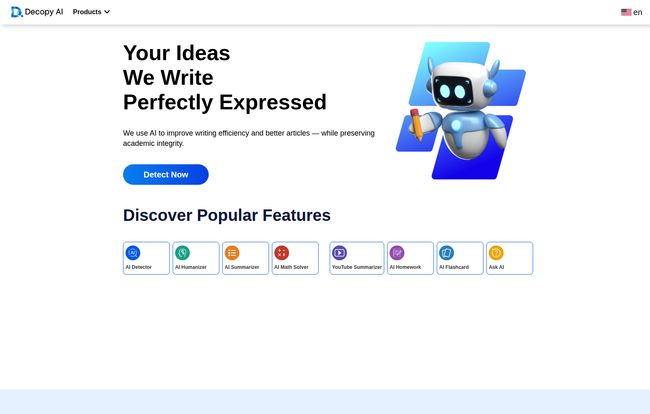
First off, Decopy AI isn’t trying to be just another ChatGPT clone. Thank goodness. Instead, it positions itself as a companion to the writing process. Think of it less as the author and more as the world’s most efficient editor and coach. The homepage calls it an “AI writing tool for detection, humanization, and summarization to improve content clarity,” and that’s a pretty fair description.
It’s a whole suite of tools bundled into one clean interface. You’ve got your AI Detector, an AI Humanizer (the main event, in my opinion), a Summarizer, a Paraphraser, and even a Grammar Checker and Math Solver. It’s like a Swiss Army knife for anyone who works with words, especially students and educators.
Visit Decopy AI
A Closer Look at the Core Features
Okay, let’s get into the nitty-gritty. A platform is only as good as its features, right? I took a few of them for a proper spin.
The AI Detector: Can It Sniff Out the Robots?
The first thing I tested was the AI detector. The whole AI detection space feels like a digital arms race. You’ve got powerful tools like Turnitin’s AI detector and GPTZero that have everyone on edge. So, how does Decopy AI stack up? I fed it a few different texts. First, a piece I wrote myself. It correctly identified it as human. Phew, my job is safe for another day.
Then, I threw in some raw, unedited text straight from ChatGPT-4. The kind of prose that is grammatically perfect but has all the soul of a microwave manual. Decopy’s detector flagged it immediately as 100% AI. No surprises there. The real test, however, is a mixed text. I took a paragraph written by AI and tweaked it a bit myself. The detector gave a mixed score, which is actually pretty sophisticated. It seems to have a good sense of what to look for—uniform sentence structures, predictable word choices, that kind of thing.
The AI Humanizer: Giving Your Text a Soul?
This is the feature that most people will be here for. The AI Humanizer promises to take robotic-sounding text and make it sound natural, aiming for that elusive “100% human score.” This is the magic wand everyone is looking for. But does it work?
I took that same raw ChatGPT text and ran it through the humanizer. The result was… impressive. I have to admit it. It wasn’t just swapping synonyms like some basic paraphraser. It restructured sentences, introduced more varied cadences, and added some colloquial flair. It felt less like a machine had translated it and more like a skilled editor had done a quick polish.
It’s like giving your AI draft a shot of espresso and a lesson in charm. It’s not going to turn a bad idea into a good one, but it can definitely sand down the robotic edges and make the text flow much, much better. It’s a fantastic tool for getting over that initial hurdle of a clunky first draft.
The Other Tools in the Box
While the detector and humanizer are the stars, the other tools are solid supporting actors. The AI Summarizer is a godsend for students (or professionals) staring down a 50-page research paper. It does a decent job of pulling out the key points and giving you a concise overview. The AI Paraphraser and Grammar Checker do exactly what you’d expect, and they do it well. Having them all in one place without needing to open ten different tabs is a genuine convenience.
The Big Question: Can Decopy AI Beat Turnitin?
Alright, let’s talk about the elephant in the room. The main reason a student would seek out a tool like this is to avoid getting flagged by plagiarism and AI detectors, chief among them being Turnitin. Decopy AI’s own site implies it can help you achieve originality and integrity.
Here’s my honest, professional opinion: No single tool can guarantee a 100% bypass of a sophisticated detector like Turnitin. Anyone who tells you otherwise is selling you snake oil. These detection systems are constantly being updated. However, that’s not the right way to think about it.
Using the AI Humanizer isn’t about tricking a system. It’s about improving the quality of the writing to a point where it no longer carries the obvious hallmarks of AI. By varying sentence structure, improving word choice, and adding a natural flow, the text becomes fundamentally better. And better, more human-like writing is simply less likely to get flagged. So, use it as a tool to refine and improve, not as a magic invisibility cloak.
What’s the Price Tag? The Great Pricing Mystery
So, how much does this all cost? Well, that’s where things get interesting. I clicked on the ‘Pricing’ link on their website, and you know what I found? A 404 error page. Yup, a big ol’ “Sorry, we couldn’t find what you’re looking for.”
As of this writing, there is no public pricing information available. The tools, for now, appear to be free to use directly on the site without even needing an account. This is great for accessibility, but it could mean a few things. They might be in a beta phase, gathering users before launching a subscription. Or they might be planning a freemium model. For now, you can just hop on the Decopy AI website and start using the tools. My advice? Take advantage of it while you can.
My Final Take: The Good and The Not-So-Good
After playing around with Decopy AI, I’ve got a pretty clear picture of its strengths and weaknesses.
Things I Genuinely Liked
The all-in-one platform design is a huge win. Not having to jump between a detector, a paraphraser, and a grammar checker is a real time-saver. The AI Humanizer is the standout feature; it’s genuinely effective at polishing robotic text. And the clean, simple UI makes it incredibly easy to use right out of the gate. No steep learning curve here.
Areas for Improvement
The lack of a login for the free tools might raise some privacy flags for people working with sensitive or proprietary content. I’d feel a bit wary pasting in a confidential company report, you know? Also, while the humanizer is good, users need to have realistic expectations. It’s a powerful assistant, not a replacement for genuine human thought and critical editing.
Frequently Asked Questions About Decopy AI
I’ve seen a few common questions pop up, so let’s tackle them head-on.
Is Decopy AI free to use?
Currently, yes. As of late 2023, all the tools on the Decopy AI website seem to be free to use without an account. The pricing page is not active, so this could change in the future.
Can Decopy AI really get past Turnitin?
It’s not a magic bullet. It helps by making your writing sound more human and less robotic, which reduces the chances of being flagged by detectors like Turnitin. Think of it as improving your writing, not tricking the system.
How accurate is the Decopy AI detector?
In my tests, it was quite accurate. It correctly identified both 100% human-written and 100% AI-generated content and was able to spot the difference in mixed-source text.
What languages does Decopy AI support?
The platform supports multiple languages, making it a versatile tool for international students and users around the world.
Do I need to sign up to use Decopy AI?
Nope. Right now, you can go to the website and start using the tools immediately without creating an account or logging in.
How does it compare to tools like QuillBot or Undetectable AI?
It holds its own quite well. While QuillBot is a fantastic paraphraser, Decopy AI’s humanizer feels a bit more advanced in its approach to sentence structure and flow. Its all-in-one suite also gives it an edge in convenience compared to single-purpose tools.
So, Is Decopy AI Worth Your Time?
After all this, what’s the verdict? I walked in a skeptic, and I’m walking away pleasantly surprised. Decopy AI isn’t a magical solution that will solve all your writing problems, but it is an incredibly useful and well-designed tool for the modern writer.
If you’re a student trying to make sure your work is polished and original, or a content creator using AI to speed up your drafting process, this platform is absolutely worth bookmarking. It helps bridge that uncanny valley between AI efficiency and human expression. And in today’s content landscape, that’s a bridge we all need to cross.
Reference and Sources
- Decopy AI Official Website: https://decopy.ai/
- Turnitin’s AI Writing Detection Information: https://www.turnitin.com/products/features/ai-writing-detection


