
Categories: AI Blog Generator, AI Ebook Generator, AI Repurpose, AI Transcription, AI Writing
Designrr Review: My Secret Content Repurposing Weapon

We’re all on the content hamster wheel. Churning out blog posts, social media updates, newsletters… it’s a never-ending grind. For years, I’ve preached the gospel of ‘work smarter, not harder,’ but sometimes that feels like a hollow platitude when you’re staring at a blank content calendar. You create this one amazing piece of content—a killer blog post, an in-depth podcast episode—and then what? It gets its moment in the sun and then fades into the archives. A crying shame, really.
I’ve tested more tools than I can count that promise to solve this. Most are clunky, over-hyped, or require a design degree to make anything that doesn’t look like a 1998 GeoCities page. So when I started hearing the buzz about a tool called Designrr, I was skeptical. Another magic bullet? Sure. But the buzz didn’t die down. It grew. So, I did what any self-respecting SEO and traffic nerd would do: I dove in headfirst, credit card in hand, ready to be disappointed.
Spoiler alert: I wasn’t. For the most part.
So, What Exactly is Designrr?
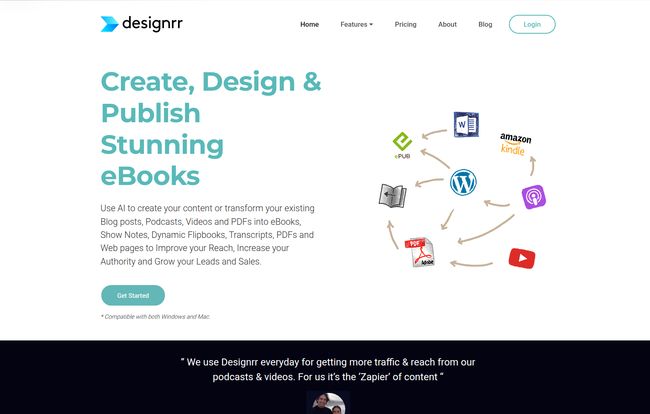
Think of Designrr as a content alchemist. You give it a piece of lead (your existing content), and it helps you spin it into gold (a bunch of new formats). Its main gig is taking one source of content and effortlessly transforming it into professional-looking eBooks, lead magnets, flipbooks, and even formatted blog posts. And it doesn’t just work with text. Oh no. This is the part that really got my attention.
You can feed it a URL from your blog, a Microsoft Word doc, a Google Doc, or even a PDF. But you can also give it a YouTube video, a podcast episode, or any audio/video file. It transcribes the content and pulls it right into its editor. That, my friends, is a game-changer for anyone in the multimedia space.
Who Should Even Bother With Designrr?
I’m always wary of tools that claim to be for ‘everyone.’ That usually means they’re not truly great for anyone. Designrr, however, has a pretty clear set of people who would get massive value from it. I see you nodding.
- Content Marketers & Bloggers: This is a no-brainer. You’ve got a back catalog of blog posts, right? Turn your top 10 posts on a topic into a comprehensive eBook. Take a high-performing article and whip it into a slick-looking PDF lead magnet to grow your email list. This is content repurposing 101, but without the headache of copy-pasting into Canva for six hours.
- Podcasters & YouTubers: You guys are sitting on a goldmine. Every episode you produce is a potential blog post, a series of social media snippets, a show-notes PDF, or even a full-on book. The automatic transcription feature alone is worth its weight in gold, saving you hours of work or hundreds of dollars on transcription services.
- Course Creators & Coaches: Imagine creating beautiful workbooks, cheat sheets, and resource guides from your course videos or scripts. It adds a layer of professionalism and value that your students will absolutely love. It makes you look like you have a whole design team on staff.
- Marketing Agencies: Scaling content creation for multiple clients is the eternal challenge. Designrr allows you to quickly create branded assets for each client, turning a single piece of research into multiple deliverables. The Agency plan even has a dedicated client interface. Smart.
Visit Designrr
A Look Under the Hood at The Core Features
Alright, let’s pop the hood and see what makes this thing tick. It’s more than just a simple converter; there are a few key components that make the whole system work so well together.
The Magic of Multi-Source Import
This is the starting point, and it’s beautifully simple. You can import from a blog post URL, and it does a surprisingly good job of stripping out the junk like sidebars and ads. You can upload Word docs, or connect to your Google Drive. But as I mentioned, the real star is the video and audio import. I tested it with one of my old YouTube videos. It pulled the audio, transcribed it (with timestamps!), and plopped the text right into the editor. The transcription wasn’t 100% perfect—no AI is—but it was about 95% of the way there, which saved me a ton of time on cleanup.
Wordgenie AI: Your Ghostwriting Assistant?
Designrr has its own AI writer built-in, called Wordgenie. You can use it to expand on points, rewrite sentences, or even generate entire sections of content from a prompt. Now, let’s be honest. As an SEO and writer, I’m picky about AI content. Wordgenie is a solid assistant. It’s great for busting through writer’s block or fleshing out a rough outline. But you can’t just let it run wild and hit publish. You still need your human brain to check for accuracy, tone, and that little spark of personality that makes content worth reading. Think of it as a very capable intern, not a seasoned pro.
Templates and Customization
Once your content is in, you get to play designer. Designrr comes with a ton of templates. Some feel a bit… corporate, if I’m being kind. But many are modern, clean, and highly effective. You can change fonts (it includes a huge library of Google Fonts), tweak colors, add images from their copyright-free library, and drag-and-drop elements around. The 3D cover creation tool (available on the Pro plan and up) is also a really nice touch for making your eBook look legit and professional without needing Photoshop.
Exporting Your Masterpiece
What good is a beautiful eBook if you can’t get it to your audience? Designrr offers a whole suite of export options. You can generate a standard PDF, of course. But you can also export to formats ready for Amazon Kindle (MOBI) and other e-readers (ePub). The flipbook feature is particularly cool for creating an interactive preview on your website. On higher-tier plans, you can even get an HTML embed code to put your creation directly onto a webpage. That’s versatility.
The All-Important Question: Designrr Pricing
Okay, the money talk. This is often the dealbreaker. Designrr uses a subscription model with several tiers, and what you get varies significantly. It’s not the cheepest tool on the block, but given what it does, it’s not outrageous either.
Here’s a quick breakdown as of my writing this. For the most current details, you should definitely check their official pricing page.
| Plan | Price (Monthly) | Who It’s For |
|---|---|---|
| Standard | $29 | Solo bloggers or marketers just starting with content repurposing. Good for turning blog posts into basic PDFs. |
| Pro | $39 | The sweet spot for most serious creators. Adds way more templates, the 3D cover tool, and the awesome flipbook generator. |
| Premium | $49 | Podcasters, YouTubers, and course creators. This is the first plan with video/audio transcription and the AI image generator. |
| Business | $99 | Power users who need more transcription hours per month. |
| Agency Premium | $249 | Agencies managing multiple clients, needing multi-user access and a client-facing portal. |
My take? If you don’t do video or audio, the Pro plan offers the best bang for your buck. But if your content strategy relies on multimedia, the transcription services in the Premium plan are non-negotiable and make the price jump entirely worth it.
The Good, The Bad, and The AI-Generated
No review is complete without a little tough love. After spending a good amount of time with the platform, here’s my brutally honest breakdown.
The Good Stuff
The biggest win here is time. The sheer speed at which you can go from a single blog post to a fully-designed, 30-page eBook is just staggering. It cuts out the tedious, soul-crushing busywork. The versatility is another huge plus. The fact that it handles text, audio, and video inputs puts it in a class of its own. It genuinely empowers non-designers to create professional-grade materials. That’s huge.
Where It Could Be Better
It’s not perfect. The editor can feel a little bit finicky at times when you’re doing heavy-duty customization. There’s a slight learning curve to get past the basics and into the really powerful features. And my biggest caution is about the AI. It’s a fantastic tool, but you must review its output. The AI transcription might mishear a niche term, or the AI writer might phrase something in a way that’s just… off. Relying on it 100% without a human review is a recipe for embarrassment. You have been warned.
Conclusion: Is Designrr the Real Deal for Content Marketers?
So, after all that, did I cancel my subscription? Nope. It’s staying in my toolbox.
Designrr isn’t a magic wand that creates brilliant content out of thin air. But it is an incredible force multiplier. It takes the great content you’ve already worked hard to create and gives it new life, new formats, and new channels to reach your audience. For me, the ability to turn my videos and articles into lead magnets and supplemental materials in under an hour is worth the price of admission alone.
If you’re a content creator who is serious about maximizing the reach and lifespan of every single piece of content you produce, then yes, Designrr is the real deal. It helps you finally get off that hamster wheel and start building a real library of assets for your business.
Frequently Asked Questions
Can I really create an eBook in 2 minutes?
The marketing says yes, and technically, it’s possible to import content and slap a template on it that fast. But to create a good eBook that you’re proud of? Plan on spending at least 30-60 minutes tweaking the formatting, adding images, and proofreading the text. It’s still incredibly fast, just manage your expectations.
How good is the video and audio transcription really?
It’s very good, but not flawless. For clear audio with a single speaker, I’ve found it to be around 95-98% accurate. It struggles a bit more with heavy accents, multiple speakers talking over each other, or poor audio quality. You will always need to do a final proofread, but it saves you from doing the entire transcription from scratch.
Do I need design skills to use Designrr?
Absolutely not. That’s the whole point. The templates do all the heavy lifting. If you can use a simple word processor and drag and drop images, you have all the skills you need to create something that looks great.
What’s the main difference between the Standard and Pro plans?
The Pro plan is a significant step up. The biggest additions are the 300+ templates (vs. 100), the 3D cover tool, and the flipbook generator. For many users, the flipbook feature alone is worth the extra $10 a month as it’s a great interactive tool for websites.
Can I import content from a PDF?
Yes, but this feature is only available on the Pro plan and higher. It’s a powerful feature if you have a lot of old reports or guides locked away in PDF format.
Is there a free trial?
Designrr’s offer seems to change from time to time. Their site mentions being able to “Cancel your Trial or Subscription at Anytime,” which suggests trial periods are available, often for 7 days for $1. It’s best to check their main page for the current offer when you sign up.


