
Categories: AI Art Generator, AI Disney Poster, AI Image Generator, AI Movie Poster, AI Poster Generator, Image to Image, Text to Image
Disney AI Poster Generator: An Honest Review (2024)

If you’ve been on Instagram, TikTok, or basically anywhere on the internet in the last few months, you’ve seen them. Those ridiculously charming, personality-packed Disney Pixar-style movie posters. You know the ones: your friend’s dog as the hero of an epic adventure, or a couple reimagined as the leads in a whimsical rom-com. My feed was flooded, and the FOMO was real.
I’ve been in the SEO and digital content game for years, and I’ve seen AI tools come and go. Some are revolutionary, others are just… well, not. So when I kept seeing posters made with the Disney AI Poster Generator, my professional curiosity (and, let’s admit it, my inner child) was piqued. Is this just another flash-in-the-pan AI toy, or is it a genuinely useful tool for creators? I decided to put my money where my mouth is, buy some credits, and find out.
First, What Exactly Is This Thing?
At its heart, the Disney AI Poster Generator is a specialized AI image tool. It’s not trying to be an all-in-one behemoth like Midjourney or a local tech-head’s dream like a self-hosted Stable Diffusion setup. Nope. Its mission is simple and clear: to turn your ideas, or even your own photos, into posters that look like they came straight out of a Pixar brainstorming session. It’s built on powerful models, including what they mention as Stable Diffusion XL, which is a pretty solid engine for this kind of creative work.
The platform primarily works in two ways. You can either type in a text prompt and let the AI run wild, or you can upload a picture and have it re-interpreted in that signature animated style. It’s this dual functionality that first caught my eye. It’s one thing to describe a scene, but it’s another thing entirely to see your own face get the full Disney treatment.
Visit Disney AI Poster
Getting Started and First Impressions
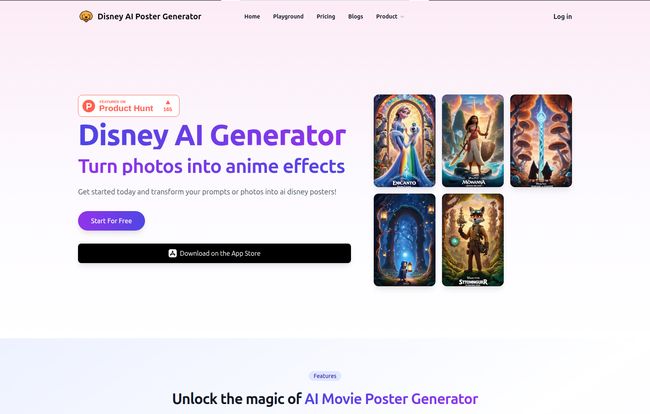
Landing on their homepage feels clean. There’s no fluff, no confusing jargon. It’s just: here’s what it does, here’s how to do it. I appreciate that. In a world of overly complicated SaaS dashboards, simplicity is a breath of fresh air. It feels less like firing up a complex piece of software and more like being handed a magical crayon.
You’re basically presented with a canvas and a couple of choices. It’s inviting. You want to start creating immediately. And that’s the whole point, isn’t it?
The Core Features That Actually Matter
So, beyond the shiny homepage, what can you actually do? Let’s break down the main creative levers you get to pull.
From Text Prompt to Movie Magic
This is the classic AI image generation we’ve all gotten used to. You write a description, and the machine brings it to life. I started with something simple: “A tired SEO blogger, surrounded by glowing screens and too many coffee cups, looking heroic, Disney movie poster.” The results were… surprisingly good. The lighting was dramatic, the character had that expressive, big-eyed look, and my coffee cup collection was indeed epic. The platform even offers some example prompts, which is a smart move for anyone new to the prompt-crafting game. Remember, the old saying ‘garbage in, garbage out’ has never been more true than with AI art.
Turning Your Selfies into Storybook Characters
This is the feature that I think will pull most people in. The image-based generation. I uploaded a fairly standard headshot of myself. The tool doesn’t just slap a filter on it; it genuinely tries to rebuild your facial structure and features in its animated style. It’s pretty clever. Some results can be a little uncanny, sure, but when it hits, it really hits. You see a version of yourself that feels both familiar and completely new. It’s a fantastic way to create a unique profile picture or a fun gift for someone.
A Funky Nod to Nostalgia with the PS2 Filter
Tucked away in their features list is something called “Replicate Face To Many PS2 Filter.” This was an unexpected little feature. It essentially gives your image a retro, blocky, early-2000s video game aesthetic. Is it the main reason to use the tool? Probably not. But as a guy who spent way too many hours on a PlayStation 2, I have to admit, it’s a fun, quirky addition that shows they’re not taking themselves too seriously. I love little easter eggs like this.
Let’s Talk Money: The Pricing and Credit System
Alright, the elephant in teh room. How much does all this fun cost? This is often where these tools win or lose me. The Disney AI Poster Generator uses a credit-based system with one-time payments, which is a model I’m personally starting to prefer over the endless sea of monthly subscriptions.
Here’s the breakdown as of my review:
| Plan | Price | Credits | Cost Per Image | Validity |
|---|---|---|---|---|
| Freelancer | $7.9 | 20 | ~$0.40 | 1 Month |
| Most Popular | $12.9 | 80 | ~$0.16 | 2 Months |
| Enterprise | $19.9 | 300 | ~$0.07 | 3 Months |
One credit gets you one image generation. The model is straightforward. The more you buy, the cheaper each image becomes. For someone like me just testing it out, the $7.90 pack was a no-brainer. For a social media manager churning out content, the bigger packs offer way better value.
The Catch: No Freebies and No Refunds
Now for the two points that will likely give people pause. First, there are no free credits. You can’t try before you buy. This is a bold move. Their justification, which is stated on the site, is that image processing has significant costs. I get it. Rendering this stuff isn’t free. Still, it feels like a bit of a barrier. Even one or two free credits would be nice to see if you even like the AI’s ‘style’ before committing.
Second, and this is the big one, there are no refunds. Once you buy the credits, they’re yours. If the image comes out looking like a melted Picasso, that credit is still spent. Again, they cite the processing costs. It’s a tough pill to swallow, but it’s a policy a lot of AI generation services use. My advice? Start with the smallest package. Think of that $7.90 as your entry ticket to the theme park. If you have a good time, you can always buy a bigger pass later.
So, Who Is This Tool Actually For?
After playing around with it for a while, I have a pretty clear picture of who would love this tool.
- Social Media Managers & Content Creators: Need to quickly create eye-catching, on-trend visuals for Instagram or Facebook? This is a goldmine. It’s fast, easy, and the results are incredibly shareable.
- Freelancers: If you’re a designer who needs to mock up a concept quickly or a writer looking for a unique blog header, this is way faster than trying to illustrate something from scratch.
- The Everyday User: Honestly, it’s also just for fun. It’s for the parent who wants an adorable poster of their kid for the wall, or for a group of friends who want to create a poster for their fantasy football league. It’s accessible fun.
It’s not for the AI purist who wants to fine-tune every single parameter of a model. This is about convenience and a specific, popular aesthetic.
Frequently Asked Questions
How many credits does one poster cost to make?
It’s a simple 1-for-1 system. One image generation costs exactly one credit, regardless of the complexity of your prompt.
Is this a monthly subscription?
Nope! And that’s one of its best features in my opinion. All the credit packs are one-time payments. You buy what you need, when you need it. No subscription fatigue here.
What happens if I don’t like the image it creates?
This is the important part: you still lose the credit. The platform has a strict no-refund policy due to the high cost of AI processing. So, make your prompts count and be prepared for a bit of trial and error!
Can I download the posters I create?
Yes, absolutely. You can download the generated images directly to your computer and share them on social media or use them as you see fit.
Is my payment info safe?
According to their website, yes. They use Stripe for all their payment processing, which is a major, highly secure, and reputable payment processor. They don’t store your card details on their own servers.
My Final Verdict
So, is the Disney AI Poster Generator worth your hard-earned cash? In my experience, yes—with a couple of caveats. If you’re looking for a powerful, all-purpose AI art generator with infinite controls, this isn’t it. Go learn the intricacies of Midjourney’s Discord bots for that.
But if you want a tool that does one thing—create charming, high-quality, Disney-style posters—exceptionally well and with almost zero learning curve, it’s a fantastic choice. The one-time payment model is a huge plus, even if the lack of a free trial and the no-refund policy smarts a little. It’s a fun, effective, and surprisingly addictive tool for bringing a little bit of that animated movie magic to your own ideas.
I went in a skeptic and came out with a folder full of ridiculously fun images. And sometimes, that’s more than enough.


