
Categories: AI 3D Model Generator, AI Developer Tools, Image to 3D Model
DiverseShot AI Review: No-Code 3D Gaussian Splatting

For years, creating high-quality 3D content felt like a dark art. It was a world reserved for those with beefy computers, expensive software subscriptions, and the patience of a saint to wrestle with things like Blender, Maya, or 3ds Max. I’ve been in the SEO and digital content game long enough to see countless trends come and go, but the barrier to entry for true 3D has always been stubbornly high.
Then came the AI wave. We saw NeRFs (Neural Radiance Fields) pop up, and they were incredible… but still a bit, you know, technical. You needed a certain knack, and the processing could take ages. It was a step in the right direction, but not quite the ‘3D for everyone’ revolution we were promised.
But recently, a new technique has been making waves: Gaussian Splatting. And with it, tools are emerging that want to put this power into the hands of regular creators, marketers, and developers. One of the most interesting I’ve seen is DiverseShot AI. It claims you can go from a simple video to a photorealistic, web-ready 3D scene without writing a single line of code. A bold claim. So, I had to see if it lives up to the hype.
What is Gaussian Splatting Anyway? (And Why Should You Care?)
Before we get into the tool itself, let’s quickly demystify the tech. If you’ve been around the 3D space, you’re probably used to thinking about polygons, meshes, and textures. It’s like digital sculpting.
Gaussian Splatting is different. My favorite analogy is this: instead of building a detailed 3D mesh like a sculptor, imagine you’re capturing a scene by throwing millions of tiny, colorful, semi-transparent paintballs at it. Each ‘splat’ has a position, a color, a size, and an opacity. When you look at all these splats together from any angle, they perfectly recreate the scene in 3D.
Why is this a big deal? It’s generally much faster to render than NeRFs and the resulting files are often easier to manipulate. For anyone in e-commerce wanting interactive product showcases, real estate agents building virtual tours, or even indie devs needing quick assets, this technology is a game-changer. It’s the bridge between a flat 2D image and a fully immersive 3D world, and it’s being built right now.
Getting Your Hands Dirty with DiverseShot AI: A 3-Step Walkthrough
The beauty of DiverseShot AI is its simplicity. The entire process is boiled down to three main steps, which is a breath of fresh air. Here’s my take on the workflow.
Step 1: Shoot Your Video (The Most Important Part)
This is where it all begins, and honestly, it’s the step that will make or break your final result. The old GIGO principle—Garbage In, Garbage Out—applies here more than ever. The AI is smart, but it’s not a mind reader.
DiverseShot recommends shooting a video from multiple angles. The ideal shot is a smooth 360-degree orbit around your object. Think of it like a product video you’d see on Apple’s website, slowly circling the new iPhone. You need to capture all sides of the object with good, consistent lighting. The good news? You dont need a fancy RED camera. Your smartphone is perfectly capable of producing great source material. Just keep your movements steady!
Step 2: The AI Magic – Running the Training
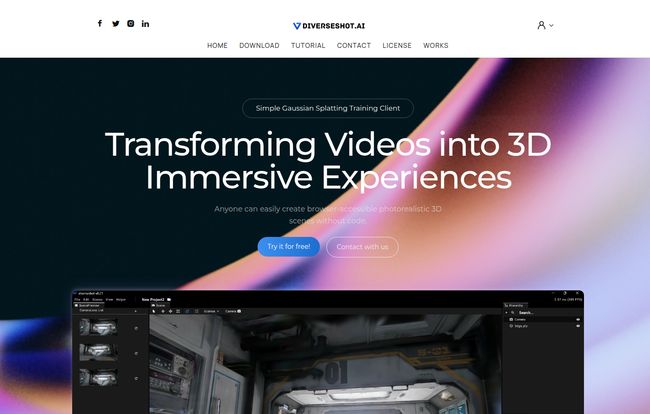
Once you have your video, you bring it into the DiverseShot client. This part is almost disappointingly easy. You literally drag your video in, and the platform automatically creates a project and starts the training process.
But here’s the feature I genuinely love: real-time observation. You’re not just staring at a progress bar, hoping for the best. You can actually watch as the AI identifies points and begins to construct the 3D scene. It’s like watching a ghost of your object slowly materialize on screen, point by point. It’s not only cool to watch but also incredibly useful, as you can quickly spot if something is going horribly wrong with your capture.
Visit DiverseShot AI
Step 3: Exporting and Showing Off Your Creation
After the training is complete and you’ve made any little manual tweaks (like cleaning up stray points), it’s time to export. DiverseShot AI spits out a .ply file. This is a standard 3D file format that stores your cloud of Gaussian splats.
Now, this file isn’t a standalone thing. It needs a viewer to be displayed on the web. The folks at DiverseShot seem to be big fans of Spline, a fantastic browser-based 3D design tool. You can import your .ply file into Spline and then embed it on your website. This creates a really fluid, interactive experience for your visitors, allowing them to drag, rotate, and zoom in on your 3D creation right in their browser.
The Good, The Bad, and The Hmm, Interesting
No tool is perfect, right? After playing around with it, here’s my unfiltered breakdown.
The Good (The “Heck Yeah!” Moments)
The accessibility is off the charts. Taking a process that was, just a year ago, the domain of researchers and command-line wizards and putting it into a simple UI is a massive win. This truly lowers the bar for 3D content creation. The real-time training feedback is also more than just a gimmick; it’s a genuinely helpful diagnostic feature.
The Bad (The Reality Checks)
This is not a one-click magic wand. The quality of your final 3D scene is almost entirely dependent on the quality of your initial video. Shaky footage, poor lighting, or not enough angles will result in a messy, incomplete splat. You should also expect to do some manual cleanup in the tool to get rid of artifacts or floating bits. Perfection out-of-the-box is rare.
The Hmm, Interesting (The Nuances)
The reliance on an external platform like Spline for the final display is an interesting choice. Some might see it as a downside—it’s not a fully self-contained ecosystem. But I actually see it as a smart move. DiverseShot focuses on what it does best (the conversion and training) and lets a dedicated 3D web viewer do what it does best. It keeps the tool lean and focused.
Who is DiverseShot AI Really For?
I can see a few groups getting really excited about this. I had a client in the bespoke furniture business a few years back who would have absolutely killed for a tool like this. We spent weeks trying to get a decent 3D model of a chair made. This could have done it in an afternoon.
Here’s a quick rundown of who should be hitting that download button:
| User Group | Potential Use Case |
|---|---|
| E-commerce Store Owners | Creating interactive 360-degree views of products (shoes, electronics, crafts). |
| Real Estate Agents | Capturing specific rooms or architectural details for immersive virtual tours. |
| Indie Game Developers | Quickly creating 3D assets for environments or props from real-world objects. |
| Digital Marketers | Building engaging, high-impact content for landing pages and social media. |
What About the Cost? The DiverseShot AI Pricing
Here’s the million-dollar question. As of writing this, there’s no public pricing page for DiverseShot AI. Their website features a prominent “Try for free” button, which suggests it might currently be in a free beta phase or they plan on a freemium model.
My guess? They’re trying to get a user base built up, gather feedback, and will likely introduce tiered pricing later on. This is a common strategy for new tools in a hot space. For now, it seems you can experiment with it without opening your wallet, which is always a plus in my book.
Frequently Asked Questions about DiverseShot AI
- What is Gaussian Splatting again, in simple terms?
- Think of it as creating a 3D model from millions of tiny, colored, transparent dots (or ‘splats’) captured from a video. It’s a fast and realistic way to represent a 3D scene.
- Do I need a special camera to use DiverseShot AI?
- Nope! One of its biggest strengths is that you can use video from almost any device, including your smartphone. Just make sure the video is smooth and well-lit.
- Is DiverseShot AI completely free to use?
- Currently, it appears to be free. The website encourages users to “Try for free,” but this could change in the future as the platform develops.
- What exactly is a .ply file?
- It’s a standard file format used for storing 3D data. In this case, it holds all the information about your millions of Gaussian ‘splats’—their position, color, size, and opacity.
- Can I use these 3D models in game engines like Unity or Unreal?
- This is a more technical question. While game engines are starting to add support for Gaussian Splatting, it’s not yet a plug-and-play process. You may need specific plugins or converters to get your
.plyfiles working seamlessly in Unity or Unreal Engine, as they traditionally rely on mesh-based models. - How does this compare to photogrammetry?
- Photogrammetry creates a 3D model by stitching together hundreds of photos to form a solid mesh. Gaussian Splatting creates a model from a point cloud captured from video. Splatting is often faster and can excel at capturing reflective or transparent surfaces, which can be tricky for traditional photogrammetry.
Final Thoughts: A Promising Step Forward for 3D
So, is DiverseShot AI the tool we’ve all been waiting for? For a lot of people, I think the answer is yes. It successfully takes an incredibly complex and powerful technology and wraps it in a simple, accessible package.
It isn’t a flawless automaton that will solve all your 3D problems with a single click. You still need to respect the process, especially when it comes to capturing good source video. But it dramatically lowers the learning curve and opens up the world of photorealistic 3D to a much, much wider audience. It’s a tool that empowers creativity, and in my line of work, that’s always something to get excited about. The world is becoming more three-dimensional, and tools like DiverseShot AI are making sure no one gets left behind.


