
Categories: AI Chatbot, AI Document Extraction, AI PDF, AI PDF Summarizer, AI Research Tool, Large Language Models (LLMs)
Docudive Review: Chat with Your PDFs & Save Time?

We all have that one folder on our desktop. You know the one. It’s probably named something vague like “To Read” or “Important Docs,” and it’s become a digital graveyard for dense PDFs, eye-watering reports, and academic papers you swore you’d get to… eventually. Mine’s a bottomless pit of market research and trend analysis reports. Every time I open it, a small part of my soul withers.
The core of the problem isn’t a lack of desire to be informed. It’s the sheer volume. It’s the mountain of text we’re expected to climb just to find a few key nuggets of information. For years, the answer was ‘suck it up’ and get good at skim-reading. But now, AI is offering a different path. A more conversational one. I’ve been hearing a lot of chatter about tools that let you literally talk to your documents, so I decided to take one for a spin. The platform in my crosshairs? A slick-looking tool called Docudive.
So, What Exactly is Docudive?
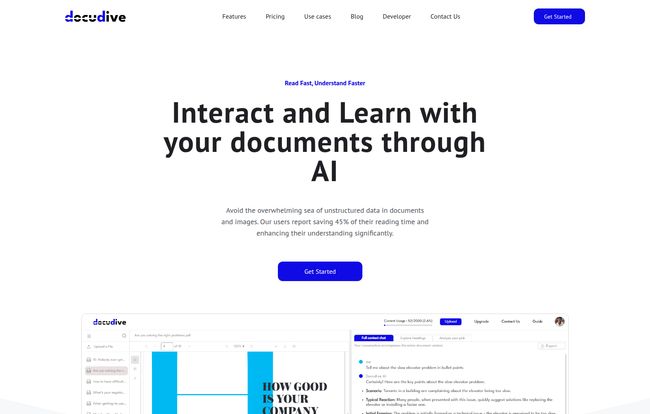
In the simplest terms, Docudive is an AI-powered platform that acts as your personal research assistant for any document you throw at it. The tagline on their site is, “Why drown when you can dive?” and honestly, that pretty much nails it. Instead of you manually sifting through page after page, you upload your file, and the AI ‘reads’ it for you. Then, you can ask it questions, request summaries, pull out specific data, and interact with the content like you’re having a conversation.
It’s built for anyone who feels the pain of document overload. Think students wrestling with textbooks, researchers dissecting complex studies, legal pros combing through contracts, or even marketers like me trying to make sense of a 50-page competitor analysis. The promise is huge: save time, understand things better, and maybe, just maybe, finally clear out that dreaded desktop folder.
Visit Docudive
My First Impressions: Putting Docudive to the Test
I decided to start with something meaty. I grabbed a hefty PDF report on Q4 consumer spending habits that had been mocking me for weeks. The upload process was simple—just drag and drop. The interface is clean, no unnecessary clutter, which I appreciate. It doesn’t feel like you need an engineering degree to figure it out.
Once the document was processed (which was surprisingly fast), I was presented with a chat window next to my document. It felt… futuristic. I started with a softball question: “Summarize the key findings of this report in five bullet points.
Within seconds, it spat out a concise, accurate summary. Okay, impressive. But summarization is table stakes for AI these days. I pushed it further. “What was the reported growth in the e-commerce sector for millennials?
It pulled the exact percentage from a chart on page 37. Then I tried, “Who were the main competitors mentioned in the analysis?
It listed them out. This was the moment it clicked for me. This isn’t just a summary tool; it’s a search engine for a single document. It felt less like I was doing work and more like I was interviewing the document itself. A genuine ‘wow’ moment.
The Standout Features That Actually Matter
After playing around for a while, a few features really stood out from the pack. It’s not just a one-trick pony.
The Interactive Chat: Your Personal Document Guru
This is the star of the show. The ability to ask follow-up questions and refine your queries on the fly is what makes Docudive powerful. You can go from a broad “What’s this about?” to a super-specific “Compare the conclusions in section 2 with the data presented in section 5.” It’s like having a subject matter expert who has perfectly memorized the entire document and is just waiting to help you. For complex topics, this is an absolute game-changer for comprehension.
Automated Information Extraction: Cutting Through the Noise
This goes beyond simple chat. Docudive can pull out structured information and present it cleanly. Imagine you have a stack of resumes. You could ask it to extract the names, contact info, and previous job titles from all of them into a neat list. Or pull all the deadlines from a project proposal. This automated data-pulling feature turns chaotic, unstructured text into organized, actionable information. That’s where the real time-saving magic happens.
Let’s Talk Turkey: The Docudive Pricing Breakdown
Alright, so how much does this magic cost? I’ve got to say, the pricing structure is pretty straightforward and seems well-thought-out for different types of users. They have a free tier, which is always a great way to dip your toes in the water.
Here’s a quick look at the plans:
| Plan | Price | Key Features |
|---|---|---|
| Free | $0 / month | 50 credits/month (up to 50 pages or 2 files), unlimited AI chats, limited info extraction. |
| Lite | $10 / month | 700 credits/month (up to 700 pages or 100 files), premium extractor service, beta features. |
| Pro | $25 / month | 2000 credits/month (up to 2000 pages or 500 files), premium support. |
| Premium | Let’s Talk | Unlimited everything, for organizations. |
My take? The Free plan is perfect for trying it out, but you’ll hit the limits fast if you’re serious. The Lite plan at $10 feels like the sweet spot for most students, freelancers, and professionals. The Pro plan is for the real power users who live and breathe complex documents daily.
The Good, The Bad, and The AI-ish
No tool is perfect, right? After my initial excitement, I tried to look at Docudive with a more critical eye.
On the plus side, the time savings are undeniable. It can turn hours of reading into minutes of targeted questioning. It also genuinely improves understanding. You can ask it to explain a complex concept in simpler terms, which is something you just can’t do with a static PDF.
On the other hand, the free plan’s limits on information extraction are a bit of a tease. You see how powerful it could be, but you can’t fully use it. Which is the point, I guess. More importantly, you have to remember that you’re still relying on an AI. While I found it incredibly accurate, I wouldn’t bet my entire career on its interpretation of a legal contract without a final human review. I did catch a minor contextual error once when I asked a very nuanced question, a good reminder that the robots haven’t totaly taken over yet.
How Does Docudive Stack Up Against the Competition?
The “chat with your PDF” space is getting crowded. You’ve got tools like ChatPDF and even the built-in functionality of giants like Adobe and ChatGPT Plus. So where does Docudive fit in? In my opinion, its strength lies in its focused, clean interface and the power of its dedicated information extraction feature. While a general-purpose tool like ChatGPT can summarize, a specialized tool like Docudive feels more refined for the specific task of deep document analysis. It’s less of a Swiss Army knife and more of a precision scalpel. The right tool for the right job, as they say.
Conclusion: Is Docudive Worth Your Time (and Money)?
So, what’s the final verdict? I’m genuinely impressed. Docudive isn’t just another tech gimmick; it’s a practical solution to a very real problem of information overload. It successfully turns the passive act of reading into an active, engaging conversation.
If you’re a student, researcher, analyst, or anyone whose job involves wading through dense documents, I’d say give the free trial a go without hesitation. For serious users, the $10 Lite plan is a small price to pay for the hours you’ll get back. It’s not going to read your mind, but it’s the next best thing. It has definitely earned a permanent spot in my digital toolkit, and my “To Read” folder is finally starting to look a little less intimidating.
Frequently Asked Questions About Docudive
- Is my data secure when I upload documents to Docudive?
- This is a big one, especially for business documents. While Docudive likely has security protocols in place, it’s always smart to review the platform’s official privacy policy and terms of service before uploading highly sensitive or confidential information. As an Australian-owned company, they are subject to specific data privacy laws.
- What happens if I run out of credits on my plan?
- Based on their model, if you run out of your monthly credits (for pages/files), you would likely need to wait for the next billing cycle for them to reset or upgrade your plan to get a higher allowance immediately. The FAQ on their site confirms you can upgrade or downgrade at any time.
- Can Docudive understand charts, graphs, and images within a PDF?
- This is a common challenge for many document AI tools. While my test showed it could pull data points that were also referenced in the text, its ability to ‘read’ a complex, unlabeled chart or a photograph is probably limited. Its primary strength is in analyzing the text itself.
- Is Docudive better than just using ChatGPT for summarizing?
- It depends on your needs. For a quick, one-off summary, ChatGPT works fine. However, Docudive is a specialized tool designed for deeper, ongoing interaction. Its focused interface, document management features, and specific information extraction capabilities make it a more powerful choice for serious document analysis.
- What kind of files can I upload?
- The website and examples focus heavily on PDFs, which is the most common format for reports, papers, and books. It’s best to assume it’s optimized for text-based PDF files for now.


