
Categories: AI 3D Model Generator, AI Realistic Image Generator, AI SVG Generator
Draw3D Review: AI Sketch to Photorealistic Image Magic?

Let’s have a real chat. How many times have you had a brilliant idea for an image, a character, or a scene? You can see it perfectly in your head. You grab a pen, scribble it onto a napkin or a tablet, and… it looks like something a toddler would draw during a sugar rush. Yeah, me too. My stick figures have always looked medically concerning. For years, there’s been this massive canyon between the idea in our heads and the professional-looking asset we need for a blog post, a client presentation, or just for fun.
We’ve all seen the explosion of AI image generators like Midjourney and DALL-E. They’re amazing, but they have their own learning curve. You become a “prompt engineer,” wrestling with commas and clauses to describe your vision to a machine. But what if you could just… draw it? What if you could give an AI your clumsy, imperfect sketch and it would understand?
That’s the promise of a tool I’ve been playing with recently called Draw3D. It claims to transform your sketches into photorealistic images. Not from text, but from your actual drawing. I was skeptical, of course. But also, incredibly intrigued. So, I jumped in to see if it’s the real deal or just another piece of shiny AI vaporware.
So, What Is Draw3D, Exactly?
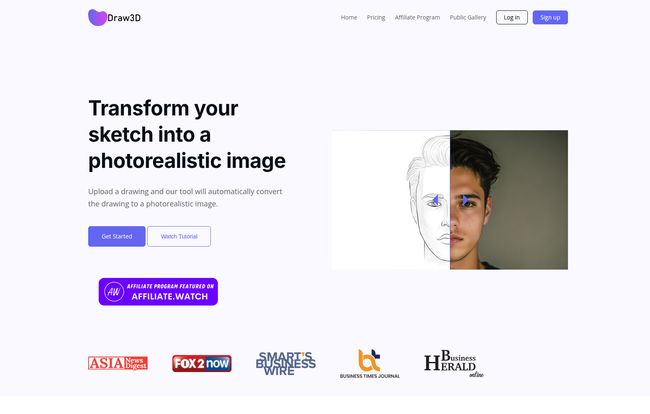
In a nutshell, Draw3D is an AI-powered platform that acts as a translator between your hand and a final, polished image. You feed it a drawing—be it a detailed landscape, a quick character concept, or even a doodle of your dog—and its AI model interprets that sketch to generate a photorealistic version.
Think of it less like a magic wand and more like a hyper-talented apprentice artist who can instantly grasp your creative direction. It’s built for artists, designers, marketers, and creators who need to visualize ideas quickly without spending hours on complex 3D modeling software or trying to find the perfect stock photo. This isn’t about replacing artists; its about augmenting their workflow. It’s a bridge.
Visit Draw3D
From Doodle to Da Vinci: A Look at The Core Features
Okay, the concept is cool, but execution is everything. After spending some time with the tool, a few things really stood out to me. Some are brilliant, others are, well, a work in progress.
The Sketch-to-Image Conversion is the Star
The main event, obviously, is the sketch conversion. I uploaded a few things to test its limits: a simple drawing of a tree, a more detailed sketch of an animal face, and a laughably bad doodle of a futuristic car. The results were pretty darn impresive. It did a fantastic job with the detailed sketches, capturing the essence of the form and lighting I hinted at. It even turned my weird car doodle into something that looked like a plausible concept vehicle.
The secret sauce here seems to be its ability to handle detail. Where other tools might get confused by messy lines, Draw3D seems to find the structure within the chaos. It also has a really interesting feature where it can transform a photo of a sculpture into a photorealistic image of the person. I saw an example with Einstein, and it was uncanny. You can even do the reverse: turn a photo into a sculpture render. Wild stuff.
The Built-in Editor and Upscaler
Once your image is generated, you’re not just left with a static file. Draw3D includes a simple but powerful built-in image editor. You can apply filters, crop, resize, and even remove the background with a click. It’s not going to replace Photoshop, let’s be clear. But for quick adjustments, it’s incredibly handy to have it all in one place. You don’t have to download the image, open another program, make a change, and re-upload. It just saves time.
It also features a 4x upscaler. This is huge for anyone who needs high-resolution assets for their website or print. The quality is solid, and I hear they’re working on an 8x upscaler, which would be a massive plus. The current 4x limit is a slight drawback if you need gigantic images, but for most web and digital use cases, it’s more than enough.
The Commercial License is a Big Deal
This is a big one for me and any other professional. With any of the paid plans, you get a commercial license for the images you generate. This means you can use them for client work, in marketing materials, on products, you name it. In a world full of murky AI usage rights, this clarity is refreshing and absolutely necessary for anyone using the tool for business. It also removes the watermark, which is standard but essential.
Let’s Talk Turkey: Draw3D Pricing
Alright, so how much does this magic cost? Draw3D runs on a freemium model. There’s a free plan to let you test the waters, but the generations are limited. If you find yourself using it regularly, you’ll want to look at a paid plan. They offer both monthly and yearly options (with a nice discount for the yearly commitment).
Here’s a quick breakdown of their plans:
| Plan | Monthly Price | Generations/Month | Best For |
|---|---|---|---|
| Starter | $9 | 120 | Hobbyists and occasional users. |
| Basic | $15 | 200 | Freelancers, bloggers, and regular creators. |
| Professional | $39 | 1,000 | Agencies and power users. |
Note: Yearly plans offer more generations for a lower overall cost. For instance, the Basic Yearly plan is $150 and gives you 2,800 generations for the year.
For my money, the Basic plan seems to be the sweet spot. It provides enough generations for a steady stream of content creation without a huge monthly cost. All paid plans include the important stuff: unlimited downloads, commercial license, no watermark, editor access, 4x upscale, and background removal. The main difference is just the number of times you can click that ‘generate’ button.
Are There Any Downsides? A Moment of Honesty
No tool is perfect, and it would be dishonest to pretend Draw3D is. There are a couple of things to keep in mind.
First, the free plan is quite limited in the number of images you can generate. It’s enough to see if you like the tool, but not enough for any real project. That’s pretty standard for SaaS products, but worth mentioning.
Second, as I mentioned, the upscaling is currently capped at 4x. This is a temporary constraint, as they are planning to introduce 8x soon. For now, if you’re a print designer who needs billboard-sized images, you might need an additional tool for further upscaling. But for the 95% of us working on digital projects, it’s perfectly fine.
So, Who Is Draw3D Actually For?
I see a few groups of people who would absolutely love this.
- Concept Artists and Designers: Quickly iterate on ideas. Take a rough character or environment sketch and get a realistic render in minutes to show a client or art director.
- Bloggers and Content Creators: Need unique, eye-catching featured images that aren’t the same old stock photos everyone else is using? This is your answer.
- Indie Authors and Game Devs: Visualize your characters, worlds, and props without a huge budget for a dedicated artist.
- Hobbyists and Tinkerers: It’s just plain fun! Bring your imaginative doodles to life and see what the AI comes up with.
Frequently Asked Questions
Can I really use the images I make for my business?
Yes! If you are on any of the paid plans (Starter, Basic, or Professional), you get a full commercial license to use the images you generate for any project, client work, or marketing. The free plan images are for personal use only.
What kind of sketches work best with Draw3D?
In my experience, it handles detail surprisingly well. A more defined sketch with clear lines and some basic shading seems to give the AI more to work with, leading to a more accurate result. That said, it can also produce interesting interpretations from very simple doodles.
Is Draw3D difficult to use?
Not at all. The interface is one of its strong points. It’s incredibly straightforward: upload your sketch, add a simple prompt if you like (or let the auto-prompt do it), and generate. It’s far simpler than wrestling with complex text prompts on other platforms.
Is there a free trial?
Yes, there’s a free plan that allows you a limited number of generations so you can try out the core functionality before committing to a paid subscription.
How is this different from Midjourney or DALL-E?
The main difference is the input. Midjourney and DALL-E primarily work off of text prompts—you describe what you want to see. Draw3D works off of a visual input—your sketch. This gives you a different kind of creative control, rooted in your own drawing.
My Final Verdict on Draw3D
So, is Draw3D the AI sketch tool we’ve all been waiting for? I think for a lot of us, the answer is a resounding yes. It’s not perfect, but it’s a powerful, intuitive, and genuinely useful tool that fills a specific gap in the creative market. It successfully bridges the chasm between a rough idea and a tangible, photorealistic visual.
It democratizes the ability to create high-quality concept art. It’s a fantastic aid for designers, a powerful asset for content creators, and a ridiculously fun toy for anyone with an imagination. If you’ve ever looked at one of your own drawings and wished you could see it brought to life, you owe it to yourself to give Draw3D a try.
Reference and Sources
- Draw3D Official Website: https://draw3d.online
- Draw3D Pricing Information: https://draw3d.online/pricing


