
Categories: AI Art Generator, AI Image Generator, Open Source AI Models, Text to Image
DreamStudio Review: AI Art with Stable Diffusion’s Power

The AI image generation space has absolutely exploded. It feels like just yesterday we were all losing our minds over the first quirky, slightly-off images from DALL-E. Now, you can’t scroll through your feed without seeing some mind-bending, photorealistic, or just plain weird AI art. It’s a gold rush for creativity, and everyone’s looking for the best pickaxe.
I’ve spent more hours (and probably more money) than I’d care to admit playing with pretty much every text-to-image tool out there. From the artistic leanings of Midjourney to the user-friendly approach of Canva’s tools. But there’s one platform I keep coming back to when I want raw power and control: DreamStudio.
It’s the official playground from the folks at Stability.ai, the brains behind the open-source titan, Stable Diffusion. Think of it this way: if Stable Diffusion is the high-performance engine, DreamStudio is the official, custom-built race car they designed around it. It’s sleek, it’s fast, and it hands you a lot of the controls. But is it right for you?
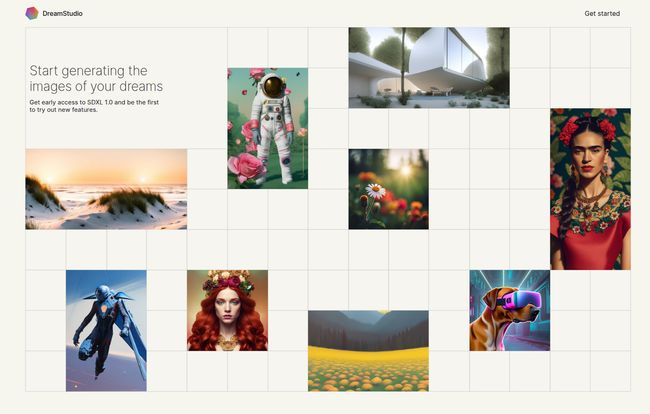
Visit DreamStudio
So, What Exactly Is DreamStudio?
Let’s clear this up first, because the names can get confusing. Stable Diffusion is the underlying technology, the model itself. It’s open source, which is a huge deal. It means developers all over the world can build on it, creating a wild ecosystem of apps and tools. DreamStudio is Stability.ai’s own web-based tool for using Stable Diffusion. It’s their flagship interface.
I like to think of it like this: DreamStudio is less like a point-and-shoot camera and more like a DSLR. You can absolutely use it in ‘auto mode’ and get great results. But its real magic shines when you start fiddling with the settings, changing lenses (models), and manually adjusting the focus. It gives you direct access to the latest and greatest models from the source, often before they trickle down to other apps.
First Impressions and Actually Using The Thing
Hopping onto the DreamStudio site, the first thing you notice is… space. It’s clean. Almost minimalist. On one side, you have your settings—the prompt box, negative prompts, aspect ratios, model selection. On the other, a big, beautiful canvas where your creations appear. It doesn’t bombard you with pop-ups or confusing menus. It respects that you’re here to create.
Getting started is easy. You can try it for free; they give you a handful of credits to get your feet wet. And this is where the fun begins. The core of any AI art tool is the prompt, and this is where DreamStudio’s DSLR-like nature first shows itself.
The Creative Toolkit Features
Sure, it generates images. They all do. But DreamStudio is more of a creative suite than a simple generator. The features go beyond just a text box.
The Art of the Prompt
This is the heart of it all. You can type in “a red car” and get a red car. Fine. But the real power is in the details. Something like, “hyper-detailed photograph of a vintage 1960s muscle car, cherry red, parked on a rain-slicked neon-lit Tokyo street, cinematic lighting, 8k, photorealistic” is where you start to see the magic. But honestly, this is also its biggest hurdle. Learning how to ‘speak’ to the AI is a skill. It requires some experimentation, and your first few attempts might look a bit… funky. It’s a learning curve, for sure, but a rewarding one.
Going Beyond Generation with Editing Tools
This is where DreamStudio really pulls ahead of some of the simpler tools for me. It’s not just a one-and-done generator. It has a built-in editor that includes features like:
- Inpainting: Got an image that’s almost perfect, but the person’s hand looks like a melted claw? (We’ve all been there). With inpainting, you can just mask that area and tell the AI to regenerate only that part. It’s a lifesaver.
- Outpainting (or ‘Uncrop’): This feels like actual witchcraft. You can take an image you generated and literally expand the canvas. The AI will intelligently fill in the new space based on the existing image. You can turn a close-up portrait into a full-body shot. It’s incredible.
- Image-to-Image: You can upload your own sketch or photo and use it as a starting point for a generation, guiding the AI with both your text prompt and the source image.
These features turn it from a vending machine for pictures into a proper digital art studio.
The Million-Dollar Question: What’s the Price?
DreamStudio doesn’t run on a monthly subscription like, say, Midjourney. Instead, it uses a credit-based system. You buy a chunk of credits, and then you spend them as you generate images. Last I checked, it was about $10 for 1,000 credits.
Now, how far do those credits go? It depends. A simple, standard-resolution image might cost a fraction of a credit. Ramping up the resolution, increasing the number of generation steps (for higher quality), or using the latest, most powerful models will cost more. I actually kind of prefer this model. I’m not locked into a subscription if I have a slow month, I just pay for what I actually use. It feels fairer, especially for hobbyists or people who work on projects in bursts.
How It Stacks Up Against the Competition
So, why would you choose DreamStudio over something like Midjourney or DALL-E 3?
In my experience, Midjourney is incredibly artistic and has a very strong, recognizable style. It’s fantastic for creating beautiful, often fantastical images right out of the box with relatively simple prompts. The downside? It lives on Discord, and you have less granular control over the nuts and bolts.
DALL-E 3, especially with its ChatGPT integration, is amazing at understanding natural language and complex scenes. It’s probably the best at accurately interpreting a long, conversational prompt. But it can feel a bit more… sanitized? And you don’t get the same deep editing suite that DreamStudio offers.
DreamStudio is for the tinkerer. It’s for the person who wants to get their hands dirty. You get direct access to the raw Stable Diffusion models, you get the powerful inpainting/outpainting tools, and you have more control over the technical parameters of generation. The results might require a bit more prompt wrangling to get that ‘artistic’ feel, but the ceiling for control and customization is arguably higher.
The Good, The Bad, and The Creative
No tool is perfect, right? Here’s my honest take.
What I Absolutely Love
The power and the control. Being able to use outpainting to expand a scene is a game-changer. I also love getting early access to the newest SD models as soon as Stability.ai releases them. It feels like you’re right on the cutting edge. The credit system also works well for my workflow.
Where It Could Do Better
The prompt learning curve is real. It’s not as simple as just talking to it. You have to learn about weighting keywords and what kind of phrases yield the best results. The UI, while clean, might feel a bit sparse for absolute beginners who are used to more hand-holding. It doesn’t have a big community feed built directly into the interface like some others do, which can be a source of inspiration.
So, Who Is DreamStudio Really For?
After all this, here’s my verdict. DreamStudio is not for the person who wants to type one sentence and get a perfect, ready-to-post peice of art in five seconds. It can do that, but that’s not its strength.
DreamStudio is for the creator, the artist, the designer, and the curious tinkerer. It’s for the person who sees AI generation not as a final step, but as a part of a larger creative process. It’s for someone who wants to generate an initial concept, then expand it, edit it, fix its flaws, and truly make it their own. If you get excited by the idea of fine-tuning your results and having a powerful editing suite at your fingertips, then you’ll feel right at home.
It’s an incredibly powerful tool that respects your intelligence and gives you the keys to one of the most important engines in the creative AI world. Just be prepared to learn how to drive it.
Frequently Asked Questions
Is DreamStudio free to use?
You get a certain number of free credits when you sign up to try it out. After you use those, you’ll need to purchase more credits to continue generating images. It’s a pay-per-use model rather than a free service.
What is the difference between DreamStudio and Stable Diffusion?
Stable Diffusion is the core, open-source AI model that generates the images. DreamStudio is the official web-based application (or interface) created by Stability.ai to use that model. Think of Stable Diffusion as the car engine and DreamStudio as the car itself.
How does DreamStudio’s pricing work?
It uses a credit system. You buy a pack of credits (e.g., $10 for 1,000 credits). Each image you generate consumes a certain number of credits based on its settings, like resolution and complexity. More complex images cost more credits.
Is DreamStudio better than Midjourney?
‘Better’ is subjective. Midjourney is often considered more ‘artistic’ out-of-the-box and easier for beginners to get beautiful results. DreamStudio offers more technical control, access to different models, and powerful editing features like inpainting and outpainting, making it a favorite for those who want to fine-tune and edit their creations.
Can I use the images I make with DreamStudio for commercial purposes?
Generally, yes. As of my last check, you own the rights to the images you create. However, it’s always, always a good idea to check the latest Terms of Service on the Stability.ai website, as policies in the AI world can change quickly. It also depends on what you’re generating – you can’t just create images of copyrighted characters and assume you’re in the clear.


