
Categories: AI Developer Tools, Large Language Models (LLMs)
EasyFunctionCall Review: Stop Wasting LLM Tokens Now

Alright, let’s have a little chat. If you’re a develoepr or product person working with LLMs, you’ve been there. You’ve spent hours, maybe days, trying to get your application to properly talk to your backend APIs via a large language model. It’s a mess of prompt engineering, wrestling with JSON schemas, and watching your OpenAI bill climb faster than a SpaceX rocket. Every single character in that API spec you feed the model costs you. Tokens, tokens, tokens. It’s the silent killer of AI-startup budgets.
I’ve been in those trenches. I’ve written more boilerplate code for function calling than I care to admit. It feels like we’re all reinventing the same, slightly-wobbly wheel. So when I stumbled upon a tool called EasyFunctionCall, my inner skeptic raised an eyebrow, but my wallet screamed, “Please, check it out!” And I’m glad I did.
So, What Exactly is EasyFunctionCall?
Think of EasyFunctionCall as a hyper-intelligent translator for your AI. You have your app, your APIs (nicely defined in an OpenAPI or Swagger spec, hopefully), and your LLM of choice (like GPT-4). The problem is getting the LLM to understand your APIs well enough to call them correctly based on a user’s request.
Traditionally, you’d have to feed the entire, verbose API specification into the model’s context window. This is slow, expensive, and frankly, a bit clunky. EasyFunctionCall steps in as the middleman. You upload your OpenAPI/Swagger file to their service, and it does the heavy lifting. It intelligently processes your spec, creating optimized, token-efficient parameters. It’s like turning a dense, 500-page legal document into a one-page summary that the AI can instantly grasp.
It’s a SaaS platform built to solve one very specific, very painful problem: making AI function calls simple and cheap.
The Three-Step Dance: How It Works
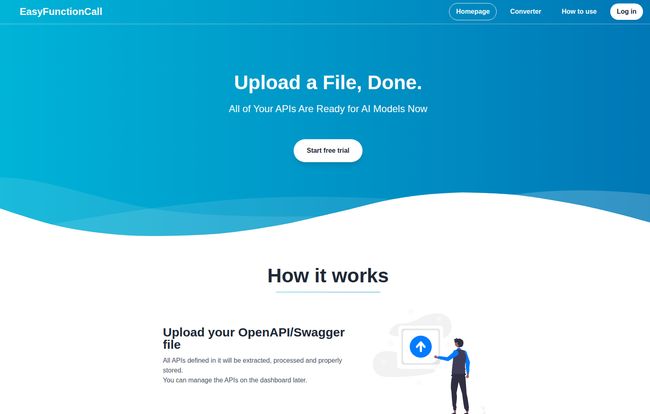
The beauty of this thing is its simplicity. The landing page claims it’s as easy as “Upload a File, Done,” and they’re not really exaggerating. Here’s the basic flow I experienced:
- Upload Your OpenAPI/Swagger Spec: You start by feeding the beast. You take your existing API documentation file and just… upload it. The service then chews on it, extracts all the necessary endpoints and schemas, and stores them in a way that’s ready for action. You can see and manage these from a neat little dashboard.
- Send the User’s Message: Next, in your application’s code, instead of doing complex logic to figure out which API to call, you just send the user’s raw message (e.g., “What’s the weather like in London?”) to the EasyFunctionCall API.
- Get Back Perfect Parameters: This is the magic bit. EasyFunctionCall takes the user’s message, intelligently matches it to the best API you uploaded, and sends back the exact function call parameters formatted perfectly for the AI model. You just pass this directly to your LLM. No fuss, no muss.
Visit EasyFunctionCall
It turns a potentially complex, multi-step process in your own codebase into a single, clean API call. That’s a win in my book.
The Real Perks of Handing Over the Reins
Why not just build this yourself? It’s a fair question, one I asked myself. But after using it, the value proposition became crystal clear.
Your Token Bill Will Thank You
This is the big one. By converting your bulky API specs into lean, optimized parameters, you’re sending way less data with each LLM call. We’re talking significant token savings here. Over thousands or millions of calls, that’s not just pocket change; that’s your company’s runway. It’s the difference between a sustainable business model and one that gets eaten alive by operational costs.
Focus on What Actually Matters: Your Product
Let’s be honest. Nobody gets excited about writing API integration middleware. It’s plumbing. It’s necessary, but it’s not the cool, user-facing feature that will make your customers fall in love with your product. Outsourcing this plumbing to a dedicated service like EasyFunctionCall frees up your engineers to build what matters. I’ve always felt that the best tech teams are the ones who are ruthless about focusing their energy, and this is a prime example of how to do it.
“By using our service, you or your engineers can spend their time on core product development instead of maintaining an API matching system, helping you build what matters most.”
That quote from their site really hits the nail on the head. It’s not just about saving money, it’s about reallocating your most valuable resource: your team’s time and brainpower.
Let’s Be Real: The Potential Downsides
Now, I’m not going to sit here and tell you it’s a perfect silver bullet. As with any third-party service, you’re introducing a dependency. If EasyFunctionCall has an outage, your function-calling feature might be affected. That’s a trade-off you have to be comfortable with. You’re also giving up a degree of control over the conversion process. For 99% of use cases, their optimization is probably better than what you’d build in-house. But if you have some bizarre, edge-case requirements, you might find the abstraction limiting.
It’s the classic build vs. buy dilemma. For my money, the convenience and cost savings far outweigh the risk of dependency for most projects, especially in the startup and scale-up phases.
EasyFunctionCall Pricing: What’s the Damage?
The pricing structure seems pretty fair and is designed to scale with you. They’ve got a free tier, which is always a great sign. It lets you kick the tires without pulling out your credit card.
| Plan | Price | Features |
|---|---|---|
| Free | $0 / month | 5 APIs, 100 Requests/month, Minimal customer service |
| Basic | $25.49 / month | 50 APIs, 10,000 Requests/month, Standard customer service |
| Enterprise | $169.99 / month | 100 APIs, 100,000 Requests/month, Highest priority customer service |
The Free plan is perfect for indie hackers or for just testing out a proof-of-concept. The Basic plan feels like the sweet spot for most small to medium-sized applications that are starting to see real traffic. And the Enterprise plan is there for when you hit the big time. Pretty logical progression.
My Final Take: Is EasyFunctionCall Worth It?
In a word, yes. For teams building AI-powered applications, especially those leveraging function calling, EasyFunctionCall feels like a no-brainer. It solves a real, expensive, and annoying problem in an elegant way. It’s a specialized tool that does one thing and does it very well.
It’s not just about saving tokens, it’s about saving time, reducing complexity, and accelerating your development cycle. In a fast-moving field like AI, that speed and focus can be the difference between leading the pack and getting left behind.
If you’re feeling the pain of LLM token costs and API integration headaches, do yourself a favor and try out their free plan. You’ve got literally nothing to lose, and potentially a lot of money and sanity to gain.
Frequently Asked Questions about EasyFunctionCall
What is EasyFunctionCall in a nutshell?
It’s a SaaS tool that takes your OpenAPI or Swagger API documentation and converts it into optimized parameters for AI models. This makes it cheaper and easier for your AI to use your APIs.
How exactly does it save LLM tokens?
Instead of you sending your entire, lengthy API spec to the LLM in every call, EasyFunctionCall pre-processes it. It finds the right API for a user’s request and returns only the lean, necessary parameters for that specific function. Less data sent to the model means fewer tokens used.
Is there really a free plan?
Yes, there is. The free plan includes support for up to 5 APIs and allows for 100 requests per month, which is great for personal projects, prototyping, or just testing the service.
What AI models does this work with?
The service is designed to work with any large language model that supports function calling. This includes popular models like OpenAI’s GPT series (GPT-3.5, GPT-4), Google’s Gemini models, and others with similar capabilities.
Can I integrate this into my existing project?
Absolutely. It’s designed to be a simple API-based integration. You’d replace your current logic for function calling with a call to the EasyFunctionCall API, which is typically a straightforward change.
What happens if I cancel my subscription?
Based on standard SaaS practices, if you cancel a paid subscription, you’d likely be able to use the service until the end of your billing period. Afterwards, your account would probably revert to the free plan’s limitations, or you might lose access to the service if you’re over the free tier limits. Always best to check their specific refund and cancellation policy!
Conclusion
In the rapidly evolving world of AI development, tools that offer a genuine competitive advantage are worth their weight in gold. EasyFunctionCall is one of those tools. It’s a practical solution to a widespread problem, providing a clear path to reduced costs and increased efficiency. By handling the nitty-gritty of API-to-AI translation, it empowers developers to do what they do best: build amazing things. Give the free tier a shot; your future self might just thank you for it.


