
Categories: AI Grammar Checker, AI Proofreading, AI Rewriter, AI Writing Assistants
editGPT Review: The AI Editor That Replaced My Grammarly

For years, my writing workflow has been the same. Write in Google Docs, paste into Grammarly, fix the obvious stuff, maybe tweak a few sentences, and hit publish. It’s been… fine. Serviceable. But lately, it’s felt like using a flip phone in an iPhone world. It catches typos but does it really improve my writing? Meh.
Then I started seeing these whispers on Twitter (or X, whatever we’re calling it this week) about a tool called editGPT. The tagline that caught my eye wasn’t some corporate jargon. It was a tweet from a PhD, Dr. Amina Yonis, that just said, “Cancel your Grammarly subscription, this is a NEW AI-powered tool called editGPT.” Bold claim. As someone who lives and breathes content and SEO, you know I had to see what the fuss was about.
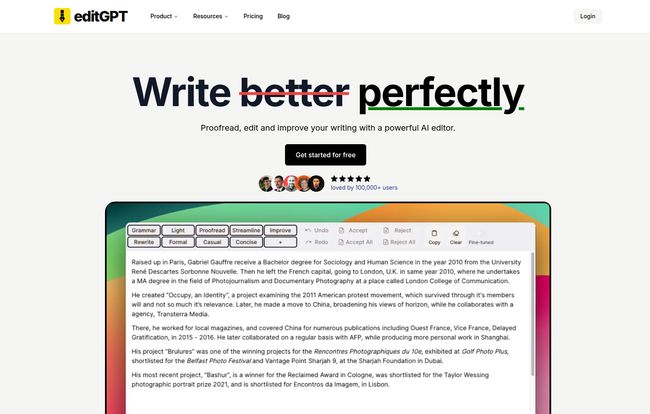
Visit editGPT
What is editGPT, and Why Should You Care?
At its core, editGPT is an AI-powered editor that uses the brains of ChatGPT to proofread and enhance your text. But calling it just a proofreader is like calling a Michelin-star chef a short-order cook. It’s a massive understatement. Where tools like Grammarly are prescriptive—following a set of grammatical rules—editGPT is creative. It’s a collaborator.
Instead of just flagging a passive voice sentence, you can tell it, “Rewrite this paragraph to be more persuasive for a marketing audience.
Or “Simplify this technical jargon so my grandpa can understand it.
It’s less about fixing mistakes and more about shaping your message. It’s the difference between a spellchecker and a personal editor sitting next to you.
The Standout Features That Genuinely Impressed Me
I’ve tested more SEO and writing tools than I can count. Most are just rehashes of each other. But a few things in editGPT really stood out.
Custom Prompts are a Total Game-Changer
This is the secret sauce. The platform comes with presets like “Fix Grammar,” “Proofread,” and “Improve.” But the real power is in the custom prompts. You can literally tell the AI exactly what you need. Think about it:
- For Academics: “Format this bibliography into APA 7th edition.”
- For Job Seekers: “Tailor this cover letter for a project manager role at a tech startup.”
- For Bloggers: “Make this intro more engaging and add a curiosity gap.”
- For Legal/Medical Pros: “Proofread this legal document for clarity while maintaining a formal tone.”
This level of control is something I’ve been wanting for years. It’s not just correcting my writing; it’s helping me write better for a specific purpose. It’s like having a team of specialized editors on call 24/7.
Track Changes in Microsoft Word? Yes, Please!
Okay, this one made me sit up straight. One of the biggest pains with AI editors is the workflow. You copy your text, paste it into the tool, get the edits, and then paste it back, losing all your original formatting and context. It’s clunky.
editGPT lets you import and export Microsoft Word documents while maintaining the track changes feature. You can run your document through the AI, get all the suggestions back as tracked changes, and then simply accept or reject them in Word. For anyone working in a team or submitting work for review, this is a massive, massive win. Seriously, a huge time-saver.
It Speaks Your Language (Literally)
With support for over 80 languages, this tool isn’t just for native English speakers. I’ve heard great things from colleagues who use it to translate and then refine their writing to sound more natural in English. The platform can even auto-detect the language. In a globalized world, this isn’t just a nice-to-have; it’s a necessity for so many people.
The Big Showdown: editGPT vs Grammarly
Let’s get to the question on everyone’s mind. Is it time to ditch Grammarly? For me, the answer is leaning heavily toward yes. Grammarly is fantastic for catching errors. It’s the safety net. But editGPT is the trapeze artist.
Grammarly tells you what’s wrong. editGPT shows you what’s possible. It’s more of a creative partner. While Grammarly might suggest a better word, editGPT can restructure an entire argument, change the tone from casual to formal, or turn a block of text into a concise bulleted list. The social proof is pretty telling, with over 100,000 users and testimonials splashed across their site from people happily making the switch.
Breaking Down The Cost: editGPT Pricing Plans
Price is always a factor, right? The good news is there’s a free plan, so you can kick the tires before you commit. Here’s how the tiers break down, as of my writing this:
| Plan | Price (Monthly) | Who It’s For | Key Features |
|---|---|---|---|
| Free | $0 / month | Casual users, students with occasional papers. | 10,000 words/month, 600 words/request, basic editing. |
| Pro | $12 / month | Professionals, bloggers, serious students. | 300,000 words/month, Word import/export, save custom prompts, batch editing. |
| Elite | $25 / month | Power users, agencies, high-volume content creators. | 2,000,000 words/month, all Pro features. |
For my money, the Pro plan is the sweet spot. The ability to save custom prompts and the Word integration are what elevate this from a cool toy to a professional tool. The free plan is generous enough to let you see if it fits your style, which I appreciate.
My Honest Take: The Good and The Could-Be-Better
No tool is perfect. Let’s be real. While I’m pretty smitten with editGPT, here’s my balanced take. I love the AI-powered editing, the sheer flexibility of custom prompts, and the game-changing track changes feature for Word. The multi-language support is a huge plus, and having a free plan makes it accessible to everyone.
On the flip side, the free plan’s word count per request (600 words) can feel a bit limiting if you’re trying to edit a longer piece. You have to break it up. And of course, the most powerful features are locked behind the paid plans. Also, there’s a slight learning curve. The tool is only as good as your prompts. You have to learn to ‘ask’ for the edits you want, which takes a little more thought than just clicking ‘accept’ on a grammar suggestion. But once you get the hang of it… wow.
Also Read: Zeitpub Review: AI Content on Autopilot?
Frequently Asked Questions About editGPT
I had some questions myself, and their site’s FAQ is pretty solid. Here are a few key ones:
How does editGPT actually work?
It sends your text, along with your chosen prompt (like ‘Proofread’ or a custom one you wrote), to the ChatGPT API. It then compares the AI’s response to your original text and shows you the differences, much like track changes.
Is ChatGPT better than Grammarly?
They’re different beasts. Grammarly is a rule-based grammar checker. ChatGPT is a generative language model. For simple error-checking, Grammarly is quick and easy. For deeper edits, rewriting, and creative changes, ChatGPT (and thus editGPT) is far more powerful.
Can I really use my own custom prompts?
Yes! This is its superpower. You can save your favorite prompts on the Pro plan so you don’t have to type them out every time. For instance, I have one saved called “Make it Punchy” for my blog intros.
Is my data safe?
According to their site, they have a privacy-first policy. Your data isn’t used for training their models, which is a big concern with some AI tools. Always read the privacy policy, but this is a good sign.
Is there a Chrome extension?
Yes, it seems there’s a distinction between the main web editor and a browser extension, which likely brings the editing power to wherever you write online.
Final Thoughts: Is editGPT Worth It?
After a couple of weeks of use, I have to say, I’m a convert. I haven’t cancelled my Grammarly subscription… yet. But for the first time, I’m seriously considering it. editGPT feels like the future of writing assistance. It’s more active, more intelligent, and more integrated into a professional workflow.
If you’re a student trying to nail that academic tone, a professional who needs to communicate with precision, or a content creator looking for an edge, I’d say give it a shot. Start with the free plan. Play with the prompts. See if it changes the way you think about editing. For me, it already has.


