
Categories: AI Document Extraction, AI Forms, AI OCR, AI Workflow
elDoc Review: Is This All-in-One Platform Worth It?

Let’s have a frank chat. How much of your workday feels like a digital scavenger hunt? You know the drill. Hunting for that one signed contract from last quarter. Digging through shared drives for the final_final_v3_UPDATED version of a presentation. It’s exhausting, and frankly, it’s a colossal waste of time.
For years, the accepted wisdom in the tech world was to build a ‘stack’. Get one tool for eSignatures (hello, DocuSign), another for file storage (hey there, Dropbox), and maybe a third, clunky app to try and automate things (looking at you, old-school workflow software). My own stack was held together with the digital equivalent of duct tape and a prayer. It worked… mostly. But it was never smooth.
Then I stumbled upon elDoc. It’s a platform that seems to be asking a very simple question: what if you didn’t have to do all that? What if all those scattered pieces could live under one roof? I was skeptical, but intrigued. So I took a closer look.
So, What Exactly is elDoc?
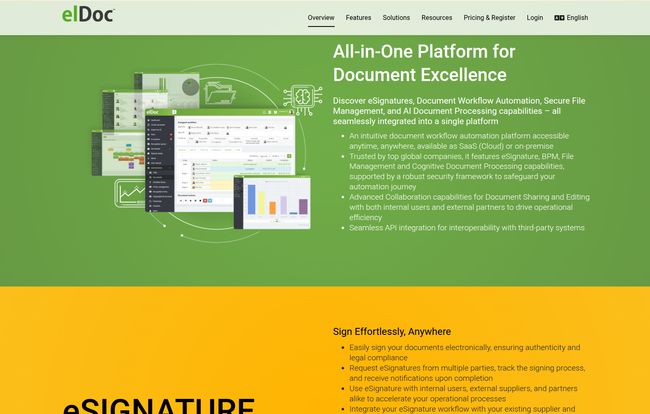
On the surface, elDoc calls itself an all-in-one platform for document processing. But what does that even mean? In my experience, it means it’s trying to be the central command center for your documents, not just another digital filing cabinet. It’s a single platform that handles everything from the moment a document is created or received, to how it gets approved, who signs it, and where it’s securely stored for later.
It’s available as a cloud service (SaaS), which is what most of us are used to, or as an on-premise installation if you have specific security needs or a dedicated IT team who loves a good project. It’s built on four main pillars: eSignatures, Workflow Automation, File Management, and some really interesting AI processing.
Visit elDoc
The Core Features That Actually Matter
A long list of features can be overwhelming. Let’s cut through the noise and talk about the parts that I think really make a difference in the day-to-day grind.
eSignatures That Just Work
This is table stakes these days. Any document platform worth its salt needs a solid e-signature function. The pain of printing, signing, scanning, and emailing is a relic of the past we should all be happy to leave behind. elDoc’s offering here is clean and straightforward. It covers certified eSignatures, tracking, and notifications. It’s the foundational piece, and it feels reliable.
Untangling the Knot with Workflow Automation
Okay, this is where things get exciting for a process nerd like me. elDoc’s workflow automation is the real engine of the platform. Think about getting a new vendor contract approved. It has to go from sales to legal, then to finance, and finally to the CEO for a signature. That’s a process ripe for delays and lost emails.
With their no-code workflow designer, you can visually map that entire process out. It’s like setting up a line of dominoes; you design the path, and elDoc makes sure each piece falls at the right time. For anyone who has tried to explain a complex business process to a developer, the ability to build and tweak this yourself is a game-changer. It’s about taking back control.
A Digital Fort Knox for Your Files
Secure file management sounds a bit boring, but it’s critically important. This is more than just a folder on a server. We’re talking version control (so you can finally say goodbye to ‘document_v4_final_jane’s_edit’), access rights (so interns can’t accidentally see payroll), and powerful search. Their full-text search is a lifesaver, letting you find a specific phrase inside a 100-page PDF without having to open and skim it yourself. It’s the peace of mind that comes with knowing your stuff is organized and, more importantly, secure.
The AI Brain: Intelligent Document Processing
I’ll admit, my eyes tend to glaze over when I see “AI-powered” slapped onto a product. It’s the marketing buzzword of the decade. But in elDoc, it seems to have a real, practical application. They call it Intelligent Document Processing, which is basically a fancy term for using AI (specifically OCR – Optical Character Recognition) to read and understand your documents.
Imagine uploading a hundred invoices. Instead of a junior team member spending a week manually typing the invoice number, date, and amount into a spreadsheet, elDoc’s AI can scan the documents, pull out that specific data, and populate it for you. That’s not a gimmick. That’s saving dozens, maybe hundreds, of hours of soul-crushing manual work. This is where you start to see some serious ROI.
Let’s Talk Money: The elDoc Pricing Model
Pricing is always the million-dollar question, isn’t it? elDoc has a modular approach, which I have mixed feelings about. It’s great because you can start small and only pay for the features you genuinely need. But you also have to be mindful that the cost will grow as you add more modules and users. It’s like a build-your-own-taco bar – the base price is tempting, but the guac and queso will cost you extra.
Here’s a simplified breakdown as of my writing this:
| Module | Price (per user/month, billed annually) | Key Features |
|---|---|---|
| eSignature | $4 | Unlimited certified eSignatures, tracking, reminders, document storage. |
| File Management | $6 | Online document editing, version control, watermarks, access management. |
| Workflow Automation | $5 | Unlimited workflow & eForm designers, tracking, workflow-integrated CRM. |
| Enterprise Plan | Contact Sales | Includes all modules plus the OCR / Intelligent Document Processing module. |
Note: Always check their official pricing page for the most current information.
My take? The flexibility is a huge pro. A small business could start with just eSignatures for $4/user and add workflow automation later as they grow. That’s a smart way to get in the door without a massive upfront investment.
The Good, The Bad, and The Realistic
No tool is perfect. Let’s get real about the pros and potential drawbacks.
What I Really Like
The biggest advantage is the all-in-one nature. The potential to replace three or four separate subscriptions with one platform is incredibly appealing, not just for cost but for sanity. The no-code workflow designer is a massive win for business users who want to build processes without learning to code. And I love that they offer both cloud and on-premise options; that level of choice is rare and shows they understand different business needs. Plus, seamless API integration means it can still talk to other critical software you rely on.
A Few Things to Keep in Mind
Naturally, the cloud version requires a stable internet connection to work. That’s a given for any SaaS tool, but still worth mentioning. The modular pricing, as I said, can be a double-edged sword. You need to map out what you need so the costs don’t sneak up on you. And if you go the on-premise route, remember that you’re responsible for the installation, server maintenance, and updates. That requires IT resources that not every company has.
Who is elDoc Actually For?
So, who should be scheduling a demo right now? In my opinion, elDoc is a fantastic fit for small to medium-sized businesses that are starting to feel the pain of document chaos. Departments like HR, Legal, Finance, and Operations, which are drowning in forms, contracts, and approval chains, would see an immediate benefit.
If you’re a solo freelancer who just needs to get a contract signed once a month, this is probably overkill. But if you manage a team and have multi-step processes for your documents, elDoc should definitely be on your radar.
Frequently Asked Questions
- 1. Is elDoc easy to use for non-technical people?
- From what I’ve seen, yes. The biggest hurdle in platforms like this is often the workflow creation, and elDoc’s no-code, drag-and-drop designer seems specifically built to be user-friendly for managers and operations staff, not just developers.
- 2. Can elDoc integrate with my other software?
- Yes, the platform is built with API integration in mind. This means it can be connected to other business systems like your CRM (e.g., Salesforce), ERP, or accounting software to pass data back and forth.
- 3. Is there a free trial for elDoc?
- The website encourages you to “get in touch to schedule a demo.” This is common for B2B software of this scale. A personalized demo is often more valuable than a free trial because they can show you how it would solve your specific problems.
- 4. What’s the main difference between the cloud and on-premise versions?
- The cloud (SaaS) version is hosted by elDoc; you just log in and use it. It’s quick to set up and they handle all the maintenance. The on-premise version is installed on your own company’s servers, giving you more control over the data and infrastructure but requiring your own IT team to manage it.
- 5. How does the AI document processing really work?
- It uses Optical Character Recognition (OCR) to convert images of text (like in a scanned PDF) into machine-readable text. Then, AI models are trained to identify and extract key information—like names, dates, and amounts—from specific document types like invoices or forms, saving you from manual data entry.
- 6. Is the pricing per user or a flat fee?
- The pricing is clearly laid out as per user, per month, and it’s billed annually to get the advertised rate. This is a standard SaaS pricing model.
My Final Verdict on elDoc
So, is elDoc the magic bullet that will instantly solve every document problem your company has? Of course not. No software is. There will always be a need for good internal processes and team discipline.
However, elDoc is one of the most compelling and well-thought-out attempts I’ve seen to unify a messy, fragmented document ecosystem. It’s not just storage. It’s not just signatures. It’s a system designed to manage the entire lifecycle of a document. For any business tired of the digital scavenger hunt, that is a very powerful proposition. It’s definitely worth a demo.
Reference and Sources
- elDoc Official Website: https://eldoc.online/
- elDoc Pricing Information: https://eldoc.online/#register


