
Categories: AI Proofreading, AI Summarizer, AI Translate, AI Writing, AI Writing Assistants
EloquentAI Review: Your AI Writing Assistant?

Staring at a blinking cursor on a stark white page, the words just won’t come. Whether it’s a high-stakes email to a client, a blog post that needs to be perfect, or just trying to sound a little smarter on social media, writer’s block is a universal pain. And in the last couple of years, the market has become absolutely flooded with AI writing tools promising to be our savior. But are they all just clones of each other, spitting out vaguely robotic text?
Every so often, a tool comes along that feels a little bit different. A little more thoughtful. That’s the vibe I got when I first stumbled upon EloquentAI. It bills itself not just as a writer, but as a reading and writing assistant. A subtle but important distinction. It’s a Chrome extension, meaning it lives right in your browser, ready to jump in whenever you need it. So, I decided to take it for a spin. Is this the co-pilot we’ve been waiting for, or just another passenger?
What Exactly Is EloquentAI Supposed to Do?
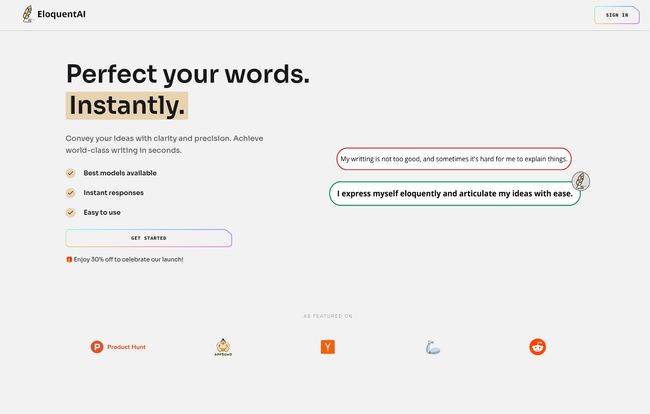
At its core, EloquentAI is designed to be your on-demand language guru. The big, shiny promise is to help you achieve “world-class writing in seconds.” A bold claim, for sure. But beneath the marketing, the goal is to help you express your ideas with more clarity and precision. It’s not about writing for you, but making what you write, better.
It works by integrating directly into your workflow. You highlight some text on any webpage, and a little EloquentAI button pops up. From there, you can do all sorts of cool things like enhance your prose to make it more impactful, completely change the tone and length to fit a different audience, or summarize a beast of an article into a few key points. It also handles translations, finds synonyms, and even lets you create your own custom prompts. It’s like having a Swiss Army knife for your words.
Visit EloquentAI
A Closer Look at the Features
Saying it has features is one thing, but are they actually useful? I spent some time messing around with the main functions, and here’s what I found.
Enhancing Your Writing on the Fly
The ‘Enhance Writing’ feature is probably the one most people will gravitate towards. We all write clunky sentences sometimes. I took a terribly worded phrase from an old draft—something like “The utilization of this methodology will facilitate a better outcome for us”—and let EloquentAI have a go. It came back with “Using this method will get us better results.” Simple. Direct. Infinitely better. It’s like having a tiny, incredibly fast editor living in your browser, cutting through the fluff without you having to agonize over every word.
The Tone and Length Shifter
This one is surprisingly powerful. Think about the different hats you wear in a single day. The formal, professional tone for a report is completely different from the friendly, casual tone you use in a Slack message to a coworker. EloquentAI’s ‘Adjust Tone & Length’ function is like a mixing board for your prose. You can take a paragraph and ask it to be more professional, more casual, more confident, or even funnier. You can also ask it to shorten a rambling email into two concise sentences or expand a single bullet point into a full paragraph. It’s a fantastic tool for making sure your message lands exactly how you intend it to.
Summarize & Explain Is a Game Changer for Research
Okay, this is where EloquentAI flexes its muscles as a reading assistant. As an SEO guy, I’m constantly sifting through dense industry reports, technical documentation, and competitor blog posts. It’s a slog. I threw a particularly jargon-heavy article about Google’s latest algorithm update at the ‘Summarize & Explain’ feature, and it was beautiful. It broke down the key points into simple, digestible language. This feature alone could save me hours every week. It’s not just for writers; it’s for anyone who has to consume large amounts of information and needs to get the gist, fast.
The Tech Powering the Magic Wand
Now for the nerdy part that actually matters. An AI tool is only as good as the brain behind it. EloquentAI isn’t running some proprietary, home-brewed model. It’s tapping into the heavy hitters: OpenAI’s GPT-4.0 and Meta’s Llama 3. This is a smart move. It means you’re getting outputs from some of the most advanced and nuanced language models on the planet. The Business plan even lets you choose between them.
But here’s a detail that a lot of people might miss: they also mention using Groq. For the non-geeks, Groq is a company building chips specifically designed to run AI models at incredible speeds. This is why the responses from EloquentAI feel almost instant. There’s no awkward pause while the AI “thinks.” That speed makes it feel less like a tool and more like an extension of your own mind, which is a pretty big deal for workflow and productivity.
Let’s Talk Money: The EloquentAI Pricing Tiers
Alright, nothing in life is free, right? EloquentAI is running a launch discount right now, which is a nice touch. The pricing is broken into three tiers, and honestly, it seems pretty reasonable for what you get. I’ve put together a quick table to break it down simply.
| Plan | Launch Price | Key Features | Best For |
|---|---|---|---|
| Pro | $4.49 /month | All features, Meta AI, 1,000 requests/month | Students or casual users with daily writing needs. |
| Premium | $6.49 /month | All Pro features, Meta AI, unlimited requests, early access | Professionals, bloggers, and heavy users. The sweet spot. |
| Business | $12.99 /month | All Premium features, Meta AI + OpenAI models, unlimited requests | Power users, agencies, or teams needing the absolute best quality. |
My take? The Premium plan is the best value for most people. The 1,000 request limit on the Pro plan might feel a bit tight if you really start integrating this into your daily routine. Unlimited requests for under $7 a month is a pretty solid deal. The Business plan is for those who need the absolute top-tier output from OpenAI’s models, and for them, the price is more than fair.
The Good, The Bad, and The Realistic
No tool is perfect. So let’s get down to it. What’s great, and what could be better?
On the plus side, its simplicity is its greatest strength. The three-step process—install, select, modify—is genuinely that easy. The speed, thanks to Groq, is phenomenal. And the quality of the output, thanks to Llama 3 and GPT-4, is top-notch. It’s an undeniable productivity booster.
On the other hand, it’s important to understand what this tool is. It’s a brilliantly designed user interface—a ‘wrapper’—for powerful third-party AIs. Its existence depends on services from OpenAI and Meta. This isn’t really a con for the user, just a reality of how many modern AI tools work. The biggest practical limitation is that request limit on the Pro plan. And of course, the AI is a partner, not a replacement for your brain. The output is only as good as your initial input and your critical eye.
So, Who Is This Tool Actually For?
After playing around with it, I can see a few people who would absolutely love EloquentAI:
- The Student: Imagine summarizing a 50-page academic paper in minutes or polishing an essay to sound more academic and clear. This is a no-brainer.
- The Content Creator: That’s me! It’s perfect for smashing through writer’s block, rephrasing a sentence 10 different ways to find the perfect one, and ensuring your tone is consistent across a long article.
- The Corporate Professional: This might be the biggest market. Writing clearer, more concise emails, getting the tone right for a message to the C-suite, deciphering long reports, and even communicating with international teams using the translate feature. It’s a communication multitool.
Frequently Asked Questions about EloquentAI
Why should I use EloquentAI instead of just opening a new tab for ChatGPT?
Convenience and workflow integration. EloquentAI works on top of any webpage, so you don’t have to break your focus, copy-paste text back and forth, or switch contexts. It’s about making the AI a seamless part of what you’re already doing.
How does it know what I want to write?
It doesn’t read your mind, but it’s a master of context. It analyzes the text you highlight and the instructions you give it (like ‘make this more formal’ or ‘summarize this’) to generate a relevant response. The Custom Prompts feature gives you even more control.
Is my data safe when I use it?
This is a huge concern with AI. According to their site, they are committed to privacy. However, as a general rule with any AI tool that relies on third-party APIs, it’s always wise to avoid inputting highly sensitive personal or proprietary company information.
Can it really help me improve my language skills over time?
I actually think so. By seeing how it rephrases your sentences and improves your writing, you start to internalize those patterns. It can be a great learning tool for recognizing wordiness and improving clarity in your own writing, even when you’re not using it.
Does it work on every website?
As a Chrome extension, it’s designed to work on virtually any text you can select in your browser, from Google Docs and emails to social media sites and news articles. I haven’t found a site it doesn’t work on yet.
My Final Verdict
So, is EloquentAI just more AI noise? I’m happy to say, no. It’s a genuinely useful, well-designed tool that understands its purpose: to be an assistant, not a replacement. It’s fast, powerful, and integrates so smoothly into my workflow that I almost forgot I was using it.
While some power users might still prefer the direct, raw access of using a platform like ChatGPT, I think for the vast majority of people—students, professionals, and creators—EloquentAI offers a more practical and efficient way to leverage AI for better communication. It polishes your own thoughts rather than just generating new ones, and in a world awash with generic AI content, that’s a distinction that really matters.


