
Categories: AI Code Generator, AI Design Generator
Email HTML Gen Review: AI Email Templates in a Flash?

If you’ve been in the marketing or SEO game for any length of time, you’ve felt the pain. The unique, soul-crushing pain of building a beautiful email campaign, only to see it render like a Picasso painting after a spin cycle in Outlook. We’ve all been there. Spending hours tweaking “ tags, wrestling with media queries, and sending endless tests to Litmus or Email on Acid, just to make sure a button aligns correctly.
It’s a time-suck. A creativity drain. And frankly, in 2024, it feels a little archaic, doesn’t it?
So when a tool like Email HTML Gen pops up on my radar, claiming to use AI to generate stunning, responsive email HTML in seconds… you bet I’m intrigued. Skeptical, but intrigued. Is this another over-hyped AI gadget, or is it the tool we’ve been secretly wishing for? I decided to take a look under the hood.
First Off, What Exactly is Email HTML Gen?
In the simplest terms, Email HTML Gen is an AI-powered email designer and coder rolled into one. You skip the whole drag-and-drop-a-million-blocks process, and you definitely skip opening up a code editor. Instead, you just… describe what you want. It’s a wild concept that’s becoming more common, but seeing it applied to the finicky world of email HTML is something else.
You tell the AI, “I need an email for a flash sale on summer dresses, with a big hero image, a countdown timer, and three featured products below.” The platform then takes that prompt and spits out the HTML code. From there, you can jump into their editor, tweak the design to match your brand, and grab the code for your email service provider (ESP). The whole idea is to take the process from hours to minutes. A bold claim.
How the Magic Happens
The workflow they lay out is refreshingly simple. There are no 10-step tutorials or complicated onboarding processes. It breaks down into four logical stages:
- Describe Your Email: This is the core of it. You write a prompt detailing your goals, your content, and your desired style.
- AI Generates Code: The platform’s AI takes your input and, well, does the heavy lifting, generating the HTML and CSS.
- Customize and Perfect: You get a visual editor to fine-tune colors, fonts, images, and layout. This isn’t a black box; you still have control.
- Export and Send: Once you’re happy, you grab the final HTML code and pop it into your Mailchimp, Klaviyo, or whatever platform you use.
It’s designed to be a conversation. You talk, it builds. And that’s a pretty powerful proposition for busy teams.
Visit Email HTML Gen
The Features That Actually Matter
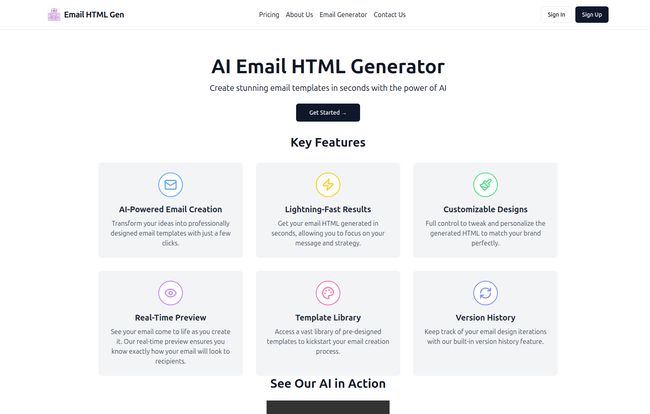
Any new platform can throw a list of features on a landing page. But after years of sifting through marketing tech, I’ve learned to spot the ones that actually make a difference in your day-to-day workflow. Here’s what stood out to me.
AI-Powered Creativity is a Game Changer
This isn’t just about filling in a template. The ability to transform a simple idea into a structured, professional email is the main draw. It’s like having a junior designer on call 24/7. For those moments when you have writer’s block for design, this could be a lifesaver.
The Need for Speed
They say “Lightning-Fast Results,” and that’s not just marketing fluff. The time saved is the single biggest ROI here. Think about it: the average custom email template can take a few hours to a full day to code and test. If this tool cuts that down to 15 minutes, the value is obvious. That’s more time for strategy, for A/B testing copy, for actually growing the business.
You Can Still Get Your Hands Dirty with Customization
My biggest fear with AI tools is a loss of control. I was relieved to see that Email HTML Gen provides a real-time preview and an editor. You can tweak the AI’s creation to perfection. This is critical. You need to be able to nudge a logo, change a HEX code, or swap out an image without starting over. It finds a nice balance between automation and hands-on control.
Little Things That Make a Big Difference
Two smaller features caught my eye: the Template Library and Version History. The library is great for inspiration when you don’t even know what to ask the AI for. And version history? Oh man. We’ve all made a change, hated it, and wished for a time machine. This is it. It’s like Ctrl+Z on steroids for your entire email design, and it’s a feature I wish more marketing tools would adopt.
So, Who Is This Actually For?
I can see a few groups getting a ton of value from a tool like this:
- Solo-preneurs and Small Businesses: When you’re the CEO, the marketer, the designer, and the janitor, time is your most precious resource. This removes a major technical hurdle and lets you create professional-looking emails without hiring a freelancer.
- Marketing Teams: For teams that need to be agile, this is huge. You can spin up campaigns for A/B tests, flash sales, or quick announcements without pulling a developer off a more critical project. It empowers the marketer to execute their own ideas.
- Agencies: Imagine being able to mock up three different email concepts for a client in under an hour. It speeds up approvals and lets you handle more clients with less overhead.
Let’s Talk Money: The Pricing Plans
Pricing is always the million-dollar question, isn’t it? Email HTML Gen has a pretty straightforward tiered system. I appreciate that they have a free plan, so you can actually try it before you buy.
Pricing Breakdown
Free Plan: $0/month
This gets you 1 email generation per day and access to basic templates. Its perfect for dipping your toes in the water or for someone with very infrequent email needs.
Basic Plan: $19.99/month
Here you get 10 generations per day, advanced templates, and priority support. This feels like the sweet spot for most small businesses and freelancers who are sending campaigns weekly.
Pro Plan: $49.99/month
Unlimited generations, premium templates, and 24/7 support. This is clearly aimed at power users, agencies, and larger marketing teams who live and breathe email.
The Good, The Bad, and The AI
No tool is perfect. Let’s get into the nitty-gritty. After playing around and thinking through the implications, here’s my honest take on the pros and cons.
The Upsides
The time savings is the most obvious benefit. It’s massive. The ability to quickly generate designs also encourages experimentation. You’re more likely to try a new layout if it doesn’t cost you half a day’s work. It also democratizes good design; you dont have to be a code wizard to send a beautiful, responsive email. And the inclusion of version history is just a thoughtful, pro-user touch.
Some Potential Downsides
Let’s be realistic. The quality of the output is entirely dependent on the AI. A vague prompt will likely yield a generic result. There’s a skill to writing good prompts. Also, if you’re a designer with a very, very specific vision, the AI might feel restrictive. You might still need to dive into the code for those final, pixel-perfect tweaks, which means some HTML knowledge could still be beneficial. You’re trading some creative control for incredible speed.
Final Thoughts: Is Email HTML Gen Worth It?
So, is Email HTML Gen the end of hand-coding emails? For a lot of people, I think the answer is yes. Or at least, it’s the end of hand-coding them from scratch.
This isn’t a tool that replaces skilled email developers for highly complex, bespoke projects. But it’s not supposed to be. It’s a tool that automates the 80% of work that goes into most standard marketing and transactional emails. It’s a force multiplier. It takes the tedious, repetitive parts of the job and handles them in seconds, freeing you up to focus on the stuff that really matters: the message, the strategy, and the customer.
For the price, especially with the free entry point, it feels like a no-brainer to at least try. It might just give you back a few hours in your week. And in this business, what’s more valuable than time?
Frequently Asked Questions
- What is Email HTML Gen?
- It’s an AI-powered platform that lets you generate responsive email HTML templates simply by describing what you need in plain English. It’s designed to drastically speed up the email creation process.
- Is Email HTML Gen good for non-technical users?
- Absolutely. In fact, that’s one of its main strengths. You don’t need to know how to code to generate a professional email template. The visual editor also makes customization intuitive.
- How good is the generated code?
- From what I’ve seen, it produces modern, responsive HTML that should work across major email clients. However, as with any automated tool, it’s always a good practice to send a test to yourself and a few colleagues before a major send-off.
- Can I customize the emails after they are generated?
- Yes. The platform includes a visual editor that allows you to change colors, fonts, images, and other elements to perfectly match your brand’s identity.
- Can I get a refund if I’m not happy?
- The website doesn’t explicitly state a refund policy on the main page, which is common. This is why starting with the Free plan is such a great option. You can fully test its capabilities and see if it fits your workflow before committing to a paid plan.


