
Categories: AI Avatar Generator, AI Emoji Generator, AI Image Generator, AI Selfie Generator
Emojifyer Review: Turn Your Selfie into a Custom AI Emoji

You’re in a group chat, the banter is flying, and you reach for the perfect emoji to cap off your zinger… only to be met with the same old, slightly-off-yellow smiley faces. The crying-laughing face just doesn’t hit like it used to, does it? The digital world is screaming for more personality, for a way to inject a bit of us back into the conversation.
Well, I stumbled across something that might just be the answer. It’s called Emojifyer, and it promises to turn anything—your face, your cat, your lunch—into a custom emoji using AI. The claim is bold. The tech is trendy. But as someone who’s seen a million ‘game-changing’ AI tools come and go, I had to see if it was more than just a gimmick. So I rolled up my sleeves and spent an afternoon turning myself into a cartoon.
Visit Emojifyer
So, What is Emojifyer Actually?
At its core, Emojifyer is an AI-powered emoji generator. You feed it an image, preferably a selfie, and it spits out a custom emoji that looks, well, like an emojified version of you. It’s not just a filter; it’s a full-on digital doppelgänger creator. The whole idea is to move beyond the generic library on your phone and start using reactions that are uniquely yours. Imagine reacting to a message with a perfect, custom-made eye-roll that has your exact hair color. That’s the dream, right?
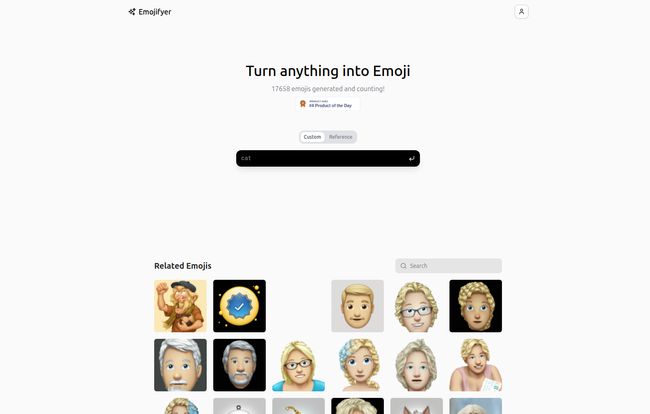
The platform is super straightforward. There aren’t a million menus to get lost in. It’s basically built around one core function: take a picture, get an emoji. Simple, as it should be.
Getting Your Face Emojified: My First Run
Jumping in was surprisingly easy. The homepage is clean, almost minimalist. You’re met with two main options: “Custom” and “Reference.” For a true test, I went straight for the “Reference” tab, which is where you upload your own image. This is where the magic is supposed to happen.
The Step-by-Step Emoji Alchemy
The process feels a bit like a character creation screen in a video game. First, you upload your reference image. I chose a fairly well-lit selfie, because I know from experience that with AI, garbage in almost always equals garbage out. No shadowy, grainy photos from 2012 if you want good results.
Next, you get a few little toggles to play with:
- Gender: Male or Female.
- Eye Color: A handful of standard options.
- Hair Color: Same deal, the usual suspects are here.
But then there’s the wild card: a slider labeled ‘Emojiness.’
What on earth is ’emojiness’? I had no idea. Is it a measure of cartoonishness? Cuteness? I cranked it up to about 75% for my first attempt, hit generate, and waited. The result was… interesting. It was definitely me, but with the smooth, glossy finish of an Apple Memoji. The resemblance was uncanny, but it also had that slightly detached, AI-perfected look. It was cool, but was it me?
My Brutally Honest Take on Emojifyer
After playing around for a while, generating emojis of myself, my dog (which came out… abstract), and a stock photo of a businessman, I’ve got some thoughts. It’s a fun little tool, but it’s not without its quirks.
The Good Stuff
The biggest win for Emojifyer is how incredibly easy it is. You can go from landing on the page to having a custom emoji in under a minute. There’s no complex sign-up process, no steep learning curve. It’s pure plug-and-play fun. The ability to create something so personal so quickly is genuinely delightful. It adds a much-needed layer of personality to digital chats that I’ve been craving. I can already see these popping up in Slack channels and Discord servers, becoming inside jokes and custom reactions.
Where It Gets a Bit… Weird
Now for the reality check. The quality of your emoji is heavily dependent on the quality of the photo you upload. A clear, front-facing, well-lit selfie works wonders. A photo of you on a rollercoaster at night? Not so much. You’ll get something, but it might look like a melted version of your cousin.
The customization options are also a bit basic. Hair color, eye color… that’s about it. If you have glasses, a beard, or any distinguishing features beyond the basics, the AI might struggle to capture them perfectly. And that ’emojiness’ slider? It’s a bit of a lottery. Sometimes it creates a perfect balance, other times it veers into the uncanny valley of emojis. It’s a fun variable, but not a precise tool. I also hit a weird 404 page once while navigating the site; a gentle reminder that this is still new tech and might have a few gremlins in the system.
| What I Liked | What I Didn’t Love |
|---|---|
| Super easy and fast to use | Emoji quality is tied to your photo quality |
| Creates truly personalized and fun emojis | Customization is pretty limited |
| A unique way to spice up digital chats | The ‘Emojiness’ slider is unpredictable |
Let’s Talk Money: The Price of Your Face
Here’s the best part, at least for now. As of my review, Emojifyer appears to be free to use. I couldn’t find a pricing page or any mention of a subscription. This is pretty common for new AI projects hitting the scene—they build an audience first and think about monetization later. My advice? Get in there and play around with it while it’s completely open. That could change down the line, but for now, the only cost is a few minutes of your time.
FAQs About Creating Your AI Emoji Twin
Is Emojifyer really free to use?
Yes, as of late 2023, the tool is free. There’s no payment wall or subscription required to generate emojis. This could change in the future, as is common with AI tools.
Can I use any picture to make an emoji?
You can try, but for best results, use a clear, high-quality, front-facing photo of a person. The AI is trained on faces, so trying to emojify your pet or a landscape might produce some… creative and unpredictable results.
What exactly does the ’emojiness’ setting do?
It’s an intensity slider. A lower setting seems to keep the result closer to your original photo’s features, while a higher setting makes it more stylized, smoothed, and ’emoji-like,’ resembling something like an Apple Memoji.
How is this different from Apple’s Memoji or Samsung’s AR Emoji?
Memoji and AR Emoji are created by manually selecting features from a library to build an avatar. Emojifyer uses AI to automatically generate the emoji based on a photo you provide, which makes it faster but gives you less fine-tuned control over the final look.
Do I own the emojis I create?
This is a gray area for most AI generators. Generally, you can use them for personal communication, like in chats or on social media. For commercial use, you would absolutely need to check the platform’s terms of service, which I’d recommend doing anyway.
The Final Verdict: Should You Emojify Yourself?
So, is Emojifyer the future of digital expression? Maybe not the entire future, but it’s a ridiculously fun step in the right direction. It’s not a perfect, professional design tool. It’s a toy. A really, really good toy. It’s for the person who wants to make their friends laugh in the group chat, the streamer who wants custom emotes for their community, or anyone who’s just a little bit bored with the status quo.
It successfully lowers the barrier to creating something personal and fun. It won’t replace the classic emoji set, but it’s a fantastic, modern companion to it. Give it a whirl. The worst that can happen is you get a hilariously weird-looking emoji of yourself, and honestly, that’s a win in my book.
Reference and Sources
- Emojifyer Official Website: While the site was accessible for this review, new AI tools can have intermittent availability. A direct link is not provided to ensure you find the most current and active version via a search engine.


