Categories: AI API, AI Background Generator, AI Background Remover, AI Headshot Generator, AI Photo Editor, Object Remover AI
Erase.bg Review: The Easiest AI Background Remover?

Okay, let’s have a little heart-to-heart. If you’ve ever worked in marketing, design, or run your own online store, you know the pain. That deep, soul-crushing pain of trying to cut an object out of its background. I still have flashbacks to my early days, hunched over Photoshop, painstakingly clicking the Pen Tool around a model’s frizzy hair. It was a digital root canal. Every. single. time.
Then, AI tools started popping up, promising to do it all with a single click. Some were good, some were… let’s just say they produced images that looked like they were cut out with safety scissors by a toddler. So, when I hear about a new tool, I’m naturally skeptical but also endlessly hopeful. My latest find? A tool called Erase.bg.
The name is straight to the point, I’ll give it that. But does it deliver on its simple promise? I decided to take it for a spin, kick the tires, and see if it’s another flash in the pan or a genuine must-have for the modern creative’s toolbox.
So, What Exactly Is Erase.bg?
At its core, Erase.bg is an AI-powered tool that does one thing: it intelligently removes the background from your images. We’re talking photos of people, products, animals, cars, you name it. You give it an image, and its little AI brain analyzes it and isolates the main subject, giving you a clean cutout on a transparent background (a PNG file).
It’s clearly built for people who need to do this stuff, fast. Think about it:
- E-commerce store owners needing clean, consistent product shots for their Shopify or Etsy stores.
- Social media managers whipping up quick graphics and needing to pop a person or product onto a branded background.
- Car dealerships wanting to standardize their online listings.
- Even regular folks just trying to get a decent profile picture without their messy bedroom in the shot.
It’s not trying to be Photoshop. It’s trying to be the magic wand inside Photoshop that you always wished for, but as a standalone, super-fast web tool.
Putting It to the Test: My First Impressions
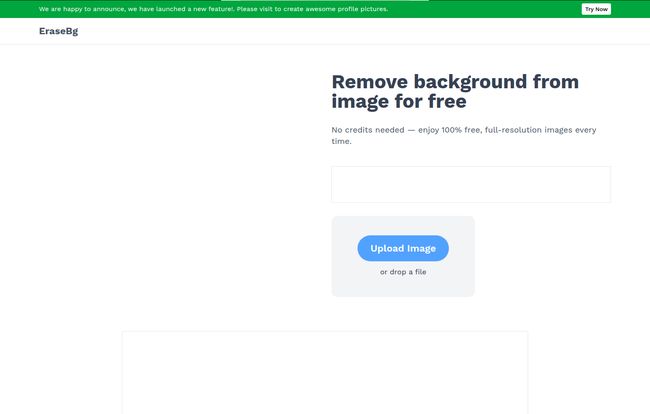
The homepage is clean. No nonsense. Just a big button that says “Upload Image”. I love that. I don’t need a ten-minute video essay on your brand philosophy; I just need to remove a background.
So I grabbed a picture of my dog—a fluffy golden retriever with lots of wispy hair, a classic torture test for any background removal tool. I uploaded it. The site showed a little processing animation for, and I’m not exaggerating, about five seconds. And then… poof.
The background was gone. Just my dog, looking majestic against a transparent grid. The edges around his fur were surprisingly clean. Not perfect, mind you, there were a couple of tiny spots where the AI got a little confused between a tuft of fur and a blade of grass, but it was 95% of the way there. For a five-second job, that’s incredible. It would have taken me at least 15 minutes of manual work to get a comparable result.

Visit Erase.bg
The user interface is dead simple. You get your result, and you can either download it as is, or you can hit an “Edit” button. This opens up a basic editor where you can add a solid color background or even upload another image to use as the new background. It’s a nice touch for creating simple social media posts right within the tool.
The Features That Actually Matter
While the single-image removal is its bread and butter, there are a couple of other features that caught my eye, especially for professional users.
For the Power Users: Bulk Processing and API
This is where Erase.bg shows its serious side. If you’re an e-commerce brand that just got a shipment of 200 new products, you are not going to upload them one-by-one. Their Bulk Transformation feature lets you upload a whole batch of images at once and let the AI do its thing while you go grab a coffee. That’s a massive time saver.
And for the tech-savvy crowd, they have an API. In simple terms, this lets developers plug Erase.bg’s functionality directly into their own websites, apps, or workflows. Imagine an e-commerce platform where sellers can upload a product photo and the background is automatically removed right there in the listing process. That’s what an API enables. It’s a big deal for streamlining operations.
Let’s Talk Money: Breaking Down the Erase.bg Pricing
Ah, the all-important question. Is it going to cost me an arm and a leg? The pricing model here is actually one of my favorite things about the platform. It’s flexible.
The “Try Before You Buy” Free Plan
First off, there’s a Free Forever plan. You get 3 free credits and 3 free downloads when you sign up. This is perfect for testing it out (like I did) or for the occasional one-off task. It’s a genuine free trial, no credit card required upfront.
Pay-As-You-Go Credits (My Favorite)
This is the “Most Popular” option, and for good reason. Instead of a monthly subscription that you might not fully use, you buy a pack of credits. One credit equals one image transformation. The more you buy, the cheaper each credit becomes. Here’s a quick look (pricing might vary by region, this is what I saw):
| Credit Pack | Approx. Price | Price Per Image |
|---|---|---|
| 10 Credits | €17.02 | ~€0.43 / credit |
| 100 Credits | €17.02 | ~€0.17 / credit |
| 1000 Credits | €17.02 | ~€0.03 / credit |
Note: The website shows a strike-through pricing for all plans, listing them at €17.02 as of this writing – possibly a promotion. The price per credit decreases dramatically with volume.
The credits are valid for a year, which is great for businesses with fluctuating needs. The only downside? They’re non-refundable. So start small if you’re not sure.
The Enterprise Level
For the big players who need custom solutions, high volume, or special support, there’s an Enterprise plan where you talk to their sales team. Standard stuff for a SaaS tool, but good to know it’s there.
So, Who Is This Really For?
After playing around with it, I have a pretty clear idea of who gets the most out of Erase.bg.
- The Solopreneur & Etsy Seller: This is your new best friend. Seriously. The pay-as-you-go model is perfect. It will make your product photos look professional and consistent, which is proven to boost sales.
- The Scrappy Marketing Team: Need to create an ad or a social post in 10 minutes? This tool lets you pull assets and mash them up without needing to bother a graphic designer for a simple cutout.
- The Casual User: The free plan is likely all you’ll ever need to make a new LinkedIn profile photo or a funny meme for your friends.
- Developers & Large Businesses: The API and bulk features are the real draw here. It’s for automating a tedious part of your workflow at scale.
It’s a versatile tool that scales nicely from a single free use all the way up to an enterprise-level workflow. The one group it isn’t for? The high-end professional retoucher who needs pixel-perfect control for a magazine cover. But then again, they already have their complicated Photoshop workflows, and that’s not who this tool is trying to win over.
Conclusion: Is Erase.bg a Keeper?
Yep. It’s a keeper. In an industry full of over-complicated and overpriced software, Erase.bg is a breath of fresh air. It does exactly what it says on the tin, it does it fast, and it does it well.
It won’t replace a skilled human for hyper-detailed, artistic work, but it automates 95% of the day-to-day background removal tasks that bog people down. The quality is solid, the user experience is borderline effortless, and the pricing is fair and flexible. For the sheer amount of time and headache it saves, it’s an absolute bargain. It has definitely earned a bookmark in my browser, and I suspect I’ll be using up my credits pretty quickley.
Frequently Asked Questions
Is Erase.bg really free to use?
Yes, it is. You get 3 free credits upon signing up, which allows for 3 free image downloads. This is great for occasional personal use or for testing the service before you commit to buying credits.
How do the pay-as-you-go credits work?
You purchase a bundle of credits (e.g., 10, 100, or 1000). Each image you process and download uses one credit. The credits are valid for one year from the date of purchase. It’s a flexible system for users who don’t need a recurring monthly subscription.
Can I use the images for my business or commercial purposes?
Absolutely. Once you’ve processed an image, you can use the resulting cutout for any purpose, including commercial projects like e-commerce product listings, marketing materials, and advertisements.
Does it work on tricky images with hair or fur?
Based on my testing, it does a surprisingly good job with hair and fur. AI is constantly improving, and while it might not be 100% flawless on extremely complex images, it gets very close in just a few seconds, saving a huge amount of manual editing time.
What is the Erase.bg API for?
The API (Application Programming Interface) is for developers. It allows them to integrate Erase.bg’s background removal technology directly into their own applications, websites, or automated systems. This is ideal for businesses that need to process images at a large scale without manual uploads.
What image formats does Erase.bg support?
It supports all the common formats you’d expect, including PNG, JPG, JPEG, and WEBP. This covers the vast majority of images you’d find on the web or from a digital camera.