
Categories: AI Animation Generator, AI Background Generator, AI Colorize, AI Face Swap Generator, AI Hairstyle, AI Headshot Generator, AI Image Upscaler, AI Inpainting, AI Outfit Generator, AI Photo Editor, AI Photo Enhancer, AI Video Generator, Image to Video
Expression Editor AI Review: My Honest Take on This Tool

How many times have you taken what you thought was the perfect photo, only to get it on your computer and see it? The weird half-blink. The forced smile that looks more like a grimace. The one person in the group shot looking completely the wrong way. As someone who’s been wrangling blog visuals and client headshots for years, I’ve seen it all. The struggle is real.
We’ve spent hours in Photoshop, trying to nudge a lip corner up or copy-paste an eye from another, lesser photo. It’s tedious work, and half the time it ends up looking… well, a little off. So when I kept hearing whispers about a tool called Expression Editor AI, my curiosity got the better of me. Another AI tool promising the world? I was skeptical, but I’m glad I took a look. Because this one… its different.
So What’s the Big Deal with Expression Editor AI Anyway?
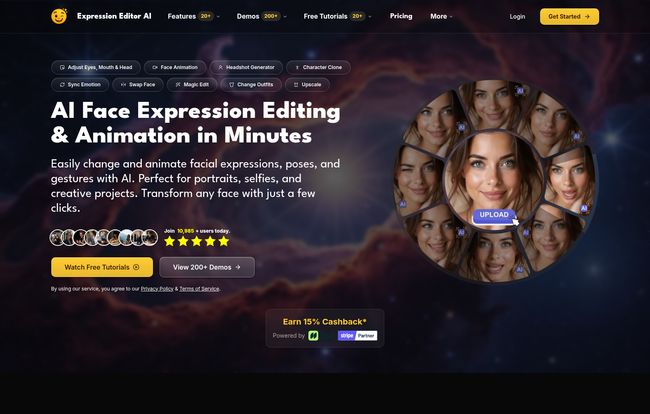
In a nutshell, Expression Editor AI is a platform that uses artificial intelligence to give you an insane amount of control over faces in your photos and even short videos. Think of it less like a filter and more like having a digital puppet master for portraits. You can subtly tweak a smile, change the direction of a person’s gaze, open their eyes, and even animate the whole thing. It’s designed for anyone who works with pictures of people—photographers, marketers, social media managers, digital artists, you name it.
For me, the appeal is obvious. Creating unique, high-quality images is a huge part of good SEO and content strategy. Stock photos are fine, but they’re generic. This tool lets you take your own photos and perfect them, or even generate entirely new headshots, without needing a degree in graphic design.
The Features That Actually Impressed Me
I’ve clicked through a hundred AI tools with flashy feature lists. Most are just fluff. Here’s the stuff in Expression Editor AI that genuinely made me stop and go, “Okay, that’s cool.”
More Than Just a Smile: The Expression Controls
This is the core of the platform. You can upload a portrait and just… start directing. You have sliders for everything. Want a slightly happier expression? Nudge the ‘Joy’ slider. Need a more pensive look? Go for it. The really impressive part is how it handles the small things, like eye controls. You can make someone look left, right, up, or down. You can even make their eyes more or less open. It’s a lifesaver for those shots where the subject blinked or wasn’t quite looking at the camera. It’s incredibly nuanced, and the results don’t scream “AI WAS HERE” which is my biggest pet peeve.
Bring Your Photos to Life with Animation
Okay, this is where it starts to feel a bit like magic. You can take a static photo and animate it. Make the person slowly smile, blink, or turn their head. The videos are short (5-10 seconds depending on your plan), but for social media content like Instagram Stories or dynamic web banners? It’s gold. Imagine a team page on a website where each person’s headshot subtly comes to life when you hover over it. It’s a small touch, but it’s the kind of thing that makes a site feel premium.
The ‘Magic’ Edits: Swaps, Clones, and Full-On Changes
This is the wild stuff. The platform includes a whole suite of powerful editing features that go way beyond expressions.
- Face Swap & Clothes Swap: Yep, it does exactly what it says. You can swap faces between photos or even change a person’s outfit from a t-shirt to a suit. I’ve found this is most effective for marketing materials where you need to quickly create variations of an ad without a full reshoot.
- Magic Edit & Erase: This is their version of a content-aware fill. You can brush over an object you dont want—a stray hair, a photobomber, a logo on a shirt—and the AI will remove it and fill in the background. It works surprisingly well.
- Face Clone: This is an interesting one. It’s part of their ‘Replicate’ feature set, allowing you to generate new images of a person in different styles or settings while keeping their facial identity. It’s like having a digital twin for your creative projects.
Visit Expression Editor AI
Let’s Talk Money: The Pricing Breakdown
Alright, the all-important question: what’s this going to cost? Expression Editor AI runs on a subscription model that gives you a monthly allowance of credits. Every action, like generating an expression or animating a face, costs a certain number of credits. It’s a pretty common model for AI services these days.
Right now, they’re running a Mid-Year Sale, which makes the entry point pretty attractive. Keep in mind these prices might not last forever.
| Plan | Sale Price | Key Features |
|---|---|---|
| Creator | $4.99 /month (Normally $9.99) | 500 Credits/month, Core Features, 2x Upscale, 5s 720p Video Animation. |
| Pro | $14.99 /month (Normally $29.99) | 1,500 Credits/month, Unlimited Presets, 4x Upscale, 10s 1080p Video Animation, Advanced Controls. |
The Creator plan is plenty for casual users or someone who just needs to fix a few photos a month. If you’re a professional content creator, agency, or photographer who will be using this daily, the Pro plan’s higher credit limit and better output quality (especially for video) is probably the way to go.
My Honest Take: The Good and The Not-So-Good
No tool is perfect. After playing around with Expression Editor AI for a while, here’s my unfiltered opinion. The biggest advantage is the sheer creative freedom it gives you. The ability to salvage a technically perfect photo ruined by a bad expression is, frankly, a game-changer. It saves time and potentially saves you from having to do an entire reshoot. The interface is clean and pretty intuitive, which is a huge plus. You dont need to be a tech wizard to get good results.
On the flip side, the credit system is something to be aware of. If you’re not careful, you can burn through your credits pretty quickly just experimenting. It forces you to be a bit more deliberate with your edits. And naturally, some of the most powerful features—like the higher-quality animation and unlimited presets—are locked behind the more expensive Pro plan. That’s standard business, but still something to consider if your budget is tight.
So, is Expression Editor AI Worth It?
The bottom line is… yeah, I think it is. For the right person, at least.
If you’re a photographer who constantly battles with getting the ‘perfect’ expression from clients, this is a no-brainer. If you’re a social media manager trying to create more engaging visual content, the animation features alone could be worth the price of admission. It bridges a gap between static, boring images and complex, expensive video production.
It won’t replace a skilled photographer or a professional video editor, but it’s not trying to. It’s a powerful new tool in the creative arsenal. It empowers you to fix common problems and add a layer of polish and dynamism that was once incredibly difficult or expensive to achieve. With the current sale price, it’s a pretty low-risk way to see if it fits into your workflow. I’d say give it a shot.
Frequently Asked Questions
1. Is Expression Editor AI difficult to learn?
Honestly, no. If you’ve used any kind of photo editor before, you’ll feel right at home. The layout is straightforward with sliders and clear labels. They also have tutorials on their site to get you started.
2. How does the credit system work exactly?
You get a set number of credits each month with your subscription (500 for Creator, 1,500 for Pro). Each action, like changing an expression or generating an animation, costs a small number of credits. You can also buy more credits if you run out before your monthly renewal.
3. Can I use the images for commercial projects?
Generally, yes, the images you create and edit are yours to use. However, I always recommend checking the platform’s latest terms of service, especially regarding features like Face Swap, to ensure you’re in the clear for your specific use case.
4. Is the AI-generated output realistic?
For the most part, yes. The key is to make subtle changes. If you push the sliders to the absolute maximum, it can start to look artificial. But for small tweaks—fixing a blink, adding a slight smile—the results are impressively natural.
5. Will it work on any photo?
It works best on clear, front-facing or slightly angled portraits where the face is well-lit and not obscured. It might struggle with photos taken from extreme angles, in low light, or where the face is very small in the frame.


