
Categories: AI Short Video Generator, AI Tiktok Video Generator, AI Video Generator, AI Youtube Video Maker, Text to Video
FacelessVideos.ai Review: Your AI Video Sidekick?

We all know video is king. The algorithms on TikTok, Instagram, and YouTube absolutely feast on video content, especially Shorts. As an SEO guy, I’m constantly telling my clients, “You need to be doing video!” Then they look at me with that familiar panic in their eyes. The thought of setting up a camera, a mic, lights… and then actually being on camera? It’s a huge barrier. It’s what I like to call digital stage fright.
For years, the answer was… well, just suck it up and do it. Or hire someone expensive. But the game is changing, and fast. The rise of ‘faceless’ YouTube channels—think those history doc channels or a-s-m-r cooking with just hands—has proven you don’t need to show your face to get millions of views. But it still took time. Skill. Editing software.
Then a tool like FacelessVideos.ai lands on my desk. The promise is bold: “Create viral, faceless videos for your YouTube and TikTok accounts in seconds.” Seconds? That’s a big claim. So, naturally, I had to see if this thing was just another drop in the AI hype bucket or a genuinely useful tool for creators and marketers.
So, What Exactly is FacelessVideos.ai?
In a nutshell, FacelessVideos.ai is an AI-powered platform designed to do one thing and do it well: turn a simple text prompt into a short, engaging, faceless video. You’re not stitching clips together or fighting with a complicated timeline. You’re the director, and your script is a single line of text. You type in “The surprising history of coffee,” and the AI is supposed to act as your researcher, stock footage finder, editor, and narrator all at once.
It’s built for the fast-paced world of short-form content. We’re talking about the kind of stuff you’d see scrolling through TikTok or YouTube Shorts – quick, punchy, and designed to grab attention immediately. The goal here isn’t to create a cinematic masterpiece, it’s to get on the content creation treadmill and actually keep up.
How Does It Actually Work? (The 3-Step Magic Trick)
The beauty of the platform is its almost absurd simplicity. They’ve boiled it down to a three-step process that anyone, and I mean anyone, can follow.
- Write a prompt: This is your creative spark. You give the AI a brief description of the video topic.
- Generate video: You click the button and the AI elves get to work, pulling together visuals and creating the video.
- Publish: Once it’s done, you can push it right out to your accounts.
That’s it. It’s a process so streamlined it almost feels like it’s missing steps. But it isn’t. This reduction of friction is the entire point. It’s for the person who has ideas but not the time or technical skills to execute them traditionally.
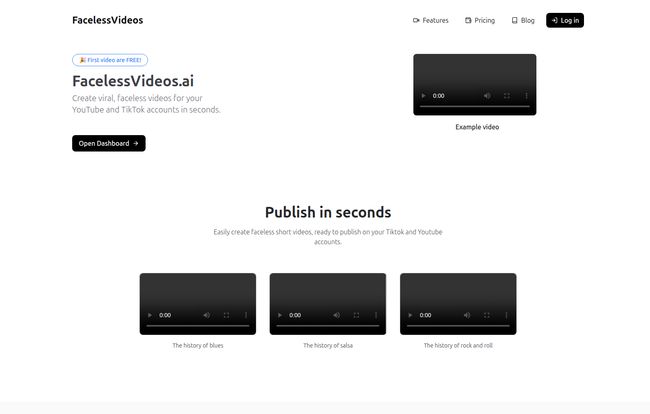
Visit FacelessVideos.AI
The Good, The Bad, and The AI-Generated
No tool is perfect, right? Especially in the wild west of AI. So let’s get into the nitty-gritty. After playing around with it, here’s my honest breakdown.
What I Really Like About It (The Upside)
The speed is genuinely impressive. Creating a short video in minutes instead of hours is a massive win for content velocity. If you want to test a dozen different topics to see what resonates with the TikTok algorithm, you can do that in an afternoon. That’s a powerful advantage.
The biggest draw, of course, is being camera-free. For introverts, people who want to maintain their privacy, or brands that don’t have a designated “face,” this is a godsend. It completely removes the biggest mental hurdle for so many would-be creators. Plus, all the plans come with unlimited storage, which is a small but very welcome detail for anyone who’s ever gotten that “cloud storage full” notification of doom.
Oh, and on their homepage, they have a little banner that says, “First video are FREE!” The grammar might be a bit off, but the offer is solid. It lets you dip your toe in the water without commitment.
Where It Might Stumble (A Reality Check)
Now for the other side of the coin. You are, by design, giving up a lot of control. The final product is entirely dependent on the AI’s interpretation of your prompt and its library of assets. The video quality is at the mercy of the machine. Some might argue that this leads to videos that feel a bit… generic. And they’re not wrong, sometimes. You can’t meticulously tweak every single transition or swap out a specific clip you don’t like.
This isn’t Adobe Premiere Pro. It’s a prompt-to-video tool. If you’re a perfectionist who needs to control every pixel, this might drive you a little crazy. You have to approach it with the right mindset: it’s a tool for rapid production, not bespoke artistry.
Let’s Talk Money: The FacelessVideos.ai Pricing Structure
The pricing is pretty straightforward, broken down into four tiers. It’s a classic SaaS model that scales with your output needs.
| Plan | Price/Month | Details |
|---|---|---|
| Starter | $19.99 | 15 videos/month, Unlimited storage |
| Daily | $29.99 | 30 videos/month, Unlimited storage |
| Pro | $49.99 | 75 videos/month, Unlimited storage |
| Advance | $99.99 | 200 videos/month, Unlimited storage |
In my opinion, the Starter plan is perfect for someone just experimenting. The Daily plan, at about a dollar a day, feels like the sweet spot for a serious solo creator aiming to post consistently. The higher tiers are clearly for agencies or businesses managing multiple accounts. The inclusion of a ‘cost per second’ metric is an interesting bit of transparency, though I think most people will focus on the number of videos per month.
Who Is This Tool Actually For?
I can see a few groups getting a ton of value from this.
- Niche Content Creators: Think about channels dedicated to history, science facts, philosophy quotes, or book summaries. This tool could be an absolute content machine for them.
- Affiliate Marketers: Need to quickly create dozens of short videos about different products? This is way faster than setting up a mini-studio for each one.
- Small Businesses: A local restaurant could create videos like “The history of the pizza” or “5 fun facts about pasta” to fill their social media calendar without hiring a videographer.
- SEOs and Traffic Generators: For people like me, this is a fantastic tool for experimentation. We can test video’s impact on traffic for various keywords without a huge upfront investment in time or resources.
Also Read: Klipme Review: AI Video Editing Made Easy?
My Final Take: Is FacelessVideos.ai Worth the Hype?
So, here’s the bottom line. FacelessVideos.ai is not a magic wand that will instantly make you a viral sensation. No tool can promise that. What it is, is an incredibly effective AI co-pilot that demolishes the biggest barriers to video creation: time, technical skill, and camera shyness.
It’s a specialized tool for a specialized job. If you need to produce simple, informative, faceless short-form videos at scale, I think it’s absolutely worth a look. It democratizes a corner of the content world that, until recently, was still out of reach for many. It won’t replace a creative human editor, but it was never meant to. It’s meant to get your ideas out of your head and onto the screen. And it does that very, very well.
Frequently Asked Questions
- Is there a free trial for FacelessVideos.ai?
- Yes, you can create your first video for free to test out the platform and see if it works for you before committing to a paid plan.
- Do I need any video editing experience to use it?
- Absolutely not. The entire platform is built around a simple text prompt system. If you can write a sentence, you can create a video.
- What kind of content is this best for?
- It’s ideal for educational, informational, or listicle-style short videos. Think topics like history, science facts, quick tips, or trivia for platforms like YouTube Shorts and TikTok.
- Can I customize the videos with my own branding or voiceover?
- The platform is designed for simplicity and speed, so advanced customization options like adding your own specific voiceover files or complex branding overlays might be limited. Its main function is generating the complete video from a prompt.
- How long are the videos it creates?
- The tool is optimized for short-form content, perfect for the under-60-second format that performs best on TikTok and YouTube Shorts.


