
Categories: AI Face Recognition, AI Image Recognition, AI Search Engine
FaceSearch AI Review: My Take on This Face Search Engine

Ever get that weird, prickly feeling on the back of your neck? The one that whispers, “I wonder where that old profile picture from 2012 ended up?
Yeah, me too. In our line of work, we talk a lot about keywords, traffic, and SERP rankings, but we often forget about our most personal data point: our face.
For years, the internet has been the Wild West for our images. Once a photo is out there, it feels like it’s gone for good, scattered across a thousand servers, forums, and sketchy websites. Trying to track them down has always felt like an impossible task. So when I heard about a tool called FaceSearch AI, which bills itself as an advanced face recognition search engine, my curiosity was definitely piqued. Another tool promising to wrangle our digital ghosts? I’ve seen a few. But this one felt a little different. So, I did what any self-respecting, slightly paranoid digital marketer would do: I spent a few weeks kicking the tires.
So, What Exactly is FaceSearch AI?
Let’s cut through the jargon. At its core, FaceSearch AI is a reverse image search engine, but specifically for faces. You give it a picture of a person, and its AI-powered engine scours the web to find where that same or a very similar face appears. Think of it like Google Images, but instead of finding pictures of cats, it’s finding pictures of… well, you.
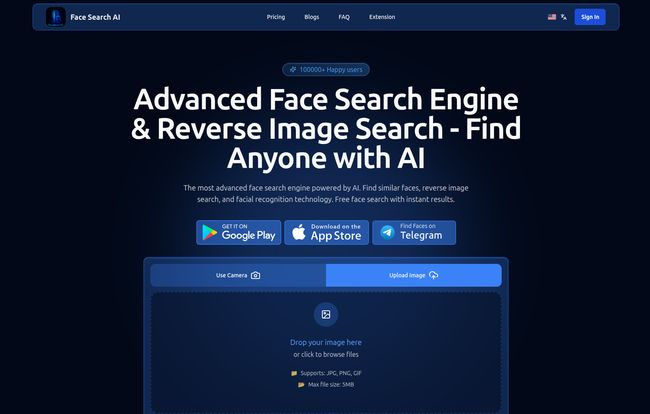
Visit FaceSearch AI
It’s not just about vanity searches, though. This is a tool built for what I call digital self-defense. It’s for content creators who want to see if their images are being stolen, professionals managing their online reputation, or frankly, anyone who wants a little more control over their digital identity. It’s a direct competitor to tools like Pimeyes, but it seems to be putting a heavy emphasis on privacy and a user-friendly experience, which is a big plus in my book.
Why Your Digital Photo Footprint Is a Bigger Deal Than You Think
We obsess over our personal brand, right? We curate our LinkedIn, polish our bios, and carefully select the content we share. But an unauthorized photo on a weird blog or a forum can undo all that hard work. It’s not just about embarrassing party pics from a decade ago. It’s about:
- Copyright Protection: For photographers and creators, this is huge. Finding where your work is being used without permission is the first step to getting it taken down or getting paid.
- Preventing Catfishing and Scams: Your face could be the front for someone else’s fake profile. It happens more often than you’d think.
- Reputation Management: Knowing what’s out there allows you to control the narrative. An old photo on an outdated staff page can cause confusion.
Your online presence is a chaotic, sprawling mural, and tools like this are the first real chance we have to step back and actually see the whole picture. It’s about taking back a sliver of control.
Putting FaceSearch AI Through Its Paces: My Experience
Alright, let’s get to the good stuff. Signing up was straightforward. The interface is clean, dark-themed, and doesn’t bombard you with a million options. It’s refreshingly simple: upload a photo, and let it cook.
I started with a clear, well-lit headshot of myself. The results came back… fast. I’m talking seconds. It pulled up my profiles on various social media sites, mentions in articles I’d written, and even a thumbnail from a webinar I’d forgotten I participated in. The accuracy was impressive. It correctly identified me even in group shots where my face was smaller and slightly angled.
The AI and Its Magic
The AI-powered facial recognition here is no joke. It’s not just matching pixels; it’s doing proper biometric analysis. It can account for different lighting, minor changes in facial hair, and even glasses. However, and this is important, the quality of your source image matters. A blurry, low-res photo from a dimly lit bar isn’t going to give you great results. Garbage in, garbage out—that old chestnut holds true here.
A Focus on Privacy
One of the first things I look for in any tool that handles personal data is its privacy policy. FaceSearch AI claims to have strong data protection protocols. They state they dont save the photos you search with, which is a massive relief. In an age of constant data breaches, knowing your search history (especially one this personal) isn’t being stored and sold is a fundamental requirement for me. This privacy-first stance is a major selling point, especially for those wary of similar platforms.
Breaking Down the FaceSearch AI Pricing
Okay, let’s talk turkey. The tool isn’t free, and for something this powerful, it shouldn’t be. The costs are broken down into three main subscription tiers. I’ve found that the tiers make sense for different types of users, from the casually curious to the power user.
| Plan | Price | Who It’s For |
|---|---|---|
| Basic | $7.77 / month | Perfect for a quick look. You get 10 searches (credits) a month. It’s enough to check up on your main profile picture and satisfy your initial curiosity. |
| Premium | $14.20 / month | This feels like the sweet spot for most regular users. 150 credits give you a lot more freedom to search different photos, and it unlocks PDF downloads of your results. |
| Professional | $19.95 / month | This is for the pros. 500 credits, deep search capabilities, and background check features. If you’re a journalist, private investigator, or a creator actively policing your content, this is your plan. |
My take? The Premium plan offers the best bang for your buck for the average person who’s serious about monitoring their digital presence.
The Not-So-Perfect Stuff
No tool is perfect, and it would be dishonest to pretend otherwise. My main gripe is that the core functionality is locked behind a subscription. While I understand the reasoning—running these AI models is expensive—a limited free trial would be a nice touch to let people see the power for themselves before committing. Also, the number of search credits on the Basic plan is a bit tight. Ten searches can be used up pretty quickly if you’re doing a thorough audit.
But are these deal-breakers? For me, no. The value I get from the peace of mind and control outweighs the monthly cost. It’s an investment in my own digital security.
Final Thoughts: Is FaceSearch AI Worth It?
After spending some quality time with FaceSearch AI, I’m genuinely impressed. It’s a powerful, fast, and surprisingly user-friendly tool that does exactly what it says on the tin. It gives you a fighting chance to see and manage your own digital footprint.
Is it a little unsettling to see how effectively an AI can find you online? Absolutely. But I’d rather have that power in my own hands than be blissfully unaware of where my likeness is floating around. It’s a pragmatic solution for a modern problem. If you care about your online privacy and reputation, giving FaceSearch AI a spin is, in my professional opinion, a no-brainer.
Frequently Asked Questions
1. How does FaceSearch AI actually find the images?
It uses sophisticated AI algorithms to perform a biometric scan of the photo you upload. It then compares these unique facial data points against a massive, constantly updated database of images from public websites across the internet to find matches.
2. Is uploading my photo to FaceSearch AI safe?
According to their privacy policy, yes. They claim they do not save the photos you search with or your search history. This is a critical feature that differentiates it from some other services and is designed to protect user privacy.
3. What kind of photo gives the best results?
For the best accuracy, use a clear, high-resolution photo where the face is looking forward and is well-lit. Avoid photos with sunglasses, heavy shadows, or where the face is very small or blurry.
4. Can I use it to find someone else?
Technically, yes. The tool searches for the face in the photo you provide. However, you should always be mindful of privacy and ethical considerations. It’s primarily designed as a tool for protecting your own image and identity.
5. What’s the difference between the search credits in different plans?
One credit equals one search. The Basic plan gives you 10 searches per month, the Premium plan provides 150, and the Professional plan offers 500. The more credits you have, the more photos you can search for and the more comprehensive your personal audit can be.
6. Is FaceSearch AI better than Pimeyes?
“Better” is subjective. FaceSearch AI positions itself as a strong Pimeyes alternative with a heavy emphasis on a clean user interface and user privacy. Some users might prefer its straightforward approach and clear pricing, while others might be more familiar with Pimeyes. It often comes down to personal preference and which platform’s ethos you align with more.


