
Categories: AI Caption Generator, AI Hashtag, AI Image Generator, AI Instagram, AI Marketing, AI Social Media, AI Social Media Post Generator, AI Writing Assistants
Flick Review: Is This AI Social Tool Worth It?

Managing social media can feel like you’re a hamster on a wheel that’s on fire. You’re constantly running, churning out content, searching for the perfect hashtags, and trying to post when your audience is actually awake. It’s exhausting. For years, I’ve juggled a dozen different tools—one for scheduling, another for hashtag research (that was usually just a messy spreadsheet), and a notes app full of half-baked content ideas.
So when a tool like Flick comes along, waving its hands and promising to be an “all-in-one” platform powered by AI, my inner skeptic raises an eyebrow. We’ve heard these promises before, right? But my curiosity, and my desperate need for more hours in the day, got the better of me. I decided to take a proper look, to see if Flick could actually tame the social media beast or if it was just another shiny object.
What Exactly is Flick? (And Who Is It For?)
In a nutshell, Flick is a social media marketing platform that bundles the four things that cause the most headaches into one place: content creation (with AI), hashtag strategy, post scheduling, and analytics. It’s designed for the people in the trenches—the small business owners, the creators, the solopreneurs, and the marketers who are wearing way too many hats.
It’s not just about scheduling posts. The big hook here is the integration of AI to try and lighten the cognitive load of actually coming up with stuff to say. A noble goal, if you ask me.
Let’s Talk About the AI: Meet Iris
Okay, the AI. This is the feature that gets all the buzz. Flick calls its AI the “Social Media Assistant,” and its name is Iris. The idea is to have a little AI-powered brainstorming partner to help you get past that dreaded blinking cursor.
Visit Flick
Iris can help you in a few ways:
- Brainstorming Ideas: You can feed it a topic, and it’ll spit back a bunch of content ideas. This is probably its most powerful use. It’s great for breaking through that initial “I have no idea what to post about” wall.
- Writing Content: It can take one of those ideas and draft a full caption for you. Now, here’s my professional two cents: never just copy and paste what an AI writes. It’s a starting point. A great one, sometimes! But you have to inject your own voice, your own stories, your own brand personality. Otherwise, you’ll sound like a friendly, helpful robot.
- Repurposing: This is a sneaky-good feature. It can help you reframe an old blog post into a LinkedIn article or a series of Instagram posts. That’s a massive time-saver for anyone practicing content marketing correctly.
Think of Iris less as a creative director and more as a really eager junior assistant. It gets the ball rolling, but you still need to provide the final polish and strategic direction.
The Hashtag Tools: Your Secret Weapon for Reach?
Ah, hashtags. The bane of every Instagrammer’s existence. We all know we need them, but finding good ones that aren’t spammed to death or completely irrelevant is a chore. I’ve spent more time scrolling through competitor’s posts for hashtag ideas than I care to admit.
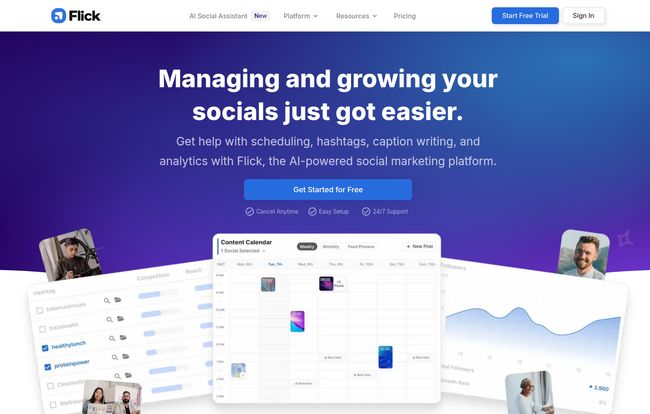
Flick’s hashtag tools are, frankly, one of its strongest selling points. It goes beyond just generating a list of 30 tags. It provides data—real, actionable data. You can see how competitive a hashtag is, its potential reach, and find related tags you might not have thought of. The platform encourages you to build collections of hashtags for different content pillars, which is just smart strategy. It’s about being intentional, not just throwing spaghetti at the wall.
Even better, their analytics (which we’ll get to) can actually track how well your chosen hashtags are performing. Are they bringing in new eyes? Or are they just taking up space? Finally, an answer.
Scheduling and Planning: Finally Getting Organized
A good scheduler is table stakes for any social media tool, and Flick’s is solid. It features a clean, visual content calendar that lets you see your week or month at a glance. You can schedule posts across Instagram, Facebook, TikTok, and LinkedIn. For me, seeing everything laid out visually is a game-changer for spotting content gaps and ensuring a good mix of posts.
One of the more helpful features is the “Best Times to Post” suggestion. It analyzes your specific audience’s activity to tell you when they’re most likely to be scrolling. While this feature isn’t unique to Flick, having it integrated directly into the scheduler, fed by your own account data, is incredibly convenient. It removes the guesswork and helps your hard work get seen.
What’s the Damage? A Look at Flick’s Pricing
Alright, the million-dollar question. Or, in this case, the £11-a-month question. Flick offers a few different plans, and they all come with a 7-day free trial, so you can poke around before committing. Let’s break it down in plain English.
| Plan | Price (Annual) | Best For | Key Features |
|---|---|---|---|
| Solo | £11 / month | Creators & Solopreneurs | 4 social profiles, 30 scheduled posts/month, Basic Hashtag Search. |
| Pro | £24 / month | Growing Businesses | Everything in Solo, plus unlimited posts, Advanced Hashtag tools, Repurposing, full Analytics. |
| Agency | £55 / month | Agencies & SMMs | Everything in Pro, but for 20 social profiles and more users. |
For my money, the Pro plan is the real sweet spot. The 30-post limit on the Solo plan feels a bit tight if you’re serious about daily posting across a few platforms. The unlimited scheduling and the advanced hashtag features in the Pro plan are what make Flick truly powerful. The Solo plan is a great way to start, but I suspect most growing businesses will want to upgrade pretty quickly.
The Good, The Bad, and The “It Depends”
No tool is perfect, so let’s get into the nitty-gritty. After using Flick, here’s my honest take.
The biggest positive is the all-in-one nature of the platform. Not having to jump between three different tabs to do my job is a genuine relief. The AI assistant is a fantastic cure for writer’s block, and the hashtag tools are some of the best I’ve used. They’re built for strategists, not just content stuffers.
On the flip side, if you’re a complete beginner to social media strategy, the amount of data and features might feel a tad overwhelming at first. There’s a learning curve, albeit a small one. Also, let’s be clear: the magic is in the paid plans. The free trial is essential, but the real power is unlocked when you subscribe. And my biggest caution remains with the AI—if you get lazy and just copy-paste its outputs, your brand’s unique voice will suffer. It’s a tool, not a replacement for a human.
So, is it worth it? I think so. If you’re a creator or marketer who values their time and headspace, Flick is a serious contender. It’s a force multiplier. It doesn’t do the work for you, but it makes the work you do smarter, faster, and more effective. It’s less about working harder and more about working with better intelligence.
“If you’re a content creator, business owner, or marketer, you need Flick in your life.”
– Josh Smith, Social Media Manager & Creator
It’s not a magic bullet, but it’s a damn good toolkit. It takes the most tedious parts of social media management and streamlines them, freeing you up to focus on the stuff that actually matters: creating authentic connections with your audience.
Frequently Asked Questions (FAQs)
- What platforms does Flick support for scheduling?
- Flick allows you to schedule content for Instagram, Facebook, TikTok, and LinkedIn. The most detailed analytics, however, are focused on Instagram.
- Is Flick officially approved by Instagram?
- Yes, Flick is an official Meta Business Partner, so you can connect your accounts with confidence. They use the official API, which is the secure and approved way to work with third-party tools.
- Can the AI really write my posts for me?
- It can draft them for you, and it’s a great starting point! But for the best results, you should always edit the AI-generated text to add your brand’s unique voice, tone, and personal stories.
- How good are the hashtag analytics?
- They’re very detailed on the Pro and Agency plans. You can track metrics like which hashtags led to the most reach or engagement on your posts, helping you refine your strategy over time.
- Is there a free trial for Flick?
- Yep! All of Flick’s paid plans come with a 7-day free trial. You can test out all the features of a specific plan to see if it’s the right fit for you before you pay anything.
- Which Flick plan is the best value?
- In my opinion, the Pro plan offers the best value for most users. The unlimited scheduling and access to the advanced hashtag and analytics tools are what make the platform truly powerful for growing a social media presence.


