
Categories: AI Models, AI Short Video Generator, Image to Video, Text to Video
Fllow.ai Review: Is This the Best AI Video Generator?

The world of AI video generation is a bit of a mess right now. We’re all seeing these mind-blowing demos from places like OpenAI’s Sora, and we’re getting excited. We’re picturing ourselves creating cinematic masterpieces with a few keystrokes. Then reality hits. We sign up for a tool, and we’re met with crazy high monthly fees, bizarre content restrictions that won’t even let you generate a video of a person smiling too widely, and results that look… well, like they were made by a drunk robot.
I’ve been in the SEO and content game for years, and I’ve watched this cycle repeat with every new tech trend. So, naturally, I was skeptical when I stumbled upon Fllow.ai. The name itself is a little on the nose, right? But something about its promise felt different. It wasn’t screaming about being the “ultimate solution.” Instead, it seemed to be quietly offering professionals exactly what they’ve been asking for: control, flexibility, and quality. So, I decided to take a look.
So, What on Earth is Fllow.ai?
In a nutshell, Fllow.ai isn’t just another AI video generator. It’s more like a master command center for a whole suite of them. Instead of building their own single, proprietary model and forcing you to use it for everything, they’ve integrated a bunch of the best-in-class AI video models from around the world. Think of it less like a single instrument and more like a full recording studio.
You can generate video from a simple text prompt (“a cinematic shot of a lone astronaut walking on a neon-lit Mars”) or from a still image, bringing your static pictures to life. The whole platform is built for people who are serious about creation and tired of the one-size-fits-all approach that most other tools take.
The Secret Sauce: A Whole Toolbox of AI Models
This multi-model approach is, in my opinion, Fllow.ai’s killer feature. If you’ve ever tried to get a specific look from an AI image generator, you know the pain. One model is great at photorealism, another excels at anime styles, and a third is perfect for abstract art. It’s the same with video.
Why You Need More Than One AI Brain
Relying on a single AI model is like being a carpenter with only a hammer. Sure, you can build something, but you’re going to have a hell of a time cutting wood or driving screws. Fllow.ai gives you the whole toolbox. You can pick and choose the model that best fits the specific shot you’re trying to create. Need a hyper-realistic, slow-motion clip? There’s a model for that. Want a fast-paced, stylized animation? There’s a different model for that. This flexibility is a game-changer for anyone doing client work or building a project with a specific aesthetic.
Meet the Crew: From WanX to Kling
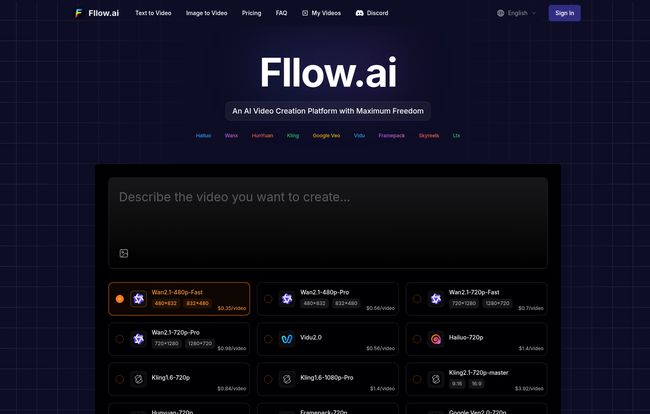
When you look at the Fllow.ai dashboard, you see a roster of names that might be familiar if you’re deep in the AI space: WanX, Hailuo, Kling, HunYuan, and others. For most people, these are just names. But what it means in practice is that you’re getting access to the technology developed by giants like Tencent and Kuaishou, all in one place. Each has its own strengths in terms of resolution, max duration, and artistic style. You can see the cost-per-second for each one, so you’re always in control of your budget.
Unchained Creativity: Finally, an AI Tool That Trusts You
Okay, let’s talk about the elephant in the room: content filters. Most AI platforms are terrified of what users might create. This has led to frustratingly strict, and often nonsensical, restrictions. I’ve been blocked for trying to create a historical battle scene because it was too “violent,” or a simple marketing video because the AI mistook a logo for something else. It stifles creativity.
Fllow.ai takes a radically different stance. Many of their integrated models are listed with “No Restriction.” This means what it sounds like. They give you the creative freedom to generate what you envision, without an overzealous nanny AI looking over your shoulder. Of course, some models have “Medium Restriction,” but the transparency is what’s key. You know exactly what you’re working with before you spend a single credit. For artists, filmmakers, and even edgy marketers, this is a breath of fresh, unrestricted air.
Putting Your Wallet Away: The Problem with Subscriptions
I have what I call ‘SaaS fatigue’. It’s the exhaustion that comes from juggling a dozen different monthly subscriptions for tools I might only use a few times a month. It feels like throwing money away. This is where Fllow.ai really won me over.
How Fllow.ai’s Pay-As-You-Go Pricing Works
They don’t have a mandatory monthly subscription. It’s a simple, pay-as-you-go system based on credits. You buy a pack of credits, and you use them when you need them. The best part? The credits never expire. Let that sink in. You can buy a pack today and use it six months from now. This is incredibly fair and respects the fluctuating workflow of a creative professional.
Here’s a quick look at their plans:
- $15 Plan: Gets you 1,500 credits.
- $29 Plan: Their most popular, gives you 2,900 credits.
- $90 Plan: For heavy users, this one nets you 9,000 credits.
All plans give you access to all the models, text-to-video, image-to-video, and a full commercial license for anything you generate. No hidden fees, no tiers, no nonsense. It’s just simple, transparent pricing.
A Look Under the Hood: The Fllow.ai Dashboard
For a tool this powerful, the interface is surprisingly clean and intuitive. You’re greeted with a straightforward prompt box where you type your vision. Below that, you have simple controls for aspect ratio (from cinematic widescreen to vertical for social media), the number of videos to generate at once, and a field for a ‘seed’ number if you want to reproduce a specific result.
There’s also a crucial ‘Negative Prompt’ box. This is where you tell the AI what you don’t want to see, which is just as important for refining your output. Then you just browse the list of available models, see their specs and costs, and click ‘Generate.’ It’s all right there, no digging through confusing menus. It feels like it was designed by people who actually use these kinds of tools.
Visit Fllow.ai
Is This Tool for You? The Ideal Fllow.ai User
So, who should be rushing to sign up? I don’t think Fllow.ai is for my grandma who wants to make a video of her cat. It’s a professional-grade platform. I see it being a perfect fit for:
- Digital Marketers and Advertisers: Need to pump out unique, high-quality video ads for different platforms and A/B tests? This is your workhorse.
- Independent Filmmakers and Artists: Want to create stunning concept art, storyboards, or even final shots without a Hollywood budget? The creative freedom and quality here are unmatched.
- Content Creators and YouTubers: Need b-roll footage that no one else has? Or want to create animated segments for your videos? This is a goldmine.
- Creative Agencies: A single Fllow.ai account can serve an entire team, providing a flexible and cost-effective tool for various client projects.
If you’re someone who values control, quality, and fair pricing over a simplistic, dumbed-down experience, you’re the target audience.
The Fine Print: Are There Any Downsides?
No tool is perfect, and it would be dishonest to say Fllow.ai has no flaws. The main ‘con’ is that the technical capabilities, like maximum video duration and resolution, vary between the different models. One model might only do 4-second clips, while another can go up to 16 seconds. This isn’t really a flaw in the platform itself, but a reality of the current state of AI technology. You just have to be mindful and choose the right model for your needs. Also, yes, you have to create an account to use it. But honestly, in 2024, that’s barely worth mentioning.
Fllow.ai FAQs
- Is Fllow.ai good for absolute beginners?
- It’s user-friendly, but its real power is in the hands of someone with a clear creative vision. A beginner can definitely use it, but a pro will get more out of the multi-model system.
- Can I really use the videos for commercial projects?
- Yes. All the plans come with a full commercial license. You can use the videos you create for ads, social media, client work, whatever you want, without worrying about extra licensing fees.
- Do the credits really never expire?
- That’s right. It’s one of their biggest selling points. Buy them now, use them next year. It’s a wonderfully fair model that more companies should adopt.
- What’s the difference between all the AI models?
- They differ in style, speed, cost, resolution, and how long the videos can be. Some are better for realistic scenes, others for animation. The best way to learn is to experiment and see which ones you like for different tasks.
- How does Fllow.ai compare to something like OpenAI’s Sora?
- Sora is currently a non-public research model with incredible capabilities. Fllow.ai is a tool that is available to the public right now. It leverages the best publicly available models, giving you immediate access to professional-grade video generation without the waitlist or hype.
My Final Verdict on Fllow.ai
After sifting through so many over-hyped and under-delivering AI video platforms, Fllow.ai feels like a serious tool for serious creators. It’s not trying to be a magic button. Instead, its a powerful, flexible platform that respects its users’ creativity, intelligence, and wallet.
The combination of multi-model integration, genuine creative freedom, and a pricing model that doesn’t lock you into a costly subscription is a winning formula. It’s the kind of tool that I can see becoming an indispensable part of my workflow. If you’ve been disappointed by the AI video generators you’ve tried so far, I genuinely think you should give Fllow.ai a look. It might just restore your faith in the whole idea.
Reference and Sources
- Fllow.ai Official Website
- TechCrunch article on Kling AI, one of the models featured on Fllow.ai.


