
Categories: AI Assistant, AI Note Taker, AI Task Management, AI Voice Assistants
Flowtica Review: An AI Voice Assistant for Your Brain?

My digital life is a mess. My notes app is a dumpster fire of half-baked ideas, screenshots of things I meant to buy, and random strings of text I don’t even remember typing. My to-do list is a source of anxiety, not action. For years, we’ve been promised that AI would be our savior, the digital butler that would neatly organize the chaos of our minds. And for years, most of what we’ve gotten are clunky voice assistants that misunderstand us and transcription tools that spit out generic, soulless bullet points.
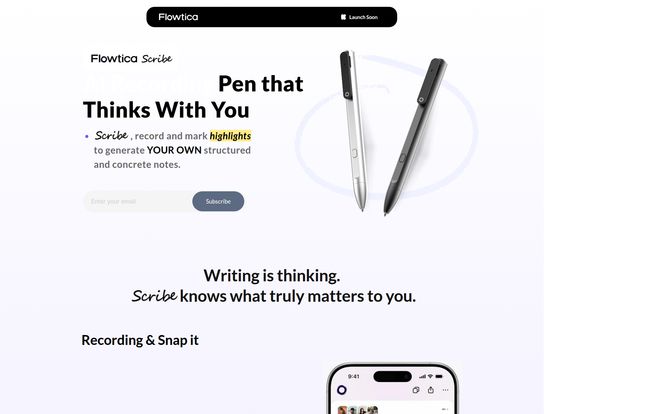
So when I stumbled upon Flowtica, I was skeptical. Another app promising to be an “all-in-one workspace”? Bold claim. But then I saw their tagline: “Writing is thinking. Scribe knows what truly matters to you.” Okay, you have my attention. It seems to be taking a direct shot at the very problem I have: most tools capture the words, but not the intent. They don’t get the thinking behind the notes.
So, What Exactly is Flowtica?
At its core, Flowtica presents itself as an AI voice assistant designed to be your second brain. But not just a passive storage unit. This is meant to be an active participant in organizing your work and life. You talk, you snap photos, you jot down notes, and Flowtica’s AI works in the background to connect the dots. It’s built for capturing those fleeting thoughts you have while walking the dog or the key action items from a meeting while you’re still in the room.
What’s really interesting is its current status. You can’t just go and buy it. There’s a “Super Early Bird” offer and a “Join Waitlist” button. This tells me it’s new, it’s fresh, and they’re probably building a community of founding users. I kind of like that. It feels less like a faceless corporation and more like a tool being built with actual user feedback. It’s a bit of a gamble, but sometimes the biggest gambles have the best payoffs.
The Core Features That Caught My Eye
Alright, let’s get into the nitty-gritty. What does it actually do? I’ve been digging through their site and the information I could find, and a few things really stand out.
Speaking Your Mind with Natural Voice Input
I think out loud. A lot. The ability to just speak naturally and have an app capture my to-dos, ideas, or meeting notes is huge. No more fumbling with the tiny on-screen keyboard while trying to cross the street. Flowtica is built around voice input. And they even support multiple languages, which is a big plus for global teams or just anyone who is bilingual. It feels like it’s built for how humans actually operate, not how we’ve been forced to operate by technology.
The Magic of Automated ‘FlowTags’
Now this, this might be the secret sauce. Flowtica uses something they call “FlowTags” to automatically organize your information. This isn’t your standard, manual tagging system where you have to remember your own complex web of labels. The idea is that the AI understands the context of your note and tags it for you. Did you mention a deadline? It gets tagged as a to-do. Did you talk about a new project idea with a specific person? It gets categorized appropriately.
Think of it like having a personal archivist living in your pocket. You just throw information at it, and it sorts, files, and cross-references everything without you lifting a finger. I will say, the official info mentions a potential learning curve to get the most out of FlowTags. That’s fair. Any powerful system requires a bit of know-how. I’m willing to invest some time if it means an end to my chaotic digital notes.
Finding That Needle in the Haystack
What good is capturing information if you can never find it again? We’ve all been there—frantically searching through emails, documents and old notes for that one thing someone said three weeks ago. Flowtica claims to offer instant information retrieval using keywords, timestamps, and even context. That last part is key. Being able to search for “that idea I had last Tuesday during my morning walk” is the holy grail of Personal Knowledge Management (PKM).
Your Brain, Synced Everywhere
This is a non-negotiable for me. A tool has to work across all my devices. Flowtica syncs across iOS and the Web, with more platforms to come. This means I can capture a thought on my iPhone while I’m out, and then flesh it out on my laptop when I’m back at my desk. It’s a simple feature on paper, but so many apps get it wrong. A seamless sync is the backbone of any good productivity system.
Going Beyond Basic AI Summaries
Okay, I have to dedicate a whole section to this because it’s a major pet peeve of mine. I’ve used AI meeting summarizers that are, for lack of a better word, dumb. They create a list of keywords and pull out sentences that sound important, but they completely miss the nuance of the conversation. It’s like a bad movie summary that tells you the characters’ names but misses the entire plot.
Visit Flowtica
Flowtica seems to get this frustration. They literally say on their site, “We built it for anyone tired of summaries that completely miss the point.” Yes! Thank you! Their product, Flowtica Scribe, is designed to be different. It’s not just about transcribing; it’s about understanding. It lets you create your own highlights and focuses on summarizing what you thought was important during the recording. This blend of AI power with human curation feels like the right approach. It’s not about replacing your brain; its about augmenting it.
A Realistic Look at The Good and The Not-So-Good
No tool is perfect, especially one that’s still in its early phases. Let’s get real for a second. Based on what I’ve seen, here’s my take.
On the one hand, the upsides are pretty compelling. The effortless voice commands, the promise of truly automated organization with FlowTags, the powerful search capabilities, and the cross-device sync make for a strong package. It’s designed to reduce friction and mental load, which is exactly what busy professionals need.
However, there are some potential drawbacks. The reliance on voice input might not be great for every situation. Trying to dictate notes in a loud coffee shop or a dead-quiet open-plan office isn’t always practical. And as I mentioned, there’s a learning curve to master the more advanced features. Most importantly, it’s a beta product. That means you should probably expect a few bugs or a bit of instability here and there. That’s the price of being an early adopter, you get to shape the future but you have to deal with the present.
What’s the Price Tag on This Brain Upgrade?
This is the million-dollar question, isn’t it? Well, right now, the answer is… we don’t know. Flowtica is playing this one close to the chest. The site is pushing a “Save More Than 50% For Super Early Bird Price” offer, which requires you to join a waitlist. This creates a bit of FOMO, for sure.
Out of curiosity, I went looking for a pricing page—the kind of deep-dive research I do for you all—and I actually hit a ‘Page not found’ error. This tells me they are genuinely in a pre-launch phase and the pricing structure just isn’t public yet. So, if you’re interested, your best bet is to get on that waitlist and lock in the potential discount. It costs nothing to look.
My Final Thoughts: Is Flowtica Worth the Hype?
So, what’s the verdict? I’m cautiously optimistic. I’ve seen a lot of tools make big promises, but Flowtica seems to be targeting a very real, very specific pain point: the gap between capturing information and actually using it.
It’s not just another note-taking app. It’s an ambitious attempt to create a private, searchable knowledge base that learns how you think. For anyone who considers themselves a ‘verbal processor’ or is deep into the world of PKM and building a second brain, Flowtica could be a game-changer. It’s taking on the goliaths of disorganization and forgetfulness with a smart, voice-first approach.
Will it succeed? Time will tell. But am I intrigued enough to join the waitlist myself? Absolutely. In the endless war against mental clutter, I’m always willing to try a new weapon.
Frequently Asked Questions about Flowtica
- What is Flowtica?
- Flowtica is an AI-powered voice assistant and all-in-one workspace designed to help you capture, organize, and retrieve information. It uses voice commands, photos, and notes to build a personal knowledge base.
- How does Flowtica organize my notes?
- It uses a proprietary feature called ‘FlowTags.’ This is an AI system that automatically analyzes the context of your notes and assigns relevant tags to organize them without manual effort.
- Is Flowtica a free tool?
- The final pricing for Flowtica hasn’t been released to the public yet. Currently, they are offering a “Super Early Bird” discount of over 50% for people who join their waitlist before the official launch.
- What devices does Flowtica work on?
- Flowtica syncs across multiple devices, including iOS for mobile use and a Web app for desktop or laptop access. They have indicated that more platforms will be supported in the future.
- How is Flowtica different from other note-taking apps?
- Its main differentiators are its voice-first interface, the AI-powered automatic organization via FlowTags, and a more intelligent approach to summarizing content that focuses on user intent rather than just generic keywords.


