
Categories: AI Image Generator, AI Image Upscaler, AI Inpainting, AI Realistic Image Generator, Image to Prompt, Text to Image
Flux AI Pro Review: My New Favorite AI Image Generator?

The world of AI image generation feels a bit like the Wild West right now, doesn’t it? Every week there’s a new gunslinger in town, promising to be faster, sharper, and smarter than the last. As someone who lives and breathes this stuff for a living—generating traffic, finding trends, and yes, creating countless images for blogs and ads—I’ve seen ’em all. I’ve been a loyal Midjourney user for ages, I’ve dabbled with DALL-E, and I’ve wrestled with Stable Diffusion on my own machine until the wee hours.
So when Flux AI Pro swaggered onto my screen, I was skeptical. Another one? Really? The homepage was splashy, full of gorgeous, almost ethereal artwork. But I’ve been burned by slick marketing before. What really caught my eye was the bold claim right at the top: “Exceptional prompt following.”
Anyone who’s spent more than ten minutes with an AI image tool knows that’s the holy grail. The number of times I’ve asked for “a Corgi wearing a tiny sombrero” and gotten a chihuahua in a fedora… it’s enough to make a grown man weep. So, I decided to put Flux AI Pro to the test. Is it just another flash in the pan, or is it the real deal?
What Exactly is Flux AI Pro? (And Why Should You Care?)
First off, this isn’t just another pretty interface slapped onto a generic Stable Diffusion model. Flux AI Pro is built on its own foundation: the FLUX AI models, specifically something they call FLUX.1. The promise is that this architecture is fundamentally designed for a better understanding of human language. It’s not just looking for keywords in your prompt; it’s trying to grasp the context, the relationship between the objects, the scene you’re trying to build.
For me, that’s everything. It’s the difference between a tool that’s a fun toy and one that’s a professional asset. It’s about reducing the time I spend re-rolling prompts and fighting the AI to get what’s in my head onto the screen.
First Impressions: The Good, The Great, and The Gorgeous
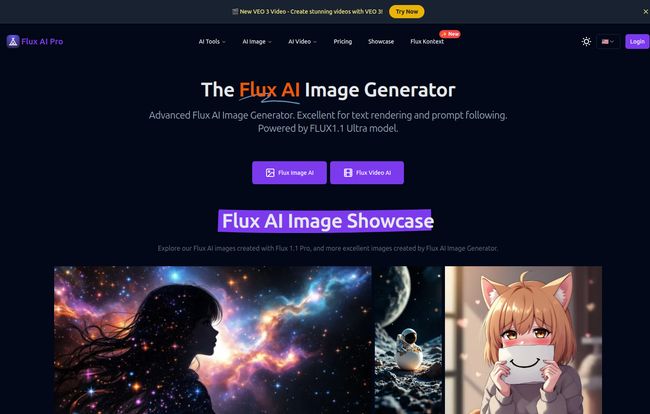
Signing up was simple, and they toss you 50 free credits to get started, which is always a nice touch. The user interface is clean, no major complaints there. It’s straightforward. But the community showcase… wow. That’s where they hook you.
The quality of the images is genuinely breathtaking. From hyper-realistic portraits to sprawling fantasy landscapes and slick anime characters, the versatility is immediately obvious. The results have a certain polish, a crispness that some other generators can lack, often producing images that feel a bit… muddy. Not here. The colors are vibrant, the lighting is dynamic, and the details are sharp.
Visit Flux AI Pro
But back to that golden promise: prompt adherence. I decided to throw it a few curveballs, prompts that other AIs have choked on. Things with complex prepositions and multiple subjects. I’m talking stuff like, “A photorealistic cat sitting under a glass table, as seen from above.” That kind of thing. And I have to say, it nailed it an impressive number of times. It’s like finally having a conversation with a creative partner who actually listens, instead of just nodding along and then painting whatever they felt like.
A Look Under the Hood: The FLUX Models
Flux AI doesn’t just give you one button; it gives you a few different models to play with, which I appreciate. The main ones are:
- FLUX.1 Pro: This seems to be the flagship, the big kahuna. It’s the one you use when you want the absolute best quality and the most precise prompt following. It costs more credits, naturally, but for final pieces, it’s the one.
- Schnell: This is German for fast, and that’s exactly what it is. It’s a speedier, cheaper model. Perfect for iterating on ideas quickly, trying out different compositions, and just messing around without burning through your precious credits. The quality is still very good, just not quite at the ‘Pro’ level.
- Dev: The name suggests this is a more experimental or technical model. I found it produced some really interesting and unique styles. It feels a bit wilder, a little less predictable, which can be fantastic for happy accidents and creative breakthroughs.
On their site, they have this comparison table where they rate their own FLUX.1 Pro against giants like Midjourney v6 and DALL-E 3. Now, of course, I take that with a grain of salt—it’s like asking a chef if their restaurant has the best food in town. But after using it, I can see where their confidence comes from. On ‘Prompt Adherence’ and ‘Quality’, they rate themselves ‘Outstanding’ and ‘Excellent’, and honestly… it’s not far from the truth. The gap is closing, folks.
Let’s Talk Money: The Flux AI Pro Pricing Puzzle
Alright, this is where things get a bit complicated. Flux AI Pro uses a credit-based system, which is a love-it-or-hate-it affair for most people. I’ve put together a simpler breakdown because their pricing page can be a little overwhelming at first glance.
You basically have two paths: monthly/yearly subscriptions or one-time credit packs. A huge plus for the commitment-phobes out there.
Subscriptions for the Regular Creator
If you’re going to be using this tool consistently, a subscription is probably the most cost-effective route. They’re billed yearly to get the best price.
| Plan | Price (Billed Yearly) | Monthly Credits | Best For |
|---|---|---|---|
| Basic | $4.89 /month | 1,200 | Hobbyists and light users |
| Pro | $12.24 /month | 4,000 | Serious users and professionals |
| Premium | $24.49 /month | 10,000 | Power users and small agencies |
The big catch with these plans? Monthly credits don’t roll over. It’s a classic “use it or lose it” scenario, which can be a bit of a pain if you have a slow month.
One-Time Purchases for Flexibility
This is where I think Flux AI Pro really shines for a lot of people. You can just buy a chunk of credits without any recurring payments. Perfect for project-based work or if you just want to test teh waters more extensively.
- Hobby Plan: $6.9 for 500 credits (valid for 1 month)
- Starter Plan: $12.9 for 1,200 credits (valid for 1 month)
- Pro Plan: $29.9 for 3,600 credits (valid for 3 months)
- Mega Plan: $69.90 for 10,000 credits (valid for 6 months)
I really like that the validity period extends with the bigger packs. It shows they understand that not everyone is churning out hundreds of images every single week.
Who is Flux AI Pro Actually For?
After spending some quality time with it, I have a pretty clear idea of who would love Flux AI Pro. Digital marketers, for sure. Being able to quickly generate high-quality, specific images for blog posts, social media, and ads is a game-changer. Content creators, graphic designers, and concept artists would also find that prompt adherence incredibly valuable.
Who might want to stick with their current tool? Probably the person who needs unlimited generations for a flat fee, like the basic Midjourney plan offers. If your workflow is based on generating thousands of variations at a low cost, the credit system here might feel restrictive.
Also Read: OHMYSYNT Review: AI Content on Your Terms
The Not-So-Perfect Parts (Because Nothing Is)
No review is complete without a bit of constructive criticism. My main gripe is the one I’ve already mentioned: the monthly subscription credits expiring. It just feels a bit punishing. I’d love to see them introduce rollover credits, even if it’s just for a month or two.
Also, some of the more advanced features, like priority support or advanced prompt optimization tools, are locked behind the more expensive plans. It’s a standard business practice, and honestly its a bit annoying but I get it. They have to create value tiers.
So, Is Flux AI Pro Worth Your Time and Credits?
My verdict? Yes. A resounding yes.
Flux AI Pro has carved out a real identity for itself in a crowded market by focusing on what matters most: turning your idea into the image you want with minimal fuss. The combination of stunning visual quality and best-in-class prompt following makes it a formidable tool. It feels less like gambling and more like directing.
While I might not be deleting my Midjourney account just yet (old habits die hard), Flux AI Pro has earned a permanent, prominent spot in my creative toolkit. For any project where I need precision and control, it’s going to be my first choice. With a free plan to get you started and flexible one-time purchase options, there’s literally no reason not to give it a spin.
Frequently Asked Questions about Flux AI Pro
- Can I use images from Flux AI Pro for my business?
- Yes! The paid plans and one-time purchases all come with a Commercial License, so you’re free to use the images you generate for your commercial projects.
- What’s the difference between the FLUX models?
- Think of it like this: FLUX.1 Pro is for final, high-quality images. Schnell is for fast brainstorming and drafts. Dev is for creative experimentation when you want something more unique or unexpected.
- Do I have to subscribe to use Flux AI Pro?
- Nope. That’s one of its big advantages. You can buy one-time credit packs if you don’t want a recurring monthly or yearly bill.
- How many images can I make with the free plan?
- The free plan gives you 50 credits, which are valid for one month. Depending on the model you use (Schnell is cheaper than Pro), this will get you around 50 quick generations or a smaller number of high-quality ones to test the platform.
- Is Flux AI Pro better than Midjourney?
- “Better” is subjective. If you value precise control and getting exactly what you ask for in a prompt, I’d argue that Flux AI Pro currently has an edge. If you prefer Midjourney’s specific aesthetic and enjoy its more interpretive, artistic style, you might prefer to stick with it. The best answer is to try both!
- What happens to my unused credits?
- For monthly subscriptions, unused credits expire at the end of the month and do not roll over. For one-time purchases, credits are valid for a longer period (e.g., 1 to 6 months), giving you more time to use them.


