
Categories: AI Image Generator, AI Style Transfer, Image to Image
FLUX Style Shaping Review: The AI Art Tool I Needed

Look, I get it. Another week, another ‘revolutionary’ AI tool hits the market. My inbox is practically a graveyard of launch announcements, each one promising to change the creative world forever. As someone who’s been neck-deep in SEO and traffic generation for years, I’ve seen these trends come and go. Most of them are just variations on a theme. So, when I first heard about FLUX Style Shaping, I’ll admit, I was skeptical.
But then I saw it in action. And I had to pause. This wasn’t just another text-to-image generator spitting out six-fingered hands. This felt… different. It felt like a tool built by someone who actually understands the creative process. Someone who knows that sometimes, the most frustrating part of AI art isn’t the idea, but getting the AI to respect your original composition.
So, What on Earth is FLUX Style Shaping?
Let’s break it down. Unlike tools like Midjourney where you’re essentially whispering wishes into the digital void with a text prompt, FLUX works on a three-part system: Structure + Style + Prompt.
Imagine you’re a director. You’ve already done the location scouting and blocked out the scene (that’s your Structure Image). You’ve hired a world-class cinematographer with a signature look, like Wes Anderson or Guillermo del Toro (that’s your Style Image). Then, you give them one final piece of direction to tie it all together, like “make it feel a bit more melancholy” (that’s your Text Prompt).
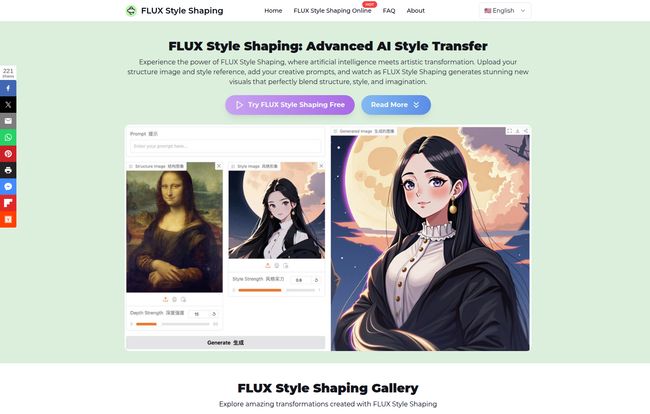
FLUX is the AI that takes all three of those inputs and merges them into a single, cohesive piece of art. It keeps the bones of your original image—the composition, the placement of objects, the overall form—while flawlessly applying the aesthetic of the style reference. And it does it all right in your browser. No installs, no wrestling with Discord bots, no need for a graphics card that costs more than my rent.
Visit FLUX Style Shaping
My First Brush with FLUX: A Quick and Dirty Test
Theory is great, but I’m a hands-on kind of guy. To see if it was legit, I put it to a simple test. I grabbed a boring stock photo of a modern living room—you know the kind, all grey and beige. For the style, I uploaded a piece of vaporwave art, full of neon pinks, purples, and that classic retro-futuristic vibe. My prompt was simple: “a lonely night in Miami, 1988, glowing neon signs outside the window.”
The process was stupidly simple:
- Upload the structure image (the living room).
- Upload the style image (the vaporwave art).
- Type in my prompt.
- Hit ‘Generate’.
Seconds later, I had my result. It was the same room. The couch was in the same spot, the lamp was on the same table. But it was transformed. The boring grey walls now had a purple hue, and a neon glow seemed to spill in from an unseen window. It wasn’t just a color filter; the tool understood the essence of vaporwave and applied it to my scene. I was genuinely impressed.
The Features That Actually Matter
Every tool lists a bunch of features, but which ones really make a difference? Here’s my take on FLUX’s core strengths.
More Than Just a Filter: The Intelligent Style Transfer
This is the magic right here. We’ve all seen those old apps that just slap a Van Gogh texture over your selfie. This isn’t that. FLUX seems to deconstruct the style image, understanding the brush strokes, color palette, and mood. It then reapplies those elements logically onto your structure image. You can see it in their own examples, turning the Mona Lisa into a slick anime character while preserving her iconic pose and enigmatic smile. It’s a much deeper level of artistic interpretation.
Keeping Your Composition Intact
For me, this is the killer feature. It’s called “Advanced Structure Preservation,” and it solves one of the biggest headaches in AI art generation. How many times have you prompted for “a knight standing on a hill overlooking a castle” only to get a castle standing on a knight overlooking a hill? FLUX’s reliance on a structure image first means you are in control of the composition. The AI’s job is to decorate the scene you’ve already set, not build it from scratch. This is a game-changer for concept artists, designers, and anyone with a specific vision in mind.
The Power of the Prompt
The text prompt is the final layer of creative control. It’s what stops this from being a simple two-image mashup. Adding prompts like “cyberpunk details,” “watercolor wash,” or “cinematic lighting” lets you nudge the final result in a specific direction. It’s the difference between a good result and a great one, allowing you to fine-tune the output until its perfect.
So, Who Is This Tool Really For?
Honestly? Pretty much any creative. I can see graphic designers using this to rapidly prototype concepts for clients. Indie game developers could use it to generate unique environmental textures or character portraits. Social media managers could create an endless stream of on-brand, eye-catching visuals without ever leaving their browser.
And of course, there are the hobbyists and artists. I saw a tweet from one user, Victor M, who was having a blast “combining the link to some famous painting with one of my sci-fi concepts.” That’s the fun of it! It’s a powerful creative sandbox.
The Elephant in the Room: Pricing and Limitations
No tool is perfect. Let’s talk about the catches. FLUX operates on a freemium model. The free version is fantastic for getting a feel for the tool, but you’ll run into standard resolution limits. If you’re a professional who needs high-quality output for print or large-format digital use, you’ll need to look at their premium options.
The website doesn’t display a clear pricing page at the moment, which is a minor annoyance. You typically have to sign up to see the tiers. Also, remember the old adage: garbage in, garbage out. The quality of your final image is heavily dependent on the quality of your input images. A blurry, low-contrast structure image won’t give you a sharp result. It’s a powerful assistant, not a miracle worker.
FLUX vs. The World: How Does it Stack Up?
For the real nerds out there, this process might sound a bit like Stable Diffusion with ControlNet. And you’re not wrong. ControlNet offers a similar level of structural control. However, the key difference is accessibility. Setting up ControlNet requires a local installation of Stable Diffusion, a powerful computer, and a fair bit of technical know-how.
FLUX takes that powerful concept and makes it as easy as uploading two photos to Facebook. It’s essentially ControlNet for the rest of us, wrapped in a clean, fast, browser-based interface. It trades some of the infinite tweakability of a local setup for sheer speed and convenience.
Frequently Asked Questions about FLUX Style Shaping
I’ve seen a few questions pop up, so let’s tackle them head-on.
What really makes FLUX different from other AI image tools?
It’s the combination of structure and style control. Instead of relying only on text, you provide a compositional blueprint (the structure image) which gives you far more predictable and controllable results.
Is FLUX Style Shaping actually free?
Yes, there’s a free version with all the essential features so you can try it out. However, for things like high-resolution downloads and probably faster processing or more concurrent jobs, you’ll need to upgrade to a premium plan.
What kind of images work best?
For your structure image, think clear and high-contrast. A clean line drawing or a photo with very defined shapes works wonders. For your style image, pick something with a strong, distinct aesthetic. An image that is too ‘busy’ or has a muddled style might confuse the AI.
Can I use the images I create for my business?
According to their site, commercial use is subject to their terms of service and proper licensing. This is standard practice. My advice? Always, always read the terms of service before using AI-generated assets in a commercial project.
What about the final image resolution?
The tool can handle and produce high-resolution images, which is great for professional work. But as mentioned, this is likely a premium feature. The free version will probably give you a resolution that’s perfect for web and social media, but not for a giant print.
My Final Verdict
So, is FLUX Style Shaping that revolutionary tool everyone claims to be? In a way, yes. It’s not a completely new invention, but it’s a brilliant and incredibly accessible execution of a powerful idea.
It successfully bridges the gap between artistic intent and AI generation, giving creators a level of control that’s often missing from purely prompt-based systems. It’s fast, its intuitive, and it’s genuinely fun to use. While the free version has its limits, it’s more than enough to show you the potential. I, for one, have already bookmarked it. It’s earned a spot in my digital toolkit.
Reference and Sources
- The official tool website: FLUX Style Shaping
- For a technical background on the underlying technology, you can read about Style Transfer in machine learning: TensorFlow’s Guide to Neural Style Transfer
- User testimonial cited from Victor M on X: Link to Tweet


