
Categories: AI Knowledge Management, AI Research Tool, AI Search Engine
Focal Review: An AI Research Tool That Actually Works?

Not the glamorous ‘eureka!’ moment, but the gritty, caffeine-fueled reality. The thirty-seven open browser tabs. The folder of PDFs with names like ‘final_draft_v2_new_FINAL.pdf’. The slow-burning panic when you can’t find that one specific statistic you read three days ago.
As someone who’s lived in the trenches of SEO, trend analysis, and content creation for years, I’ve seen my fair share of ‘game-changing’ tools. Most of them promise to solve all your problems but end up being just another subscription to manage. So, when I came across Focal, an AI platform designed for reading and research, my skepticism was, shall we say, well-honed. But after spending some time with it, I have to admit… they might be onto something.
This isn’t just another AI summarizer. It feels different. Let’s get into it.
What Even Is Focal? (And Why Should You Care?)
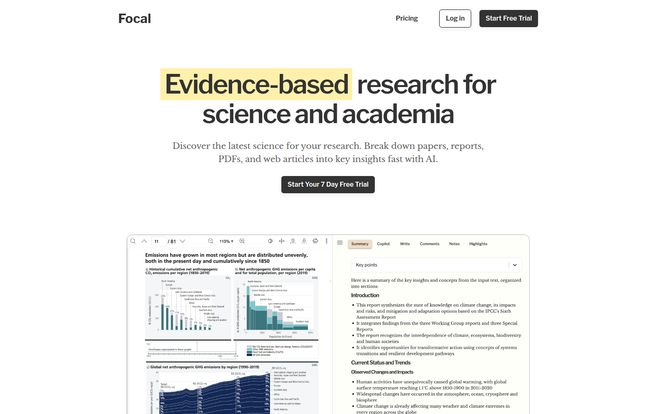
At its core, Focal is an AI-powered workspace designed to streamline the entire research process. Imagine you could dump all your source materials—web articles, dense academic papers, market reports—into one place. Now, imagine that place had a built-in research assistant who could read all of it in seconds, answer your specific questions, and even help you write your first draft. That’s the basic pitch for Focal.
It’s not just for academics in ivory towers, either. The platform is built for a whole range of professionals: finance wizards, legal eagles, health experts, and yes, even marketing folks like me who need to synthesize a ton of information quickly. It’s about turning a chaotic pile of information into a clear, usable knowledge base.
The Standout Features That Made Me Look Twice
A tool is only as good as its features, right? Here’s what caught my eye and made me think Focal is more than just hype.
Your Personal AI Research Assistant (The Copilot)
This is the main event. The Focal Copilot is the AI engine that powers the whole experience. It’s not like asking a generic chatbot a question and getting a vague, unsourced answer. When you ask the Copilot a question—say, “What is the main finding regarding AI in healthcare diagnostics?”—it doesn’t just give you an answer. It gives you a synthesized response and, crucially, cites the exact documents in your library where it found the information. You can click and go straight to the source.
For anyone who has ever spent an hour hunting down a citation, this feature alone is worth its weight in gold. It’s the difference between trust and uncertainty, and it’s what separates a professional tool from a toy.
Visit Focal AI
Taming the Citation Beast
I still have mild PTSD from my university days, trying to get my citations perfect in APA format. It’s a tedious, soul-crushing task that’s ripe for automation. Focal handles this beautifully. As it pulls information and helps you build your arguments, it can automatically generate citations in a bunch of different styles, including APA, MLA, Chicago, and more. This is a massive time-saver and anxiety-reducer. No more fiddling with commas and publication years at 2 AM.
A Distraction-Free Reading Sanctuary
Have you ever tried to read a serious article on a news site, only to be bombarded by pop-up ads, auto-playing videos, and a million other distractions? Focal lets you save web articles directly to your library, where it strips away all that clutter. What’s left is the clean, readable text. It’s like finding a quiet corner in a library during a loud music festival. It puts the focus back on the content, which is where it should be.
So, What’s the Catch? A Look at the Downsides
Look, no tool is perfect. And in the spirit of a truly honest review, we need to talk about the not-so-great stuff. First off, Focal is a desktop-only platform for now. If you’re someone who does a lot of reading and research on a tablet or phone, this might be a dealbreaker. Personally, I do my heavy-lifting research at my desk, so it doesn’t bother me much, but it’s a limitation you need to be aware of.
Second, there’s no truly free plan. They offer a 7-day free trial, which is great for getting a feel for the platform, but after that, you’ve got to open your wallet. I get it, quality tools cost money to build and maintain (especially with server costs for GDPR and SOC2 compliance), but the lack of a permanent, limited-feature free tier might turn some users away.
Focal Pricing: Is It Worth Your Coffee Money?
Alright, the all-important question: what does it cost? Focal has a tiered pricing structure that seems pretty reasonable, especially when you consider the time it can save you. They offer both monthly and yearly plans, with a nice discount if you pay annually.
| Plan | Yearly Price (Billed Annually) | Monthly Price | Best For |
|---|---|---|---|
| Student | $3 /month | $4 /month | Students with a valid .edu email, for lighter course loads. |
| Starter | $7 /month | $9 /month | Most individuals, freelance researchers, and professionals. |
| Pro | $17 /month | $29 /month | Power users, PhD candidates, and those needing the most powerful AI models (like GPT-4). |
| Business | $59 /month (for 5 seats) | N/A | Teams that need to collaborate securely on research projects. |
In my opinion, the Starter plan, especially the yearly option at $7/month, is the sweet spot. For less than the price of two fancy coffees, you get 2,000 pages per month and 300 AI answers, which is more than enough for most people’s needs. The Pro plan is for the real power users who need the absolute highest quality AI responses and are working with massive volumes of data.
Who is This For, Really?
After playing around with Focal, I can see a few groups getting a ton of value out of this.
- Students & Academics: This is a no-brainer. Conducting literature reviews, writing papers, and managing sources is what you do. Focal is practically built for you. The student pricing makes it very accessible.
- Content Marketers & SEOs: We need to digest a lot of information, from competitor analysis to industry reports, to create authoritative content. Using Focal to quickly analyze SERP results or research a topic in-depth could be a huge competitive advantage.
- Legal and Financial Professionals: These fields involve poring over dense, lengthy documents. The ability to quickly query a contract or financial report for specific clauses or data points could be a massive productivity boost.
Basically, if your job involves reading a lot of stuff and then having to be smart about that stuff, Focal is probably for you.
My Final, Honest Takeaway
So, is Focal the magic bullet that will solve all your research woes? No, of course not. You still have to do the critical thinking. But what it does, and does remarkably well, is remove the friction. It clears away the administrative gunk—the formatting, the searching, the organizing—so you can focus on the actual work of thinking and creating.
It’s a powerful AI research assistant that respects the source material. It’s a clean reading space in a cluttered digital world. And its a genuinely useful tool that feels like it was designed by people who actually understand the pains of research. While I wish it had a mobile app, its desktop performance is solid. If you’re on the fence, I’d say the 7-day free trial is a very low-risk way to see if it fits into your workflow. It just might be the research partner you’ve been looking for.
Frequently Asked Questions about Focal
Do they train their AI on my data?
This is a big one for privacy. According to their site, no. They use third-party AI models (like from OpenAI) but do not use your data for training. All your documents are stored on secure servers and are not shared.
Can I use Focal for free?
Not permanently. Focal offers a 7-day free trial that gives you access to the features to test them out. After the trial period, you will need to subscribe to one of their paid plans to continue using the service.
What kind of documents can I upload?
Currently, Focal primarily supports PDFs and saving web articles. You can build a pretty extensive library with just these two formats, as they cover most research materials you’d find online.
Is the student plan difficult to get?
It’s straightforward. The academic pricing is for users with a valid .edu email address. When you sign up with that email, you should be eligible for the discounted student rate.
What happens if I go over my page limit?
For the Pro and Business plans, there’s a small charge for additional pages (around $0.02 per page). For the Starter and Student plans, you’d likely need to wait until the next month’s reset or consider upgrading if you consistently need more pages.


