
Categories: AI Assistant, AI Chatbot, AI Mental Health, AI Productivity Tools, AI Task Management, AI Writing Assistants, Large Language Models (LLMs), Open Source AI Models
Focu App Review: A Mindful Take on Productivity

If your digital life is anything like mine, you’ve probably been through what I call the “Productivity App Gauntlet.” You know the drill. You download the latest, greatest to-do list app that promises to organize your life into color-coded, sub-tasked, synergistic bliss. You spend a weekend migrating everything over. For a week, you feel like a CEO. The week after, you’re back to scribbling notes on a stray napkin.
It’s a cycle of hope and disappointment. Most productivity tools are built on a flawed premise: that what we need is more features, more integrations, more complexity. They turn our work into a giant, stressful game of whack-a-mole. So when I stumbled upon Focu, I was skeptical. Another app? But the tagline caught my eye: “The Mindful Productivity App.” Mindful? Productivity? Aren’t those two words mortal enemies?
Turns out, they’re not. And Focu isn’t just another to-do list. It’s a different beast entirely, and after spending some quality time with it, I think it might just be the antidote to the burnout-inducing hustle culture we’re all trying to escape.
So, What on Earth is Focu?
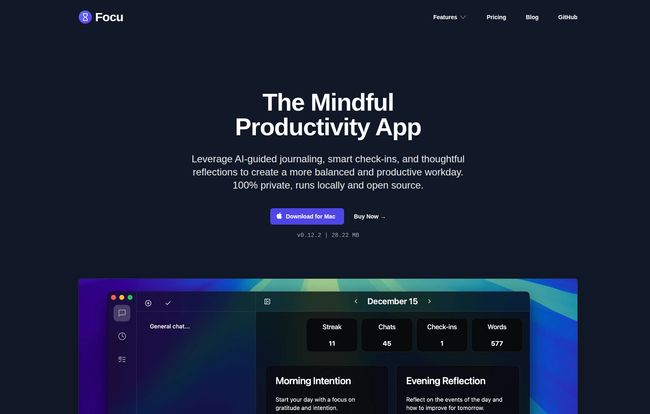
At its core, Focu is a productivity app for Mac that wants you to change your relationship with work. It’s less about cramming more tasks into less time and more about working with intention, focus, and reflection. The biggest headline feature, and the one that got my inner privacy nerd all excited, is that it runs on a local AI.
Yes, you read that right. The AI lives on your computer. Your journal entries, your plans for world domination, your chaotic brain dumps—they never leave your device. In an age where we’re practically giving our data away for the convenience of a cloud-synced shopping list, this is a monumental breath of fresh air. It’s like having a private assistant who has sworn a lifelong vow of secrecy.
Visit Focu App
First Impressions: A Surprisingly Calm Experience
Getting started is painless. There’s a 3-day free trial that gives you everything without asking for a credit card. A small detail, but one I appreciate. The app itself is clean. Minimalist, even. You can choose a light or dark mode, and the interface doesn’t scream at you with a million buttons and menus. It feels… calm.
The first thing it encourages you to do is set a “Morning Intention.” Not a list of 50 tasks, but a simple statement about what you want to accomplish or how you want to feel. It’s a small psychological shift, but it sets the tone for the rest of the day. It’s less “what I have to do” and more “who I want to be today.” I was surprised by how much this little ritual grounded me before I even looked at my email.
The Standout Features That Genuinely Help
Okay, let’s get into the meat and potatoes. What does this thing actually do? It’s a thoughtful collection of tools that work together beautifully.
The AI That’s Actually on Your Side (and Your Mac)
The local AI is the star. You can just write. Freeform. A jumble of thoughts, ideas, and worries. Focu can then read through this and automatically extract actionable tasks. I threw a messy paragraph at it like, “Okay so I need to email Susan about the report, and dont forget to pick up milk, also I should really start outlining that blog post about privacy… ugh, and the car needs gas.” And like magic, it pulled out a neat little task list. This is amazing for anyone who thinks better in prose than in bullet points.
For the power users out there, you can hook it up to a cloud AI like OpenAI or OpenRouter with your own API key if you want more horsepower. But the fact that you don’t have to is the whole point. The base experience is 100% private.
More Than a Diary: AI-Guided Journaling
This is the “mindful” part in action. The app uses AI-powered guidance for morning and evening check-ins. It asks you gentle, probing questions to help you reflect on your day, celebrate small wins, and identify roadblocks. It feels like a conversation. I’ve tried journaling before and always fell off the wagon because a blank page is intimidating. Focu provides the prompts to get you started, making it a habit that actually sticks.
A Built-in Pomodoro Timer That Makes Sense
The Pomodoro Technique is a classic for a reason. 25 minutes of focused work, 5-minute break. Simple and effective. Focu has a timer built right in, and it integrates perfectly with your tasks. You pick a task, start the timer, and go. No need for a separate app or browser extension. It keeps you tethered to your intention for that work session, which I found dramatically reduced my urge to check Twitter… for the fifth time.
Who Is This App Really For?
I’m not going to tell you this will replace Jira for a 50-person dev team. It won’t. Focu is for a different crowd. I think it’s perfect for:
- Freelancers and Solo Entrepreneurs: Juggling multiple projects and your own well-being? This is your new best friend.
- Writers and Creatives: The journaling and brain-dump-to-task features are a dream for untangling creative thoughts.
- Students: For managing coursework with intention rather than panic.
- Anyone with ADHD: One of the testimonials on their site mentions this, and I totally get it. The structure of intentions, focused timers, and gentle check-ins seems tailor-made to help a wandering mind find its anchor.
- The Privacy-Conscious: If you’re tired of big tech watching your every move, a local-first app is a no-brainer.
The Good, The Bad, and The Mac-Only
No tool is perfect, right? Here’s my honest breakdown.
What I Absolutely Love
The privacy aspect is number one for me. It’s a huge differentiator. Second, the one-time payment model. In a world of endless subscriptions, paying $19 once for lifetime updates feels like a steal. It’s an investment, not a rental. I also love that it’s open source. There’s a level of trust and transparency there that you just don’t get with closed-source, corporate software.
A Few Things to Keep in Mind
The most obvious drawback is that it’s Mac-only for now. I know, I know. My Windows and Linux-using friends are probably rolling their eyes. Hopefully, a multi-platform version is on the roadmap. Also, as mentioned, if you want to use the more powerful cloud AI models, you have to bring your own API key, which might be a small hurdle for less technical folks. But again, the local AI works great on its own.
A Look at Focu’s Pricing
The pricing is so straightforward it’s almost shocking. There are basically two options for individuals, and it’s incredibly refreshing.
| Plan | Price | Key Details |
|---|---|---|
| 3 Day Trial | Free | Try all features, no credit card needed. Full access. |
| Individual | $19 (One-Time) | Pay once for lifetime updates, unlimited devices, and priority support. |
| Custom | Contact for Quote | For teams needing custom features, integrations, and dedicated support. |
That $19 lifetime deal is the real story here. For less than the cost of two months of many subscription apps, you get Focu forever. That’s an easy decision in my book.
Frequently Asked Questions About Focu
Is Focu safe and private?
Absolutely. This is its main selling point. The app and its core AI run locally on your Mac. Your data never gets sent to a server unless you explicitly configure it to use a cloud AI with your own API key. It’s as private as it gets.
Is Focu coming to Windows or the Web?
Currently, it’s a Mac-only application. The developer hasn’t made any public announcements about a Windows or web version, but given the app’s popularity, one can hope it’s in the future plans!
Do I have to pay for OpenAI to use the AI features?
Nope! The built-in, local AI for task extraction and guidance is included and works offline. Connecting to external services like OpenAI is a completely optional feature for those who want it.
Is the $19 really a one-time payment?
Yes, it is. You pay once and you get all future updates for life. It’s a model that respects the customer and is becoming increasingly rare, so it’s a huge plus.
Can Focu actually help with procrastination?
In my experience, yes. It’s not a magic cure, but the combination of setting a daily intention, using the Pomodoro timer to create focus blocks, and the gentle accountability of the evening reflection helps tackle the causes of procrastination, like feeling overwhelmed or disconnected from your work.
How is Focu different from apps like Notion or Things 3?
Notion is a massive, collaborative workspace. Things 3 is a powerful, dedicated task manager. Focu is neither. It’s a personal, mindful productivity coach. It’s less concerned with managing massive projects and more concerned with managing your focus and well-being. They can even complement each other.
Final Thoughts: A Genuinely Refreshing Tool
I’ll be honest, I’m a bit jaded when it comes to productivity software. But Focu has won me over. It’s not trying to be everything to everyone. It has a clear point of view: that productivity should serve our well-being, not detract from it. The focus on privacy, the one-time fee, and the genuinely useful mindful features make it a standout product in a very crowded market.
If you’re a Mac user feeling burned out by the endless hustle and the creepy feeling of being watched by your own software, you owe it to yourself to give Focu a try. It might not just organize your tasks; it might just make your workday a whole lot more peaceful.


