
Categories: AI Document Extraction, AI OCR, AI PDF
GetSearchablePDF Review: Is This My New Favorite OCR Tool?

The “paperless office” is one of the biggest myths of the modern workplace, right up there with “Inbox Zero.” Instead of getting rid of paper, we’ve just created a new problem: digital landfills. We’re drowning in PDFs—scanned contracts, ancient academic papers, meeting notes hastily photographed on a phone. And the vast majority of them are just… pictures of text. You can’t search them. You can’t copy-paste from them. They are digital dead ends.
I’ve lost more hours than I care to admit squinting at a 50-page scanned document, trying to find that one clause, that single data point. It’s maddening. So when a tool like GetSearchablePDF lands on my radar, claiming to solve this exact problem in seconds, my ears perk up. But as an SEO and a data guy, I’m naturally skeptical. Is it really that simple? Is the accuracy any good? I decided to take it for a spin.
What Exactly is GetSearchablePDF?
At its heart, GetSearchablePDF is a specialized service that uses Optical Character Recognition (OCR) to turn your ‘dead’ documents into fully searchable, interactive PDFs. Think of OCR as a magic translator that teaches your computer to read text from an image. It looks at the shapes of the letters in your scanned file and converts them into actual, selectable text that your computer can understand.
Now, OCR isn’t new. It’s been around for ages. But for a long time, it was either clunky, expensive, or wildly inaccurate. What seems different here is the focus on simplicity and powerful, modern accuracy. It’s not just for clean, scanned PDFs either. The platform claims it can handle screenshots, phone pictures of documents, and even—the holy grail of OCR—handwriting. That’s a bold claim.
Visit GetSearchablePDF
The 3-Step Simplicity That Actually Works
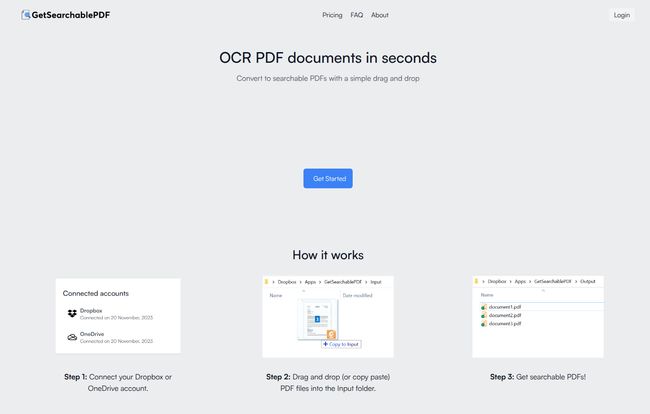
The biggest barrier to adopting a new tool is usually the learning curve. I have zero patience for complicated setups. This is where GetSearchablePDF immediately got my attention. Their whole process is built around a workflow that many of us already use.
- Connect Your Cloud Storage: First, you link up your Dropbox or OneDrive account. It’s a one-time thing that takes about 30 seconds.
- Drag and Drop: The service creates two folders in your cloud drive: ‘Input’ and ‘Output’. To convert a file, you just… drag it into the ‘Input’ folder. That’s it. No uploading to a website, no clunky interface. You just move a file like you normally would.
- Get Your File: A few moments later, a fully searchable version of your PDF appears in the ‘Output’ folder.
This is genius. It’s a ‘set it and forget it’ system. You can even do it from your phone’s Dropbox app. It turns a specialized conversion task into a simple file management action. This is the kind of workflow automation that actually saves time instead of creating more work.
Putting It to the Test: Key Features I Loved
A simple interface is great, but the engine under the hood has to perform. I threw a few different document types at it to see if it would choke.
The OCR Accuracy is Impressive
This is the make-or-break feature. Bad OCR that turns “contract” into “contact” is worse than useless. I tested it with a crisp, scanned invoice, a slightly blurry photo of a book page, and a screenshot of a web article. The results were fantastic. The text was not only searchable but also copy-pastable with very few errors. Its a significant step up from some of the free online tools I’ve used in a pinch, which often struggle with anything less than a perfect document.
Security Isn’t an Afterthought
Okay, let’s talk about the elephant in the room. We’re often dealing with sensitive documents—financial records, client agreements, personal information. The idea of uploading them to a random online service can be… unsettling. GetSearchablePDF addresses this head-on. They state that files are automatically and permanently deleted 10 minutes after processing.
“For me, this is a massive trust signal. The platform isn’t trying to hoard my data; it’s designed to be a temporary processing tool, not a permanent storage solution. This focus on security is a huge differentiator.”
Finally, Decent Handwriting Recognition
I was most skeptical about this. I have terrible handwriting, a strange hybrid of cursive and print. I scanned a page of my own meeting notes, fully expecting gibberish. While it wasn’t 100% perfect (it struggled with a few of my more abstract squiggles), it correctly identified about 90% of the words. For digitizing old letters, journals, or signed documents, this feature is an absolute game-changer.
Let’s Talk Turkey: GetSearchablePDF Pricing
Alright, so it works well. But what’s the cost? The service runs on a monthly subscription model based on ‘credits,’ where one credit equals one page processed. They offer a free trial of 10 credits so you can kick the tires before committing.
| Plan | Monthly Price | Monthly Credits | Best For |
|---|---|---|---|
| Starter | $9 | 150 | Individuals, students, or light users. |
| Professional | $35 | 800 | Freelancers, researchers, and small teams. |
| Business | $70 | 2,800 | Companies with regular document processing needs. |
The pricing seems pretty fair, especially when you calculate the time saved. If this tool saves me even one hour of manual searching a month, the Starter plan has already paid for itself.
The Good, The Bad, and The Searchable
No tool is perfect. Let’s get a balanced look.
What I really liked was the sheer ease of use, the top-tier accuracy, and the serious approach to security. It’s a tool that does one thing, and it does it exceptionally well. The support for various file types, from clean scans to messy photos, means it’s incredibly versatile. It’s a true productivity booster.
On the flip side, the subscription model might be a hurdle for some. The 10 free trial credits expire after 5 days, which feels a little rushed. And a key point from their FAQ: you can only buy top-up credits if you have an active subscription. So, you can’t just buy a block of 100 credits to use over a year; you need to be on a monthly plan. This is a bit of a bummer but understandable from a business perspective.
Who Is This Tool Really For?
I can see a few groups of people falling in love with this tool immediately. Researchers and students who have to sift through mountains of non-searchable academic articles would find this indispensable. Legal and administrative professionals buried in scanned contracts and paperwork could save countless hours. Even just for personal use, anyone trying to digitize a family archive of old letters or organize their tax receipts would benefit immensely. If you ever find yourself with a pile of digital documents that you can’t search, you’re the target audience.
Frequently Asked Questions (The Stuff You’re Probably Wondering)
- How does it actually handle my file security?
- This is their standout feature. Your files are only on their servers long enough to be processed. After 10 minutes, they’re gone for good. They don’t store your documents.
- What does one “credit” get me?
- It’s simple: 1 credit = 1 page. So if you upload a 20-page document, it will use 20 of your monthly credits.
- Can I try it before I buy it?
- Yep! They offer a free trial that gives you 10 credits to test out the service. Just be aware they expire in 5 days, so use them when you’re ready.
- What if I run out of credits mid-month?
- You can purchase more credits, but you have to have an active subscription to do so. It’s a top-up system, not a standalone purchase.
- What if I need to process more than 2,800 pages a month?
- The FAQ suggests that for very high-volume or enterprise needs, you should contact them directly to discuss a custom solution. This is pretty standard for SaaS platforms.
My Final Verdict
So, is GetSearchablePDF worth it? In my opinion, absolutely. It’s a sharp, focused tool that solves a deeply annoying and time-consuming problem. It trades a small monthly fee for a massive amount of reclaimed time and eliminated frustration. It transforms your digital junk drawer of inert files into a functional, searchable library. For anyone who deals with documents regularly, the ROI isn’t just in money; it’s in sanity.
It’s not trying to be an all-in-one PDF editor. It’s not trying to be a cloud storage platform. It’s a specialist tool for making your documents smarter, and in that mission, it succeeds brilliantly.


