
Categories: AI Article Summarizer, AI Github, AI News, AI Summarizer, AI Youtube Summary
Glarity AI Review: Your ChatGPT YouTube & Google Copilot?

The internet is a firehose of information pointed directly at our faces, and most days, I feel like I’m trying to take a sip. Between endless Google search results, 50-minute YouTube tutorials for a 2-minute solution, and academic papers that could double as sleep aids, my content consumption is… cluttered. My whole career in SEO and traffic generation is built on navigating this chaos, but even I get overwhelmed.
I’ve always been on the hunt for something that can act as a filter. A bouncer for the nightclub of my brain, if you will. Something that lets the good stuff in and keeps the fluff out. So, when I stumbled upon the Glarity AI Copilot, a browser extension promising to summarize pretty much anything with the help of ChatGPT, my curiosity was definitely piqued. Another AI tool promising to save me time? Color me skeptical but hopeful.
So, What is Glarity, Actually?
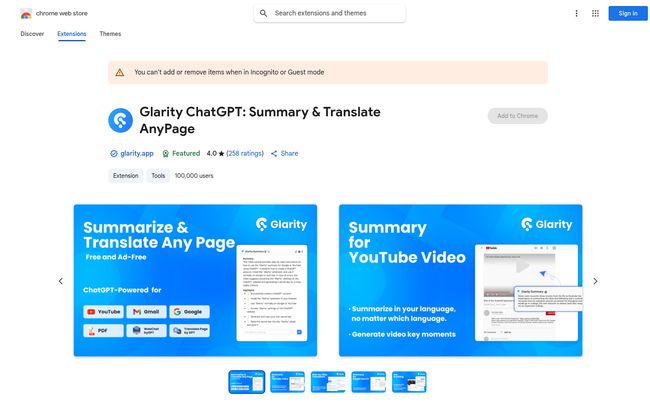
In the simplest terms, Glarity is a browser extension that plugs into your browser—it’s available for Chrome, Firefox, Safari, you name it—and acts as a smart summary tool. Its main claim to fame is summarizing YouTube videos and Google search results, but it doesn’t stop there. It’s an open-source project, which always earns a few brownie points from me. It claims to work on everything from Twitter and news sites like Yahoo! ニュース to more niche platforms like PubMed and GitHub.
Think of it as your personal research assistant, one that’s had way too much coffee and can read at the speed of light. Instead of you manually sifting through content, Glarity sends it to ChatGPT and presents you with a neat, digestible summary. The idea is brilliant. But does it actually work?
Visit Glarity
Getting It Up and Running
Installation is as simple as any browser extension. A few clicks on the Chrome Web Store, and the little Glarity icon appears in your toolbar. Done. But there’s a small catch, and it’s a model we’re seeing more and more: it relies on your OpenAI API key. This means you need an OpenAI account to get it to work. For those of us already deep in the AI world, it’s no biggie. For a casual user, it might be a small hurdle.
This “bring-your-own-key” approach is clever, though. It keeps the tool itself free or low-cost for the developer and puts the processing power (and cost) on the user. It also means the quality of your summary is directly tied to the ChatGPT model your API key has access to. A summary from GPT-3.5 is good, but one from GPT-4 is on a whole different level of nuance. Something to keep in mind.
The Main Events: How It Handles YouTube and Google
Taming the YouTube Time Sink
Okay, this is the big one. I immediately threw a 30-minute video about Google’s latest algorithm update at it. Instead of scrubbing through the timeline looking for the juicy bits, a new Glarity panel appeared next to the video. Within about 15 seconds, it generated a full transcript and a surprisingly coherent summary at the top.
It was broken down into key points, making it scannable. This is a game-changer. You can get the gist of a video before committing to it, or quickly find the specific section you need without listening to five minutes of “Hey guys, don’t forget to like and subscribe!” It’s like having the CliffsNotes for any YouTube video, on demand. I can see this being insanely useful for students, researchers, or anyone trying to learn a new skill quickly.
Making Google Searches Smarter
The other killer feature is the Google search integration. When you search for something, Glarity places a summary box right next to the search results. It attempts to answer your query by synthesizing information from the top-ranking pages. This is kinda like Google’s own SGE (Search Generative Experience) or AI Overviews, but I found it to be faster and a bit more to-the-point.
For complex research queries, it’s a godsend. You get a preliminary answer without having to click through three or four different articles. It’s not perfect, and you should always check the sources, but as a starting point? Magnificent.
Beyond the Basics: Where Glarity Shines
What really impressed me was the tool’s flexibility. The fact that it works on a PDF you’ve opened in your browser or a technical discussion on GitHub makes it more than just a social media toy. I tested it on a dense medical abstract from PubMed, and it did a commendable job of translating the jargon into plain English. That’s a powerful feature that expands its audience way beyond just marketers and content consumers.
And then there’s the prompt customization. This is where the real power users will have a field day. You’re not stuck with a generic “Summarize this” command. You can edit the prompt Glarity uses. For example, you could tell it to:
- “Summarize this article as a 3-bullet point list of key takeaways.”
- “Explain this video transcript to me like I’m a five-year-old.”
- “Extract all the names of people mentioned in this text.”
This level of control turns a simple summary tool into a versatile data extraction and content repurposing machine. It’s a subtle feature, but in my opinion, it’s the most powerful one.
The Good, The Bad, and The AI-Generated
No tool is perfect, right? After a week of using Glarity pretty consistently, here’s my honest breakdown.
The time-saving aspect is no joke. It has genuinely saved me hours of sifting and scanning. The broad support for different websites and browsers is a massive plus, and the fact that its a clean, ad-free experience is the cherry on top. But, the reliance on an OpenAI key is a double-edged sword. It keeps the tool accessible, but the summary quality lives and dies by the AI model you use. Sometimes the GPT-3.5 summaries can be a bit… generic. They miss the nuance that a more advanced model might catch.
Also, while the core features are free, the Glarity site does mention a Copilot membership for more advanced capabilities. It’s a classic freemium model, which is fair, but something to be aware of if you start hitting limitations.
What’s the Price Tag on This AI Magic?
This is often the million-dollar question. As of my review, the Glarity ChatGPT for YouTube/Google Summary extension is free to install and use for its main features. The cost comes from the OpenAI API usage, which for most people, will be pennies. Seriously, you’d have to be summarizing the entire internet to rack up a significant bill. The free tier from OpenAI is often generous enough for casual use.
They do have a pricing page for their Glarity AI Copilot service, which likely unlocks more advanced features, higher usage limits, or perhaps access to better models without your own key. For most people, though, the free version will be more than enough to get a taste of its power.
The Final Verdict: Is Glarity Worth Installing?
So, should you give Glarity a spot on your browser’s toolbar? In my experience, the answer is a resounding yes. It’s one of the most practical and immediately useful AI tools I’ve tested this year.
It’s for the student drowning in research papers, the busy professional who needs to stay on top of industry news, the developer scanning GitHub for solutions, and the eternally curious person who just wants to learn faster. It’s an efficiency engine. It’s not going to do your thinking for you, but it clears the path so you can think better. It’s a fantastic example of AI not as a replacement for human intelligence, but as an enhancement to it.
Frequently Asked Questions
- Is Glarity safe to use?
- According to their privacy policy on the Chrome Web Store, the developer states they do not collect or use your data. Since it’s an open-source project, the code is available for public scrutiny, which adds a layer of trust.
- Do I need a ChatGPT Plus subscription?
- Nope! You don’t need the paid ChatGPT Plus subscription. You just need a free OpenAI account to generate an API key. Your API usage is billed separately by OpenAI, but costs are typically very low for personal use.
- How does Glarity compare to other AI summary tools?
- There are many summary tools out there, but Glarity’s strengths are its broad website compatibility (especially for YouTube and Google), its open-source nature, and the powerful custom prompt feature. Some alternatives might be simpler, but few offer this level of control for free.
- Can I use Glarity on my phone?
- Primarily, no. Glarity is a browser extension, so it’s designed for desktop browsers like Chrome, Firefox, and Safari. Some mobile browsers that support desktop extensions might work, but its main home is on your computer.
- What languages does Glarity support?
- The Chrome Store page lists support for 51 languages, which is fantastic. You can get summaries and translations in your native tongue, making it a powerful tool for global users.
Cutting Through the Noise
In a world screaming for our attention, tools like Glarity feel less like a novelty and more like a necessity. It’s a small step, a simple extension, but it represents a significant shift in how we can interact with information. It’s about taking back control, saving our most valuable asset—time—and finally getting a chance to take a clean, refreshing sip from that information firehose. Give it a try; your brain might just thank you for it.


