
Categories: AI Article Summarizer, AI Productivity Tools, AI Research Tool, AI Summarizer, AI Video Summarizer, AI Youtube Summary
GOAT AI Review: My Take on This AI Summarizer Tool

As someone who lives and breathes SEO and digital content, my daily information intake is like trying to drink from a firehose. Between industry news, client reports, competitor analysis, and the fifty-seven tabs I have open for ‘later,’ it’s a constant battle. I’ve seen dozens of tools promise to be the magic bullet, the one-stop-shop, the… you get the picture. Most of them end up in my digital graveyard of abandoned browser extensions.
So when I heard about a tool called GOAT AI, my skepticism was, let’s say, healthy. The name itself is a bold claim. The G.O.A.T.? The Greatest of All Time? In the crowded space of AI productivity tools, that’s like a rookie calling themselves the next Michael Jordan on draft night. But I’m always game to try something that might save me a few precious hours. So, I installed the Chrome extension and took it for a spin. And I have some thoughts.
Visit GOAT AI
So, What Exactly is GOAT AI?
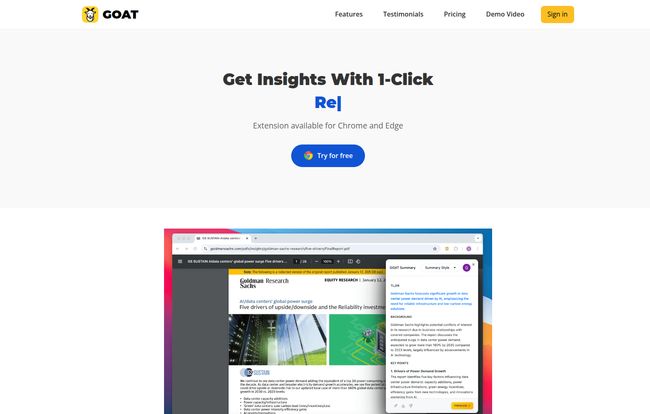
At its core, GOAT AI is a one-trick pony, but it’s a trick I desperately need. It’s an AI-powered tool, available as a browser extension for Chrome and Edge, that promises one-click summaries of pretty much any content you throw at it. Think long, winding news articles, dense academic research papers that could put an insomniac to sleep, or even those 45-minute YouTube video essays you just don’t have time for.
It’s designed for people who are drowning in information—people like us. The website specifically calls out Research Analysts, Decision Makers, and Students. I’d add content creators, marketers, and anyone with a shred of curiosity to that list. It’s for anyone who’s ever looked at a wall of text and thought, “Just give me the highlights, please!”
Getting Started: The First Click is the Sweetest
The setup was refreshingly simple. No convoluted sign-up process, no demanding a blood sample and my first-born child. I went to their site, clicked ‘Add to Chrome,’ and it was there, sitting quietly next to my other extensions. The real test, though, is the first use.
I navigated to a particularly dense article on Google’s latest algorithm update. It was filled with jargon, speculation, and the kind of technical detail that makes your eyes glaze over. I clicked the little GOAT icon in my browser bar. A sidebar appeared, whirred for a couple of seconds, and then… there it was. A neat, concise summary of the entire piece. It was fast. Almost suspiciously fast. My first reaction wasn’t just ‘cool,’ it was a genuine ‘huh, that actually worked’. It felt like a little superpower.
Putting GOAT AI Through its Paces
A single success is nice, but consistency is king. I decided to really kick the tires and see where it excelled and where it stumbled.
Taming the Beast of Academic Research
First up, a complex research paper. I remember my university days, spending entire weekends deciphering a single paper. For analysts and students, this is a daily grind. As Sarah L., a Research Analyst quoted on their site, said, it “revolutionized how I consume information.” I can see why. GOAT AI pulled out the key hypothesis, methodology, and conclusions. It wasn’t a perfect, nuanced replacement for a full reading—let’s be clear about that—but as a tool to quickly vet if a paper is relevant to your work? It’s brilliant. It’s the difference between wasting an hour and making a quick, informed decision to move on or dig deeper.
Conquering the YouTube Time Sink
Next, a YouTube video. We’ve all been there. You click on a video titled “A Quick Guide to X,” and 30 minutes later, the creator is still on their introduction. GOAT AI’s ability to summarize videos is, for me, its most compelling feature. It pulls from the transcript to give you the key talking points. This is incredible for tutorials, reviews, and educational content. Does it capture the visual gags or the presenter’s charisma? No. But does it tell you the 5 key steps in that Photoshop tutorial so you dont have to scrub through the whole video? Absolutely.
The Pricing: Is It Worth a Monthly Subscription?
Alright, let’s talk about the dollars and cents. This is often where a promising tool wins or loses me. GOAT AI has a straightforward two-tier system, which I appreciate. No confusing add-ons or hidden fees.
| Plan | Price | Features |
|---|---|---|
| Basic | Free | 10 summaries per month, Basic AI summarization |
| Premium | $14.99 / month | Unlimited summaries, Advanced AI summarization, Priority support |
The Free plan is a great way to test the waters. 10 summaries a month is enough to see if it fits your workflow. But if you’re a heavy user, you’ll hit that ceiling pretty fast.
The Premium plan at $14.99 a month is where the real power is. Unlimited summaries is the main draw, but the “Advanced AI summarization” is interesting. In my tests, the advanced summaries seemed to grasp context and nuance a bit better, especially on more technical topics. Is it worth the price of three fancy coffees? If you’re a student, researcher, or an exec whose time is money, I’d argue yes. The hours you could save in a single week would easily justify the cost.
The Honest Downsides (Because Nothing’s Perfect)
As much as I’m impressed, it’s not all sunshine and roses. The 10-summary limit on the free plan feels a little tight. I burned through mine in two days of serious testing. It’s a classic freemium model designed to get you to upgrade, and it works.
Also, while the AI is very good, it’s not a human. It can sometimes miss the tone, sarcasm, or subtle subtext of a piece. You’re getting the ‘what,’ not always the ‘how’ or the ‘why.’ For most informational content, this is fine. For literature, opinion pieces, or comedy? You’re better off experiencing it firsthand. Don’t use this to summarize a movie plot for a friend—you’ll just ruin it.
Frequently Asked Questions About GOAT AI
I’ve seen a few questions pop up, so let’s tackle them head-on.
How does GOAT AI actually work?
It uses artificial intelligence, specifically natural language processing (NLP) models, to read and understand the text or transcript of the content on your page. It then identifies the key sentences and concepts and condenses them into a short, digestible summary. It’s like a high-speed version of what you did in high school with a highlighter pen.
Is it safe to use a browser extension like this?
This is a valid concern. You’re giving an extension access to the pages you browse. According to their privacy policy, they are focused on the content for summarization and don’t sell user data. As with any extension, it’s good practice to review the permissions it requests and stick to reputable sources like the official Chrome and Edge stores.
Can it summarize absolutely everything?
Mostly, yes. If it’s a public webpage with text or a YouTube video with captions/a transcript, it should work. It might struggle with content behind hard paywalls, complex web apps, or videos without any available text. I found it worked on about 95% of the content I tried.
Is the Premium plan worth the $14.99?
It depends entirely on your usage. If you find yourself constantly needing to distill information—like a student with a heavy reading list or a professional who needs to stay on top of trends—then yes, the time saved could be invaluable. For a casual user, the free plan is probably sufficient.
How does this compare to other AI summarizers out there?
Many tools do this, but GOAT AI’s strength is its seamless integration as a browser extension. It’s less about being a destination website and more about being a tool that works wherever you are on the web. Its speed and focus on a single, well-executed feature make it a strong contender.
The Final Verdict: A Worthy Tool in the Productivity Arsenal
So, is GOAT AI truly the ‘Greatest of All Time’? That’s a lofty title, and honestly, probably not. But that’s okay. It doesn’t have to be. What it is, is a surprisingly effective, incredibly fast, and well-designed tool that does one thing exceptionally well: it saves you time.
It has earned a permanent spot in my browser’s toolbar, which is high praise coming from me. It’s not a replacement for deep, critical reading, but it’s an amazing first line of defense against the overwhelming flood of information we all face. It’s the smart, efficient assistant I didn’t know I needed. And for that, it gets a solid recommendation from this seasoned SEO pro.


