
Categories: AI Assistant, AI Productivity Tools, AI Social Media, AI Task Management, AI Twitter
HabitGraph Review: The Twitter Habit Tracker We Needed?

It’s January 1st, or a random motivated Tuesday, and we buy a new journal. We download a shiny new app with a five-star rating. We declare to the world (or just our cat) that THIS is the year we finally meditate daily, write 500 words, hit the gym, or stop doomscrolling until 2 AM.
And for a week, it works. We’re a machine of discipline. We get a little dopamine hit every time we check off that box. But then life happens. The app gets buried on page three of our home screen. The journal gathers dust. The motivation fades, and we’re back to square one, feeling just a little bit worse about ourselves.
I’ve been in the SEO and digital marketing game for years, and I’ve seen hundreds of productivity tools come and go. Most of them share the same fatal flaw: they ask you to build a new habit (using their app) to track your other new habits. It’s a bit much, isn’t it? That’s why my ears perked up when I stumbled upon HabitGraph. It’s a tool that doesn’t want you to go somewhere new. It wants to meet you where you already are: arguing, laughing, and building in public on X/Twitter.
So, What Exactly is HabitGraph?
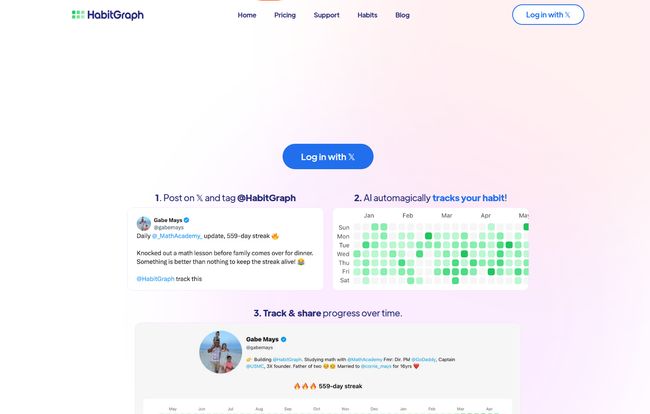
In short, HabitGraph is a habit tracker that lives and breathes on X/Twitter. Instead of opening a separate app, you just… tweet. You post an update on your habit, tag the @HabitGraph handle, and jejich AI-powered system does the rest. It picks up your update and marks it on a beautiful, clean, GitHub-style contribution grid.
You know the one I’m talking about—that sea of green squares that every software developer both loves and fears. It’s a visual representation of consistency. A calendar that doesn’t just show dates, but effort. And honestly, it’s genius.
The story behind it is just as compelling. It was built by Gabe, a self-professed habit obsessive who managed to keep a personal streak going for over 1,000 days. A thousand! After trying a bunch of apps that were either too simple or too complicated, he just built the thing he wished existed. As a creator, I have massive respect for that. It wasn’t born in a boardroom to capture a market; it was born out of genuine need. That usually leads to a better product.
How Does This Twitter Magic Work?
The elegance of HabitGraph is its simplicity. There’s no complex onboarding or 20-minute tutorial video to sit through. It’s a three-act play, and it goes like this:
Step 1: You Tweet It
You do what you were probably going to do anyway. You finish your workout, write your blog post, or finish a chapter in your book, and you post about it. The only difference is you add “@HabitGraph” to the tweet.
Step 2: The AI Does Its Thing
This is where the “automagically” part comes in. The HabitGraph AI reads your tweet, understands that you’ve completed your designated habit for the day, and marks it down for you. No manual entry, no opening another app. It just happens in the background.
Step 3: Watch Your Streaks Grow
You get your own public progress page (more on that later) with that glorious grid. Every day you successfully tweet your habit, a new green square appears. The goal? Don’t break the chain. It’s a powerful psychological motivator that has been proven to work time and time again.
Visit HabitGraph
The Terrifying Brilliance of Public Accountability
The default setting for the free version of HabitGraph is public. Your progress page, your streaks, your habits—it’s all out there for the world to see. For some, that’s a nightmare. For others, it’s the secret sauce.
The “build in public” movement has taken over corners of Twitter for a reason. When you know people are watching, you’re more likely to show up. It’s one thing to let yourself down; it’s another to have a public record of the day you decided to eat a whole pizza instead of going for a run. This tool turns public accountability from a scary monster into a kind of friendly ghost, gently nudging you to keep going. It taps into our social nature to drive personal discipline. And for that, I think its pretty darn cool.
A Closer Look at The Features
Beyond the core loop, there are a few other bits and pieces that make HabitGraph stand out.
Smart AI and Reply Summaries
The AI does more than just check a box. It’s smart enough to track your habit even if your tweet isn’t perfectly worded every time. It also provides AI-powered summaries of replies to your progress tweets, which is a neat way to see the encouragement you’re getting without getting lost in the weeds of your notifications.
Public or Private Habits
Okay, so what if you want to track a habit without broadcasting it to your boss, your ex, and your grandma? That’s where the paid plan comes in. For a small monthly fee, you can make your habits private. This gives you the best of both worlds: the slick interface and Twitter integration without the pressure of a public audience. Maybe you want to track “applying for new jobs” without tipping off your current employer. This feature is for you.
HabitGraph Pricing: What’s the Damage?
The pricing structure is refreshingly straightforward. No confusing tiers or hidden fees. Just two simple options.
The “No-Brainer” Free Plan
For the low, low price of absolutely nothing, you can get started. The free plan lets you track one habit publicly. You get the 30-day habit graph, the AI tracking, and your public progress page. For anyone looking to dip their toes in the water or focus on one single keystone habit, this is more than enough.
The “Super” Plan for Power Users
If you’re all-in on habit development, the Super plan is where it’s at. It’s affordable and unlocks the full potential of the tool.
| Feature | Free Plan ($0/month) | Super Plan ($5/mo or $50/yr) |
|---|---|---|
| Number of Habits | 1 | Up to 5 |
| Habit Privacy | Public Only | Private Habits Available 🔒 |
| Habit Graph History | 30 Days | 365 Days |
| Remove Badge | No | Yes |
| Trial | N/A | 7-Day Free Trial |
My Honest Take: The Good and The Not-So-Good
No tool is perfect, and as an SEO, I’m paid to be critical. So here’s my unfiltered take.
What I Love
The core concept is just chef’s kiss. Meeting users where they are is a fundamental principle of good product design, and HabitGraph nails it. I already spend way too much time on Twitter, so integrating my habit tracking there feels frictionless. The visual grid is incredibly motivating, and the personal story from the founder adds a layer of authenticity that you just don’t get from big-corp apps.
What Gives Me Pause
First, the obvious: you have to be a Twitter user. If you’ve sworn off the platform, this tool is a non-starter. Second, you’re putting your faith in an AI to correctly interpret your posts. While it seems to work well, there’s always a chance for a misfire. Lastly, the privacy aspect of the free plan will be a dealbreaker for some. You have to be comfortable with sharing your goals publicly. For me its a feature, for others it might be a bug.
Frequently Asked Questions about HabitGraph
Do I need to be a programmer to understand the grid?
Absolutely not! While it was inspired by the GitHub contribution graph, it’s just a simple calendar. Green square means you did your habit. White square means you didn’t. That’s all there is to it.
What if the AI misinterprets my tweet or I forget to tag @HabitGraph?
That’s a valid concern with any AI-based system. Currently, the process is heavily reliant on the tweet-and-tag method. There isn’t a manual override mentioned, so the best practice is to be clear in your tweet and double-check you’ve tagged the handle correctly. It’s a small price for the automation.
Can I track more than one habit?
Yes! The free plan is limited to one habit, which is great for focusing. If you upgrade to the Super plan, you can track up to five different habits simultaneously.
Is all my habit data public?
On the free plan, yes, your habit and progress page are public by default. To track habits privately, you’ll need to subscribe to the Super plan, which includes the option to make your habits visible only to you.
Who is this tool really for?
HabitGraph is perfect for creators, entrepreneurs, writers, developers, and anyone active in the “build in public” community on X/Twitter. If you’re motivated by social accountability and want a frictionless way to track your progress without adding another app to your daily routine, it’s a fantastic fit.
Final Thoughts: Is HabitGraph Your Missing Link?
So, is HabitGraph the silver bullet that will magically make you a disciplined superstar? No. No tool can do that. The work still has to be done by you.
But what it can do is remove a significant amount of friction from the tracking process. It cleverly bolts accountability onto a platform you’re already using, turning your social feed into a living diary of your discipline. It’s a simple, elegant solution to a very old problem. If you’ve struggled to stick with other trackers and you’re an active X/Twitter user, giving the free plan a shot is a complete no-brainer. You might just find that a little public pressure and a grid of green squares is the kick in the pants you’ve been looking for all along.


