
Categories: AI Font Generator, AI Notes Generator, Text to Handwriting
HandtextAI Review: AI Handwriting That Actually Fools You?

At some point in our lives, we’ve all wished for a magic wand to finish a handwritten assignment. I still have flashbacks to university, 2 AM, hand cramping, trying to finish a 10-page essay that the professor insisted be handwritten. The things we do for a grade, right? We’ve seen AI come for our art, our writing, and our coding. It was only a matter of time before it came for our penmanship.
Enter HandtextAI. I stumbled upon this tool a while back and my initial reaction was a mix of “Oh, here we go again” and genuine curiosity. Is it just another glorified font-changer, or does it actually deliver on its promise of realistic, human-like handwritten notes? Is it a student’s dream come true, or an ethical minefield? I decided to take it for a spin. You know, for science.
So, What Exactly is HandtextAI?
In a nutshell, HandtextAI is an online platform that converts your typed text into what looks like a genuinely handwritten document. We’re not just talking about picking a cursive font in Microsoft Word. This is a whole different beast. The tool simulates the entire page—the paper texture, the ink style, the slight imperfections in spacing and alignment that scream “a real person wrote this.” It’s designed for anyone who needs the personal touch of handwriting without the time, effort, or inevitable hand cramps.
Visit HandtextAI
First Impressions and Getting Started
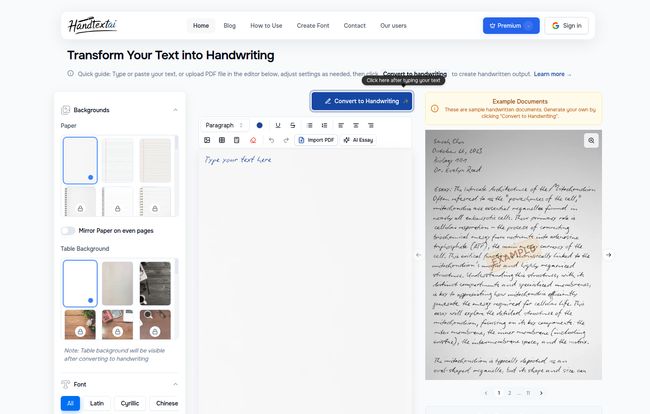
Jumping into HandtextAI is refreshingly simple. The user interface is clean, with your text input on one side and a live preview on the other. No confusing menus, no labyrinth of settings to get lost in. You type, you tweak, you see the result instantly. I appreciate that in a world where every new app seems to require a PhD to operate.
They offer a free plan, which is always my first stop. It’s pretty limited, you get 5 pages and a handful of fonts and paper types. It’s not enough for any serious work, but it’s perfect for a test drive. It’s like a free sample at Costco—just enough to get you hooked and thinking about buying the whole box.
The Features That Actually Matter
A tool is only as good as its features, and this is where HandtextAI starts to pull away from the pack. It’s not just one thing; it’s how a bunch of small, clever features work together.
The Font Library: Beyond Your Basic Cursive
The premium version boasts over 90 handwriting fonts. And these aren’t just slight variations of the same script. You’ve got everything from neat, orderly print to the kind of chaotic scrawl that looks like a doctor’s prescription. But the feature that made me sit up and pay attention is the custom font upload. Theoretically, you could use a service to digitize your own handwriting, upload the font file, and have the AI write in a style that is scarily close to your own. That’s next level.
Customization is King
This is where the real magic happens. Choosing a font is one thing, but making it look authentic is another. HandtextAI lets you fiddle with all the little details. You can change the paper background from a clean white sheet to a piece of legal pad or even textured craft paper. You can adjust word spacing, font size, and even introduce slight randomness to mimic a human hand. The visual effects—like ink bleed, shadows and subtle page rotations—are what seal the deal. It’s the difference between a photograph of a person and a wax figure; one is just an imitation, the other feels alive.
Practical Tools for Students and Professionals
I was pleasantly surprised to see built-in table support. Trying to draw a neat table by hand is a special kind of torture, so this is a massive win for students creating study notes. The premium plan also includes PDF import and export, which is essential for integrating the tool into any real workflow. You can even insert basic shapes, perfect for simple diagrams or flowcharts. They’ve clearly thought about who their users are.
The Elephant in the Room: Is Using HandtextAI Cheating?
Okay, let’s just say it. A lot of students are going to look at this and see a get-out-of-jail-free card for that dreaded handwritten essay. So, is it cheating? Well, it depends.
If you’re using it to submit an assignment where the act of handwriting itself is part of the assessment, then yeah, that’s ethically murky water. But let’s look at other use cases. What about a student with dysgraphia or another condition that makes writing difficult? This tool could be a massive accessibility win. What about a small business owner who wants to include 100 “handwritten” thank you notes in their packages but physically can’t? That’s just smart marketing. Like any powerful tool, its morality lies in the hands of the user. It can be a time-saver, an accessibility aid, or a shortcut. Your call.
Let’s Talk Money: The HandtextAI Pricing Breakdown
The pricing structure is pretty straightforward, which I always appreciate. You’ve got two main options:
| Plan | Price | Key Features |
|---|---|---|
| Free Plan | $0 | Good for a quick test. Limited to 5 pages, 10 basic fonts, and 3 paper types. No PDF export or advanced features. |
| Premium Plan | $5.99/month (billed annually at $71.88) |
Unlocks everything. Unlimited pages, 90+ fonts, custom font uploads, PDF import/export, all effects and paper types, priority support. |
The free plan is really just a demo. The Premium Plan is where the real power is. At about $72 a year, you have to ask yourself if it’s worth it. If you’re a student who constantly has to submit handwritten work or a professional who can get a real ROI from personalized materials, it could easily pay for itself in saved time and effort.
My Honest Take: The Good and The Not-So-Good
No tool is perfect. After playing around with HandtextAI, here’s my unfiltered take.
What I liked is its sheer ease of use. It’s intuitive. The sheer variety of fonts and customization options is impressive, and the output is genuinely convincing if you spend a few minutes tweaking the settings. On the other hand, the free plan is quite restrictive, but thats to be expected. Some of the more complex fonts can take a moment to generate, so a little patience is needed. And of course, the most powerful features are locked behind that subscription. It’s a classic freemium model, and it works.
Who is HandtextAI Actually For?
I see a few key groups getting a ton of value out of this:
- Students: For turning typed lecture notes into more memorable, handwritten study guides. And yes, for that last-minute assignment you completely forgot about. We’ve all been there.
- Educators: For creating engaging worksheets or providing feedback that feels more personal than a typed comment in a Google Doc.
- Marketers & eCommerce Sellers: This is huge. Imagine including a unique, personalized, “handwritten” note with every order. The perceived value and customer connection would skyrocket.
- Creatives: For digital scrapbooking, creating custom journal pages, or incorporating unique text into design projects.
Final Verdict: Is HandtextAI a Must-Have Tool?
Is HandtextAI going to change the world? Probably not. Is it an essential tool for every single person? No. But it’s an incredibly effective and well-designed tool for a very specific set of needs. It occupies that interesting space between digital convenience and analog charm.
It’s like a specialized kitchen gadget. You don’t need a sous-vide machine to cook, but if you’re serious about getting that perfect steak, it makes a world of difference. For those who need to generate realistic handwriting quickly and consistently, HandtextAI is one of the best solutions I’ve seen. It’s clever, capable, and just a little bit mischievous.
My advice? Give the free version a spin. The worst that can happen is you have a little fun. The best that can happen is you find your new secret weapon.
Frequently Asked Questions about HandtextAI
Can I cancel my HandtextAI subscription at any time?
Yes, according to their site, you can cancel your premium subscription whenever you want. You’ll retain access to the features until the end of your current billing period.
What payment methods does HandtextAI accept?
They accept all major credit cards, including Visa, Mastercard, and American Express, processed securely through Stripe.
Will I get new features if I subscribe?
Yes. They state that Premium members get early access to all new features and improvements as they’re released, which is a nice perk.
Can it really look like my own handwriting?
With the custom font upload feature on the Premium plan, you can get remarkably close. You’d need to have your handwriting converted into a font file first, but once uploaded, the tool can mimic your style.
Is it hard to use for someone who isn’t tech-savvy?
Not at all. The interface is very user-friendly. If you can use a basic word processor, you can use HandtextAI. The learning curve is practically flat.
Does it really support math equations and tables?
It does! This is a standout feature, particularly for students in STEM fields. It can correctly format mathematical equations and generate clean tables within the handwritten text.


