
Categories: Other
Headlesshost Review: A Visual CMS for Visual People?

For years, the world of Content Management Systems has felt like a battleground. In one corner, you have the developers, who want speed, flexibility, and control. In the other, you have the marketers, writers, and designers—the content people—who just want to, you know, manage content without needing a computer science degree.
I’ve spent more time than I’d like to admit wrestling with clunky, traditional CMS backends. You know the ones. They feel like they were designed in 2005 and haven’t seen a UI update since. Then the headless CMS revolution came along, and it was a massive win for developers. Decoupling the frontend from the backend? Brilliant. Lightning-fast sites with modern frameworks like Next.js and React? Sign me up. But for the content teams… it often meant staring at forms and lists of data fields, completely disconnected from what the final page would look like. A bit of a buzzkill, right?
So when I stumbled upon Headlesshost and its tagline—”Visual CMS for Visual Thinkers”—my curiosity was definitely piqued. Could this be the tool that finally builds a bridge over that troubled water? I had to find out.
First Off, What’s a Headless CMS Anyway?
If you’re new to the term, don’t sweat it. Think of a traditional CMS like WordPress as a station wagon. The engine, the body, the seats, the radio—it’s all one integrated package. It works, it’s familiar, but it’s not very flexible. You can’t easily take the engine out and put it in a sports car.
A headless CMS is just the engine. It manages and stores all your content (the “body”) but doesn’t care what the final product looks like (the “head”). This means your developers can build a super-fast, custom-designed website or app using any technology they want, and simply pull the content from the headless CMS via an API. It’s a huge deal for performance and security, which are major ticks in the SEO box.
So, What’s the Big Deal with Headlesshost?
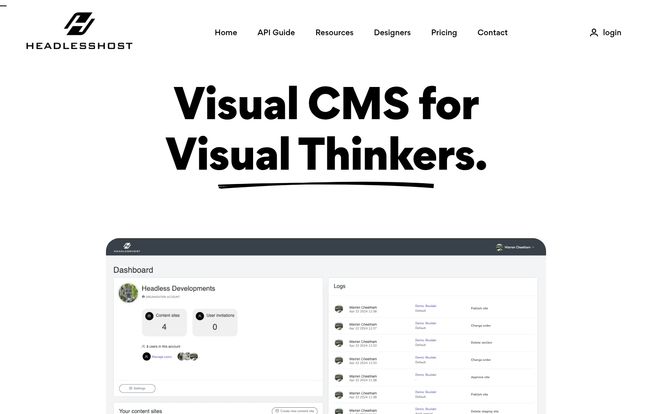
Headlesshost steps into this space and asks a simple question: Why does the backend of a headless CMS have to be so… boring? Why can’t it be visual? Why can’t it feel like you’re actually building a webpage?
Visit Headlesshost
Instead of the typical sea of forms and input fields, Headlesshost gives you a drag-and-drop interface. You build pages with sections and components that visually resemble the final output. For anyone who has ever tried to explain to a client why they have to fill out 15 separate fields just to create one “Hero Banner,” this is a revelation. It’s designed for humans, not just developers. A novel concept, I know.
The Features That Genuinely Got My Attention
I’ve seen a lot of platforms promise the world, so I’m always a bit skeptical. But Headlesshost has a few things under the hood that are worth talking about.
The Drag-and-Drop Experience is a Game Changer
This is the core of their promise. Instead of editing abstract data models, your content team can stack, rearrange, and edit visual blocks. It’s an experience much closer to Squarespace or Webflow, but with the power and flexibility of a true headless architecture on the backend. This drastically lowers the learning curve for non-technical users and, honestly, makes content entry a lot more enjoyable. It’s about empowering the creator, which I love.
Wait, There’s AI in This Thing?
Of course, there is. It’s 2024. But I’ve been pleasantly surprised. The AI-powered content creation seems to be more than just a tacked-on GPT-4 window. It’s integrated to help you draft copy, brainstorm ideas, or fill out sections directly within the workflow. While it’s never going to replace a skilled copywriter (let’s not get carried away), it’s an incredible tool for smashing through writer’s block or generating placeholder text that’s actually useful. A huge time-saver.
Finally, a CMS That Respects Designers
The platform talks a big game about being for designers, and it seems to walk the walk. The inclusion of Style Guides is a fantastic touch. This lets you pre-define colors, typography, and spacing, ensuring that no matter what the content team builds, it stays on-brand. For any agency or in-house team that’s ever battled with inconsistent branding, this feature alone is worth its weight in gold. It creates guardrails that give creators freedom without sacrificing design integrity.
The Good, The Not-So-Good, and The Nitty-Gritty
Alright, nothing’s perfect. Let’s pour a coffee and get into the real talk. Based on my experience and digging around, here’s my balanced take.
On the upside, the user-friendly interface is a massive win. The flexibility of the headless architecture combined with that visual editor is the killer combo. It’s scalable, meaning a small team can use it just as effectively as a large organization with complex approval workflows and user roles. That’s pretty impressive.
However, you can’t ignore the nature of the beast. It’s still a headless CMS. The initial setup will likely require some technical know-how. You’ll need a developer to connect your frontend application to the Headlesshost API. This isn’t a one-click-install solution like classic WordPress. Also, if you’re new to the whole headless concept, there might be a bit of a learning curve as you wrap your head around decoupling your content from your presentation layer. But in my opinion, it’s a curve worth climbing.
So, How Much is This Going to Cost Me?
Pricing is always the million-dollar question, isn’t it? Thankfully, Headlesshost’s pricing is pretty straightforward and seems reasonably competitive. Here’s a quick breakdown as of my writing this:
| Plan | Price | Best For |
|---|---|---|
| Starter | $14.95 / month | Individuals, freelancers, and small projects. It’s generous, with unlimited users and content types, but limited to 10 pages and 500MB of storage. |
| Business | $49.95 / month | Small to medium businesses. This jumps you up to 100 pages, a whopping 100GB of storage, and 5 staging sites. A very solid offering. |
| Enterprise | Contact for pricing | Large organizations needing dedicated support, unlimited pages, massive storage (1000GB), and custom features. |
(Prices and features are subject to change, so I’d recommend checking their official pricing page for the latest info).
My Final Verdict: Who is Headlesshost Really For?
After spending some quality time with it, I have a pretty clear picture. Headlesshost is for the team that has felt the pain of the developer-marketer divide. It’s for:
- Digital Agencies that want to build blazing-fast sites for clients but also want to hand over a CMS that the client will actually enjoy using.
- In-house Marketing Teams who have developers to handle the initial setup but need autonomy to create and manage content quickly without filing a ticket for every little change.
- Design-conscious companies who value brand consistency and want to empower their content creators within a beautifully designed system.
If you’re a solo blogger who isn’t very technical, a traditional solution might still be an easier path. But if you’re part of a team aiming for top-tier performance without sacrificing user experience for your content staff, Headlesshost should absolutely be on your shortlist.
Is It a Breath of Fresh Air?
Yeah, I think it is. It’s not just another headless CMS in a crowded market. It’s an opinionated take on what the content management experience should be. It’s a tool that respects both the developer and the designer, the engineer and the editor. And in my book, that’s a philosophy worth getting behind. It feels less like a compromise and more like a genuine solution. A rare thing indeed.
Frequently Asked Questions
- Is Headlesshost good for SEO?
- Yes, absolutely. Because it’s a headless CMS, your developers can build a frontend that is incredibly fast and optimized for Core Web Vitals, which Google loves. You get the SEO benefits of a modern tech stack, plus an easy-to-use editor to consistently publish content.
- Do I need to be a developer to use Headlesshost?
- To set it up and connect it to your website, yes, you’ll need a developer. But for the day-to-day work of creating, editing, and managing content? Not at all. It’s designed specifically for non-technical users like marketers, writers, and designers.
- What’s the main difference between Headlesshost and WordPress?
- WordPress is a monolithic system where the backend and frontend are tightly coupled. Headlesshost is just the backend (a headless CMS). This means more flexibility, better performance, and enhanced security, but it requires a separate, custom-built frontend.
- Can I migrate my existing website to Headlesshost?
- Yes, but it’s not a one-click process. It would involve a developer setting up your content models in Headlesshost and then migrating your existing content over, likely via scripts or manually. Your website’s frontend would also need to be rebuilt or reconfigured to fetch data from Headlesshost’s API.
- Does the AI writer replace a human content creator?
- No. Think of it as a very smart assistant. It’s great for generating first drafts, overcoming writer’s block, or creating summaries, but it lacks the nuance, brand voice, and strategic thinking of a professional human writer. Use it to augment your team, not replace it.


