
Categories: AI API, AI Developer Tools, Large Language Models (LLMs)
Helicone Review: Your New LLM Observability Co-Pilot?

Building applications on top of Large Language Models (LLMs) is a bit like the Wild West right now. It’s exciting, chaotic, and sometimes you feel like you’re just throwing prompts into a black box and hoping for the best. We’ve all been there—your costs from OpenAI or Anthropic suddenly spike, a user gets a weird response, and you’re left digging through logs trying to figure out what in the world just happened. It’s frustrating.
For a while, I’ve been on the lookout for a tool that could bring some sanity to this madness. Something that acts less like a restrictive warden and more like an experienced co-pilot, showing you exactly what’s going on under the hood. And I think I’ve found a serious contender in Helicone.
I’d seen the name pop up in a few dev communities, and the promise of an open-source LLM observability platform was too good to ignore. So, I took it for a spin on a recent project. This is my no-fluff, hands-on take on whether it lives up to the hype.
So, What is Helicone, Really?
At its heart, Helicone is a control panel for your AI applications. It’s an observability platform designed specifically for developers working with LLMs. Think of it as a flight data recorder for every single request you send to a model. It tracks, logs, and analyzes everything so you don’t have to fly blind. The whole pitch is about helping you “build reliable AI apps,” and honestly, reliability is the one thing that keeps me up at night.
The part that first caught my eye? The claim of a one-line integration. I’m alwasy skeptical of these promises, but in this case, it’s pretty darn close. You essentially route your API requests through Helicone’s gateway, and it starts collecting data immediately. No need to refactor your entire codebase, which is a massive plus when you just want to get started.
Visit Helicone
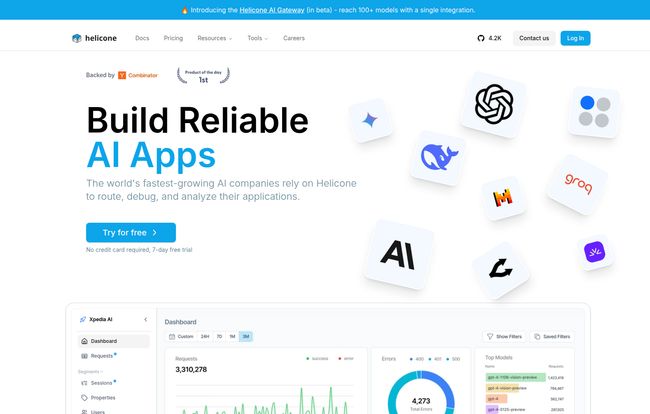
Once it’s running, you get this slick dashboard that shows you requests, latency, token usage, and—most importantly—costs. It’s the kind of visibility that separates a hobby project from a production-ready application.
The Core Features That Actually Matter
A long list of features can be overwhelming. Instead of just listing them, let’s talk about the problems they actually solve. Because that’s what we care about, right?
Finally, a Handle on Spiraling LLM Costs
If you’ve ever gotten a surprise bill from your LLM provider, you know the pain. A poorly optimized agent or a recursive loop can burn through your budget faster than you can say “tokenization.” Helicone’s cost tracking is a lifesaver. It breaks down costs per request, per user, or even per custom property you define. You can finally answer the question, “Which feature is costing us the most?” without having to do complex spreadsheet gymnastics. It’s just… there. Clear as day.
Debugging That Isn’t a Total Nightmare
When an LLM call fails or returns garbage, the debugging process can feel hopeless. Was it a bad prompt? A model issue? High latency? Helicone’s request dashboard lets you see the entire lifecycle of a request. You can see the exact prompt, the model’s response, the headers, and the time it all took. For more complex setups using agents, its tracing capabilities let you follow the entire chain of thought, which is incredibly powerful for pinpointing where things went wrong.
Taming Your Prompts and Experiments
Prompt engineering often feels more like a dark art than a science. You tweak a word here, change a sentence there, and hope for better results. Helicone brings some order to this chaos with its prompt management and experiment features. You can version your prompts, compare the performance of different templates side-by-side, and see which ones are actually performing better based on real user interactions. It helps turn your guesswork into data-driven decisions.
Beyond these big three, you get a whole suite of powerful tools baked in. Things like intelligent caching to reduce redundant calls (and save money), rate limiting to protect your app from abuse, and even guardrails to ensure your LLM’s outputs stay on topic. It’s a very comprehensive package.
Let’s Talk Money: A Breakdown of Helicone’s Pricing
Okay, this is often the make-or-break moment. A great tool with a terrible pricing model is a non-starter. I have to say, Helicone’s approach here is pretty refreshing. They have a structure that scales from a weekend project all the way to a full-blown enterprise.
Here’s a quick look at their plans:
| Plan | Price | Best For | Key Features |
|---|---|---|---|
| Hobby | Free | Solo devs & small projects | 10,000 requests/month, Core dashboard |
| Pro | $20 /seat/month | Small teams scaling up | Core observability, more requests |
| Team | $200 /month | Growing companies | Unlimited seats, Prompts, Evals, SOC-2 |
The Pro plan has usage-based pricing for requests beyond the initial allowance.
The “Hobby” Tier: Genuinely Free to Start
I love this. It’s not a 14-day trial; it’s a truly free plan. With 10,000 requests, you can build and launch a decent-sized personal project or properly evaluate the tool without ever pulling out a credit card. Big thumbs up for this.
The “Pro” Plan: When You’re Getting Serious
At $20 per seat, this is the logical next step. It’s designed for small teams. The key thing here is the usage-based pricing on requests. This is fair, as you only pay for what you use, but it does mean you still need to keep an eye on your usage—something Helicone itself helps you do!
The “Team” & “Enterprise” Plans: For the Big Players
The Team plan at $200/month is interesting because it includes unlimited seats. This is fantastic for growing companies where you don’t want to be penalized for adding more people to the team. You also get access to the more advanced features like Prompts, Experiments, and compliance goodies like SOC-2 and HIPAA. The Enterprise plan is for the giants who need custom deployments and support.
The Good, The Bad, and The Complicated
No tool is perfect, right? After spending some time with it, here’s my honest breakdown.
What I Really Liked
The open-source nature is a huge win for me. It builds trust and offers a path to self-hosting if that’s your jam. The ease of integration is another massive benefit; you can be up and running in minutes. And as I mentioned, the free tier is incredibly generous, making it a no-risk proposition to try out. The UI is also intuitive, which is a big deal when you’re comparing it to some other dev tools that feel like they were designed by engineers, for engineers, with no designer in the room.
A Few Things to Keep in Mind
It’s not all sunshine and rainbows. The usage-based pricing on the Pro plan, while fair, can be a bit unpredictable if your app traffic is spiky. You’ll need to be mindful of that. Also, some of the most powerful features, like prompt management and evaluations, are gated behind the more expensive Team plan. It makes sense from a business perspective, but it’s something to be aware of if you’re a smaller team wanting those advanced tools.
Frequently Asked Questions about Helicone
Is Helicone difficult to set up?
Not at all. For most use cases, it’s a one-line code change to point your existing OpenAI (or other LLM) API calls to the Helicone gateway URL. It’s one of the easiest integrations I’ve come across for a tool this powerful.
Can I host Helicone myself?
Yes. Since Helicone is open-source, you can self-host it on your own infrastructure. This is a great option for companies with strict data privacy requirements or those who want full control over their environment.
Is Helicone a good choice for a startup?
Absolutely. The free Hobby plan is perfect for getting a product off the ground, and they even offer special discounts for startups (50% off for a year!), which shows they’re invested in supporting the ecosystem. The Team plan with unlimited seats is also very friendly to a growing startup’s budget.
How does Helicone compare to something like LangSmith?
Both are leaders in the LLM observability space. From what I’ve seen in the comparison on their site and from my own experience, Helicone often gets praise for its more intuitive and user-friendly interface. While LangSmith is deeply integrated into the LangChain ecosystem, Helicone feels a bit more agnostic and focused on providing a clean, powerful, all-in-one observability experience, regardless of the framework you use.
My Final Verdict on Helicone
Look, the era of building with LLMs without proper observability is over. It’s just too expensive and unpredictable to continue flying blind. Helicone steps into this gap beautifully.
It’s a polished, well-thought-out platform that solves real-world problems for developers. The combination of being open-source, easy to integrate, and having a fair pricing model with a fantastic free tier makes it a compelling choice. It provides the clarity and control you need to move from a fun experiment to a serious, scalable AI product.
If you’re building anything with LLMs and you’re not using an observability tool yet, you should give Helicone a shot. It might just be the co-pilot you’ve been looking for to navigate the exciting, chaotic skies of AI development.


