
Categories: AI Background Remover, AI Design Generator, AI Graphic Design, AI Image Upscaler, AI Logo Generator, AI Vector Graphics, Text to Image
HidingElephant Review: AI Logo Design for Real Designers?

Alright, let’s have a real chat. Over the past couple of years, my feeds have been absolutely swamped with AI tools promising to revolutionize… well, everything. As someone who’s been in the SEO and digital marketing trenches for years, I’ve seen a lot of these “game-changers” fizzle out. Especially in the creative space. Most AI logo generators I’ve tried feel like they’re churning out slightly generic, clip-art-esque designs. They’re fine for a quick blog header or a side-project, but for a real brand? Hard pass.
So when I stumbled upon HidingElephant, my initial reaction was a healthy dose of skepticism. Another one? But then I looked a little closer. The messaging wasn’t aimed at Joe Schmo who needs a logo for his fantasy football league. It was talking to designers. Professional designers. That got my attention. It claims to be an AI tool built by designers, for designers. Now that’s a bold claim. So, I decided to take a look under the hood and see if this particular elephant is worth remembering.
So, What Exactly is HidingElephant?
At its core, HidingElephant is an AI-powered logo design platform. But let’s not lump it in with the five-dollar-logo-mills. This isn’t about replacing designers. From everything I can see, it’s about augmenting their workflow. Think of it less as a vending machine for logos and more like a hyper-caffeinated junior designer who can spitball a hundred ideas in seconds, never gets tired, and works for… well, we’ll get to the price later.
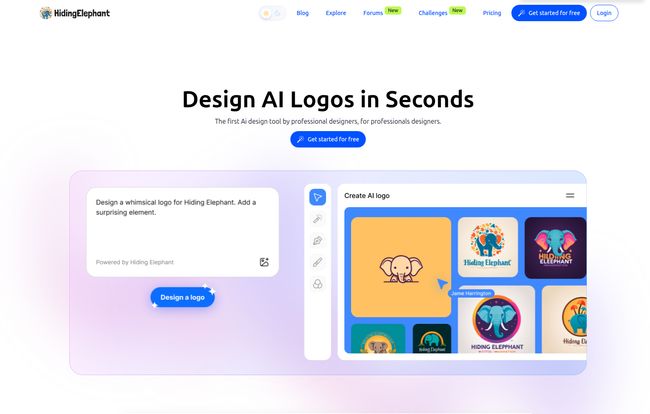
The entire platform is built around a designer’s dashboard. It’s a space to manage projects, iterate on ideas, and tap into AI to break through creative blocks. You start with a prompt—much like Midjourney or DALL-E—but the output and the tools that follow are specifically geared toward logo creation. This distinction is everything.
Visit HidingElephant
The Features That Actually Matter to Designers
Any tool can promise the world. What matters is what it can actually do. Here’s where HidingElephant starts to get interesting.
Beyond Basic Prompts with Magic Prompt
We’ve all been there. Staring at a blank canvas, the client’s brief is kinda vague (“make it pop!”), and the coffee just isn’t working. HidingElephant’s “Magic Prompt” feature is built for this moment. You feed it your initial idea, and it doesn’t just give you one concept; it generates multiple variations. This isn’t just about changing colors. It’s about exploring different styles, compositions, and iconography based on your one starting point. It’s an idea accelerator. Instead of spending hours sketching thumbnails, you can get a visual starting point in minutes and then start refining, which is where a professional’s real skill comes into play.
The Holy Grail: Pixel to Vector in a Click
Okay, this is the one. This is the feature that made me sit up straight. HidingElephant has a “Vectorize” function. For anyone not in the design world, let me explain why this is a massive deal. Most AI image generators create raster images (pixels, like a JPEG or PNG). They look great on screen, but try to blow them up for a billboard or get them screen-printed on a t-shirt, and you get a blurry, pixelated mess. Professionals work with vector files (like SVG or AI files). Vectors are made of mathematical paths, so you can scale them to the size of a planet with zero loss in quality.
The process of converting a raster logo to a vector one, often called tracing, can be a tedious, soul-crushing task. A tool that can do this reliably and cleanly with a single click? That saves hours of work. And let’s be real, thats a big deal for any designer’s productivity.
A Dashboard and Community That Doesn’t Suck
The platform seems to understand that design is a process. It’s not a one-and-done transaction. Having a proper dashboard to organize your different projects, client work, and experiments is a small but critical touch. It shows they’re thinking about actual day-to-day use. They also highlight a “Community Images” section, which I’m a big fan of. Seeing what other designers are creating with the tool is not only inspiring but also a great way to learn how to write better prompts and push the AI’s capabilities. It’s a smart move that fosters a sense of shared discovery.
Who Is This AI Tool Really For?
Let’s be blunt. This is not for your aunt who wants a logo for her Etsy store selling knitted cat hats (though she could probably use it). This is for the freelance designer juggling five clients, the in-house design team trying to refresh a brand, or the agency creative who needs to produce three solid logo concepts by end of day. It’s for people who already understand the principles of good design but want to speed up the most time-consuming part of the process: ideation.
“It seems HidingElephant isn’t trying to be the artist; it’s trying to be the world’s most advanced paintbrush.”
Someone who doesn’t know what makes a good logo will still produce a bad logo with this tool. But someone who does know their stuff can use it to explore avenues they might not have considered, saving precious time and mental energy for the refinement, presentation, and strategy—the parts of design that AI can’t touch.
Let’s Talk About the Elephant in the Room: The Pricing
Here’s the catch. As of my review, the pricing isn’t transparently listed. The pricing page has a toggle for Monthly and Yearly plans, but no actual numbers. There’s a disclaimer: “Terms, features, and pricing may change during the Early Bird and Beta phases.”
Honestly? This is pretty standard for a new tool in beta. It’s frustrating as a potential user, but it makes sense from their end. They’re likely still figuring out server costs, feature tiers and what the market will bear. I’d expect to see a subscription model, perhaps with different tiers based on the number of logos you can generate or whether you get premium access to features like vectorization. They might also go with a credit-based system. It’s a wait-and-see situation, but the fact that they have a “Get started for free” button suggests you can at least try before you buy, which is always a plus in my book.
The Good, The Quirky, and The AI-Generated
So where do I land on HidingElephant? I’m cautiously optimistic. What I love is its clear focus. It knows it’s for professionals and isn’t trying to be everything to everyone. The vectorization feature alone is worth the price of admission, whatever that price turns out to be. The ability to generate tons of variations quickly could be a legitimate cure for creative block.
What gives me pause? The main thing is the reliance on a prompt. While it’s a powerful system, sometimes you don’t have a clear prompt in your head. You just want to start noodling with shapes. I wonder if they’ll integrate more traditional-style editing tools down the line. And of course, the pricing ambiguity makes it hard to give a full-throated recommendation just yet.
Final Thoughts: Is HidingElephant a Design Revolution?
Revolution is a strong word. I’d call it a powerful evolution. Tools like this are the future of the creative industry, whether we like it or not. The smart move isn’t to fight against them, but to figure out how to integrate them into our workflows to become more efficient, more creative, and more valuable to our clients. HidingElephant seems to be one of the first AI logo tools that truly gets that. It’s not here to take your job; it’s here to make you better at it.
If you’re a professional designer who’s been curious about AI but turned off by the more gimmicky tools out there, I think HidingElephant is definitely one to watch. Go sign up for the beta. Play around with it. The worst that can happen is you get a few cool ideas for your next project.
Frequently Asked Questions about HidingElephant
1. Do I need to be a professional designer to use HidingElephant?
While the platform is designed with professionals in mind, anyone can use it. However, you’ll get the most out of it if you have a foundational understanding of logo design principles. A beginner might be overwhelmed by the options, whereas a pro will know how to guide the AI and refine the results.
2. Are the logos I create really in vector format?
Yes, one of the standout features is the ‘Vectorize’ tool. It converts the AI-generated pixel-based images into scalable vector graphics (SVG), which are essential for professional use like printing and large-format applications.
3. What does HidingElephant cost?
As of late 2023, HidingElephant is in an Early Bird/Beta phase, and its final pricing structure has not been publicly announced. They offer a free trial, and future plans will likely be a monthly or yearly subscription.
4. Can I use the logos I create for commercial projects?
Generally, AI art platforms have terms of service that outline commercial usage rights. Given that HidingElephant targets professionals, it’s highly likely that paid plans will include full commercial rights, but you should always check their latest Terms of Service to be certain.
5. How is this different from using Midjourney to create a logo?
While both use prompts, HidingElephant is a specialized tool. It’s built specifically for logo design, offering features like easy variation generation, background removal, and most importantly, the one-click vectorization which Midjourney lacks. The entire workflow is tailored for creating a usable brand asset, not just a cool image.
Reference and Sources
- HidingElephant Official Website – For the most up-to-date information on features and pricing.


