
Categories: AI Ad Generator, AI Video Generator, Image to Video
Higgsfield Review: AI Camera Control for Your Videos?

For the last year or so, my social feeds have been flooded with these weird, wobbly, and frankly, kinda dreamy AI-generated clips. You know the ones. They look cool for about three seconds, and then you notice the subject has seven fingers or the background is melting like a Dali painting. It’s been fun, a novelty, but rarely has it felt… controllable. I’ve always felt like I was just rolling the dice, hoping the AI overlords would bless me with something usable.
It often feels like you’re whispering a wish into the void. You type in a prompt, cross your fingers, and get back something that’s either magic or a complete mess. There’s been a serious lack of intentionality. A lack of control.
Then I stumbled upon Higgsfield. The tagline on their site—”THE ULTIMATE AI-POWERED CAMERA CONTROL FOR OPERATORS”—caught my eye. Camera control? That’s a bold claim. That’s the language of cinematographers, not just prompt engineers. It promises to take us from being a passenger on the AI train to being the one laying the tracks. So, naturally, I had to see if it was just marketing fluff or if we can finally put on our director’s beret and call the shots.
So, What on Earth is Higgsfield?
Let’s get this straight first: Higgsfield isn’t quite like some of the other text-to-video platforms you might have played with. Its core magic trick is turning a single, static photo into a dynamic, cinematic video clip. Think about that for a second. Got a great product shot? A cool piece of concept art? A favorite photo from your last trip? Higgsfield’s goal is to breathe life into it.
But here’s the kicker and the thing that really matters. It’s not just about making the picture move. It’s about how it moves. I’d describe it less as a simple “AI video generator” and more as an AI cinematography simulator. Instead of just saying “make this photo a video,” you’re telling it, “I want you to perform a slow dolly zoom in on the subject, add a little film grain, and give me a shallow depth of field.” See the difference? It’s a whole other ball game.
The Director’s Toolkit: A Look at the Features
When you pop the hood on Higgsfield, you see pretty quickly that this isn’t a one-trick pony. It’s built around giving you, the creator, a toy box full of levers and dials to pull. It’s genuinely exciting for anyone who’s been frustrated by the randomness of other tools.
The Camera Controls are the Real Star of the Show
This is it. This is the main event. Forget vague descriptions. Higgsfield gives you a grid of actual camera moves. We’re talking about things like:
- Dolly In / Dolly Out: Smoothly moving the entire camera forward or backward.
- Crane Shot: Sweeping the camera up or down for that dramatic reveal.
- Orbit Left / Orbit Right: Circling around your subject, perfect for product showcases.
- Slow Pan: A gentle horizontal scan across your image.
- Zoom In / Zoom Out: The classic lens-based zoom for focus and emphasis.
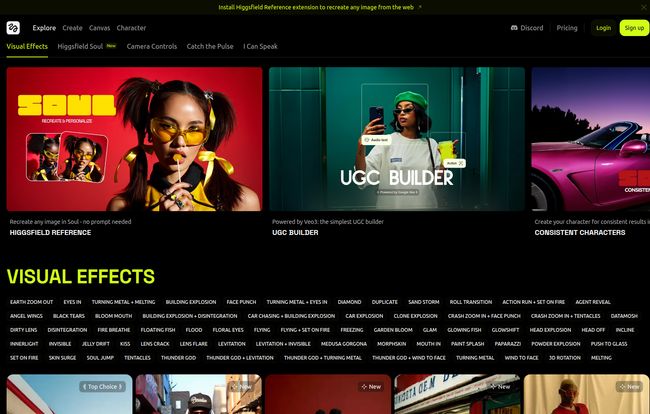
And that’s just scratching the surface. There are dozens of them. For anyone who’s ever tried to fake a camera move in After Effects, you know how much work this saves. It’s the difference between describing a feeling and giving direct, actionable instructions. This is where Higgsfield truly starts to shine, giving you a level of granular control that I haven’t seen executed this intuitively elsewhere.
Visit Higgsfield
Painting with AI Light: Visual Effects and ‘Soul’
Once you’ve picked your camera move, you get to be the colorist and stylist. Higgsfield splits this into two fascinating categories. First, there’s the straightforward Visual Effects. This includes all the technical goodies you’d expect: Lens Flare, Film Grain, Light Leaks, Chromatic Aberration, and even a VHS Look for that retro vibe. It’s a solid set of tools for dialing in a specific aesthetic.
But then there’s the section they call Higgsfield Soul. I love this. It’s less technical and more about mood and emotion. Here you’ll find styles like Dreamy, Ethereal, Ghibli-esque, and Night Drive. This is where the artistry comes in. You can combine a technical camera move, say a ‘Dolly In’, with an emotional style like ‘Ethereal’ to create something truly unique. It’s a fantastic way to bridge the gap between technical direction and artistic intent.
From Still Image to Sizzling Product Showcase
The most immediate and practical application I see here is for e-commerce and marketing. We all know video gets more engagement on social media, but getting video of every single product can be a logistical nightmare. The ability to take a clean, professional product photo from a Shopify listing and instantly turn it into a dynamic, orbiting video clip for an Instagram Reel? That’s not just cool, that’s a massive time and money saver.
What’s the Catch? A Breakdown of Higgsfield’s Pricing
Alright, this is all great, but what’s it gonna cost? This is where we need to talk about the credit-based system. And, in a moment of beautiful irony, when I went to their pricing page to grab the details, I was met with a “Sorry, we couldn’t load our plans right now.” message. See? Even the AI platforms have a case of the Mondays. A truly human touch!
But based on the info I gathered before their site had its little hiccup, here’s the general structure:
| Plan | Price (Billed Annually) | Good For |
|---|---|---|
| Free Trial | $0 / month | Just dipping your toes in and seeing what’s possible. Generations are limited. |
| Basic | $9 / month | Hobbyists or creators needing a few clips a month. |
| Pro | $20.30 / month | Social media managers, small businesses, and freelancers who need more volume and commercial use rights. |
| Ultimate | $55.30 / month | Agencies, studios, and power users who are creating AI video content at scale. |
The credit system is pretty standard for AI tools, but it’s something to be aware of. Each generation will cost you credits, so you need to be a bit mindful. This isn’t an all-you-can-eat buffet, which is one of the main downsides. The free trial is also a bit restrictive, which I get, but it can be hard to feel out teh full power of the tool before committing.
So Who is Higgsfield Actually For?
After playing around with it, I’ve got a pretty clear idea of who needs to drop what they’re doing and try this right now:
- Social Media Managers & Marketers: This is your new secret weapon. Turn static assets into thumb-stopping video content in minutes. Seriously.
- E-commerce Store Owners: Animate your product photos. Create simple, clean, and effective video ads without a camera crew.
- Artists and Indie Creators: Have a piece of digital art you want to bring to life? This is an incredible tool for adding motion and emotion to your work.
Who is it not for? If you’re looking to create a 10-minute short film with complex character interactions and dialogue, this ain’t it. At least, not yet. This is a tool for creating powerful, short-form video moments with an unparalleled level of directorial control.
Frequently Asked Questions about Higgsfield
What are credits and how do they work?
Credits are the currency you use on Higgsfield. Each time you generate a video—by selecting an image, a camera move, and a style—it consumes a certain number of credits from your account. Your monthly plan determines how many credits you get each month.
Can I get more credits if I run out?
Yes, most platforms like this allow you to buy additional credit packs if you run out before your monthly renewal. Or, you can upgrade your plan to get a larger monthly allowance.
Do my unused credits roll over to the next month?
This is a big one. Typically, on many SaaS platforms, monthly credits do not roll over. It’s a use-it-or-lose-it system to encourage consistent usage. You’d want to check Higgsfield’s most current terms, but I would operate under the assumption they probably don’t.
What’s the main difference between Higgsfield and RunwayML or Pika?
That’s a great question. While tools like Runway and Pika are incredibly powerful and often focus on text-to-video or video-to-video transformations, Higgsfield’s unique selling proposition is its intense focus on camera control for image-to-video. It’s less about generating a whole new scene from scratch and more about artfully directing motion within an existing image. It feels more like a cinematographer’s tool.
Can I use the videos I create for commercial purposes?
Yes, but this is usually tied to the paid plans. The Free Trial is often for personal, non-commercial use, while the Basic, Pro, and Ultimate plans grant you a commercial license to use the videos in your marketing, ads, and other business projects.
Final Thoughts: Is Higgsfield Worth a Spin?
Absolutely. For me, Higgsfield represents a significant shift in the AI video space. We’re moving from chaotic creativity to controlled, intentional creation. It puts the power back in the hands of the creator, offering a toolkit that feels familiar to anyone with even a basic understanding of film language.
It’s not perfect. The credit system will be a turn-off for some, and it won’t replace a full video production suite. But that’s not what it’s trying to do. It’s a specialized tool that does one thing exceptionally well: it lets you direct the AI. It finally gives you that director’s chair, and for any creator who’s been frustrated by the limits of AI video, that’s a very exciting thing indeed.


