
Categories: AI Assistant, AI Message Generator, AI Predictions
HireHarmonyAI Review: Your LinkedIn Recruiting AI?

If you’re in recruitment or HR, a huge chunk of your day can get swallowed whole by the LinkedIn vortex. You know what I’m talking about. The endless scrolling, the Boolean strings that feel like you’re casting ancient spells, and the soul-crushing task of writing yet another InMail that you pray doesn’t sound like it was written by a 2005-era chatbot.
We’ve all been there, sifting through hundreds of profiles, looking for that one golden nugget. It can be a grind. So, naturally, when a new wave of AI tools promised to be our digital pickaxe, my ears perked up. The latest one to cross my desk is called HireHarmonyAI, a Chrome extension that claims to bring some sanity back to LinkedIn sourcing.
But as we’ve learned in the SEO and digital marketing world, there’s a lot of shiny new tech that’s just vaporware. So, I decided to take a look, pop the hood, and see if this thing is actually the helpful co-pilot it claims to be, or just more noise in an already crowded cockpit.
So, What Exactly is HireHarmonyAI Supposed to Do?
In a nutshell, HireHarmonyAI is a Chrome extension that sits on top of LinkedIn. It’s designed to be your on-the-fly analyst. When you’re on a candidate’s profile, it springs to life, pulling data and giving you what it calls a “comprehensive profile analysis.” Think of it as having a junior researcher whispering in your ear, pointing out things you might have missed during your tenth coffee of the day.
It’s not trying to replace you—and thank goodness for that. Instead, it aims to automate the most tedious parts of the initial screening process: figuring out if a person is a good fit, if they’re even likely to move, and how to best reach out to them. It’s a pretty compelling pitch, I have to admit.
Visit HireHarmonyAI
The Features That Actually Matter to Recruiters
Okay, let’s get into the weeds. A feature list is just a feature list until you see how it applies to the daily grind. Here’s my breakdown of what HireHarmonyAI brings to the table.
Beyond the Resume: AI-Powered Profile Analysis
This is the core of the tool. It goes beyond just matching keywords from a job description. The extension analyzes a candidate’s entire profile—their summary, experience descriptions, recommendations—to build a more holistic picture. One of the more interesting claims is its “Personality and Communication Style Assessment.” Now, I’m always a bit skeptical of AI reading personality. It can feel a bit like digital phrenology. But, in this case, it’s less about putting someone in a box and more about suggesting communication styles. For example, it might suggest that a candidate’s writing is very direct and data-driven, so you should probably skip the fluffy intro in your outreach. That’s actually useful advice.
The Crystal Ball: Predicting Job-Switch Likelihood
This feature is a head-turner. HireHarmonyAI uses its algorithms to predict how likely a candidate is to be open to a new role. It probably looks at things like time in their current role, updates to their profile, network activity, and other signals we try to piece together manually. Is it 100% accurate? Of course not. No tool is. But even if it just slightly improves your odds of reaching out at the right time, that’s a massive advantage. It helps prioritize who you spend your precious InMail credits on, moving the most promising leads to the top of the pile.
Automating Outreach Without Sounding Like a Robot
Here’s where the rubber meets the road for me. I’ve seen so many terrible automated messages. You have too. “Dear [First Name], I saw your profile and was impressed…” Ugh. HireHarmonyAI attempts to solve this by auto-generating personalized messages. It pulls details from the person’s profile—like a specific project they mentioned, a skill they highlighted, or even their university—to craft a starting point for your message. The idea is that you take this AI-generated draft, polish it with your own voice, and send something that feels a lot more personal. It’s a time-saver, not a replacement for genuine human connection. And that’s the right way to think about it.
The All-Important Question: What’s the Catch? (Pricing & Setup)
Alright, nothing good in life is free, right? When I saw the pricing, I was intrigued. It’s not a subscription, which is a breath of fresh air in the SaaS-obsessed world we live in.
| Plan | Cost | Key Detail |
|---|---|---|
| One Time Payment | $19.99 | Requires you to bring your own OpenAI API key. |
A $19.99 one-time payment feels almost too good to be true. And that’s where the catch comes in. The fine print says, “OpenAI API key needed for this plan.”
What does this mean for you? It means the tool itself doesn’t handle the AI processing. It uses your personal or company OpenAI account to do the heavy lifting. This is a double-edged sword. On one hand, it keeps the upfront cost of the tool ridiculously low. You only pay OpenAI for what you actually use, which for a light user could be just a few bucks a month. On the other hand, it means you have to go get an API key from OpenAI, plug it in, and keep an eye on your usage. For someone who isn’t super techy, this might be a small hurdle. For high-volume recruiters analyzing thousands of profiles, those API costs could add up, potentially costing more than a flat-rate subscription from a competitor. It’s a trade-off: simplicity vs. cost control.
A Minor Hiccup in My Investigation…
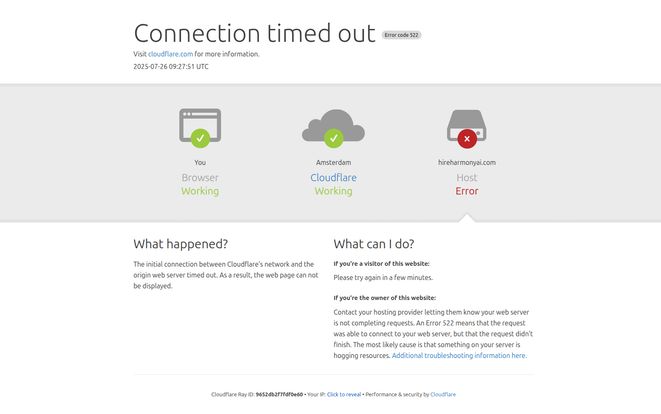
Now, in the spirit of full transparency and real-world testing, something happened while I was writing this. I went back to their website—hireharmonyai.com—to double-check a detail on the pricing page. And, well… I was greeted by a Cloudflare error. “Error 522: Connection timed out.”
This means their server wasn’t responding. Is it a temporary glitch? A sign of a small, scrappy startup still working out the kinks? Probably. I’m not writing them off because of it, but it’s something to be aware of. It’s a reminder that when you’re dealing with new tools from smaller developers, you might occasionally hit a bump in the road. For what its worth, a downed website doesn’t necessarily mean the Chrome extension itself is down, as they can operate independently, but it’s not a great look.
My Honest Take: Is HireHarmonyAI Worth a Shot?
So, the final verdict. I think for the right person, HireHarmonyAI could be a fantastic little tool. If you’re an independent recruiter, part of a small HR team, and you’re comfortable with the idea of managing your own API key, that $20 one-time fee is an absolute steal. The potential time savings on sourcing and initial outreach are huge, and the features are genuinely geared toward solving real-world recruiting problems.
However, if you work for a large corporation with strict software procurement rules, or if the idea of an API key gives you a headache, you might want to look for a more all-in-one, enterprise-grade solution. This tool feels built for the agile, tech-savvy recruiter who wants power and control without a hefty monthly bill. It’s a tool for the DIY-er, not the person who wants a full-service package with a dedicated account manager.
Frequently Asked Questions about HireHarmonyAI
How does HireHarmonyAI actually work?
It’s a Google Chrome extension that you install in your browser. When you’re on a LinkedIn profile page, you can activate the extension. It then sends the profile’s public data to OpenAI’s models via your API key to perform the analysis and generate insights right there on your screen.
Do I really have to pay for OpenAI separately?
Yes. The $19.99 is for the extension itself. Any analysis it performs is charged to your OpenAI account. For most people, the cost per-profile is fractions of a cent, so it’s generally very affordable unless you are analyzing thousands of profiles a day.
Is it hard to set up the OpenAI API key?
Not really, but it can feel intimidating if you’ve never done it. It involves creating an account on OpenAI’s platform, going to the API section, creating a new “secret key,” and then copying and pasting that key into the HireHarmonyAI settings. There are plenty of guides online, and it usually only takes a few minutes.
Can it really predict when someone will switch jobs?
“Predict” is a strong word. I’d say it makes an educated guess. It analyzes patterns and provides a probability score. It’s a data point, not a guarantee. You should use it to prioritize your outreach, not as absolute fact.
Is my LinkedIn data safe when using a Chrome extension?
This is a great question for any Chrome extension. You should always review an extension’s permissions. HireHarmonyAI needs to read data on the LinkedIn page to work. The actual analysis is done via OpenAI, which has its own data privacy policies. It’s a good practice to be mindful of what extensions you grant access to.
What happens if the website is down? Can I still use the tool?
Most likely, yes. The Chrome extension, once installed and configured with your API key, should function independently of their marketing website. The website being down mainly affects new customers or those looking for support documentation.
In the end, tools like HireHarmonyAI represent a shift in how we can approach our work. They’re not magic wands, but they can be powerful force multipliers. For a small one-time investment, this particular tool offers a chance to get some of your valuable time back and focus on what really matters: building genuine relationships with great candidates. And in this market, that’s an edge worth exploring.
Reference and Sources
- HireHarmonyAI Pricing Page: https://hireharmonyai.com/pricing
- OpenAI API Information: https://openai.com/api/


