
Categories: AI Art Generator, AI Avatar Generator, AI Background Remover, AI Book Writing, AI Colorize, AI Copywriting, AI Headshot Generator, AI Icon Generator, AI Image Upscaler, AI Lyrics Generator, AI Mockup Generator, AI Photo Restoration, AI Product Description Generator, AI Social Media Post Generator, NFTs, Object Remover AI
Hotpot.ai Review: AI Graphic Design Made Surprisingly Easy

You need a graphic for a blog post, a new banner for your LinkedIn profile, or maybe a quick mockup of your app on a phone. You need it now. You don’t have the budget to hire a designer for a five-minute job, and the thought of opening up Photoshop makes you want to go lie down. The learning curve is a cliff, and you just need a simple, decent-looking image.
For years, the choice has been between wrestling with professional-grade software or using template tools that can sometimes feel a bit… generic. But the whole AI boom has started to change the game. I’ve been keeping a close eye on tools that promise to automate the grunt work, and that’s how I stumbled upon Hotpot.ai. It’s not just one tool, but a whole collection of them, and it claims to help you create amazing graphics, pictures, and text with the power of AI.
So, is it just another drop in the ocean of AI tools, or is it something genuinely useful for the everyday creator, marketer, or business owner? I decided to get my hands dirty and find out.
Visit Hotpot.ai
What Exactly is Hotpot.ai?
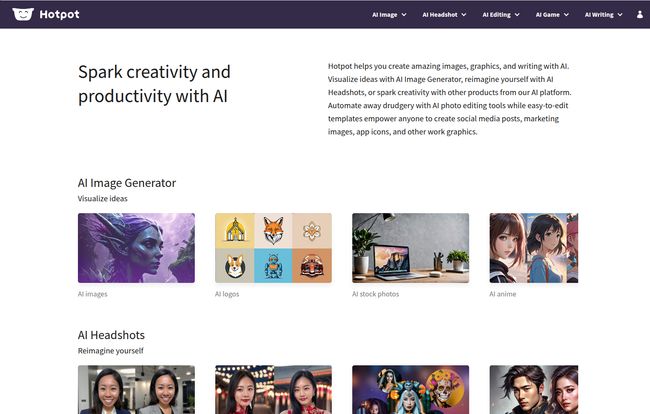
Think of Hotpot.ai less as a single application and more like a digital Swiss Army knife for visual content. It’s a platform that hosts a bunch of different, specialized AI tools. You don’t go there to find one giant, intimidating dashboard with a million buttons. Instead, you pick the specific job you need done. Need to generate a headshot? There’s a tool for that. Need to remove the background from a product photo? There’s a different tool for that. It’s all about solving specific problems, fast.
The whole idea is to automate the drudgery and spark some creativity. It’s built for people who value their time and just want to get a good result without needing a degree in design theory. Some might say that takes the art out of it, but in my experience, it just removes the headache.
The Standout Features: A Tour Through the Hotpot Toolbox
I spent a good while clicking around and testing the main offerings. Some were surprisingly powerful, while others were more… niche. Here’s a breakdown of the tools that really caught my eye.
The AI Headshot & Art Generator: Your Creative Co-Pilot
Okay, the AI Art Generator is just plain fun. You’ve seen these everywhere. You type in a prompt—something wild like “A raccoon CEO in a pinstripe suit, photorealistic”—and the AI spits out a few interpretations. It’s fantastic for creating truly unique blog headers, abstract backgrounds, or social media images that are guaranteed to stop the scroll. The quality is pretty solid, and it’s a great way to break out of a creative rut.
But the real star of the show for me, from a purely practical business standpoint, is the AI Headshot Generator. Getting professional headshots is a pain. It’s expensive, it’s time-consuming, and let’s be honest, it’s awkward. Hotpot’s tool lets you upload 10-20 of your own selfies (just regular photos from your phone), and the AI generates a whole slew of professional-looking headshots in different styles. Corporate, casual, you name it. For anyone needing to update their LinkedIn profile or ‘About Us’ page, this feature alone could be worth the price of admission. It’s not perfect, but it’s a whole lot better than that cropped photo from your cousin’s wedding.
Everyday AI Editing Tools That Actually Save Time
This is where the platform really shines for marketers and content creators. These aren’t flashy, but they solve problems that pop up constantly.
- AI Background Remover: A classic. We’ve all tried to painstakingly trace around an object in an image editor. This tool does it in seconds. Perfect for creating clean product shots for an e-commerce site or isolating a person for a collage.
- AI Photo Upscaler: Found a great image for your article, but it’s tiny and pixelated? This tool uses AI to increase the resolution and sharpen the details. It’s not magic, but it can definitely rescue a low-quality image and make it usable. I’ve used it to salvage old company photos for a ‘throwback’ post, and it worked wonders.
- AI Object Remover: Photobomber in the background? Unwanted logo on a stock image? This tool lets you just paint over the thing you want to remove, and the AI fills in the background. It’s another one of those features that saves you a trip to a more complex editing program.
These little utilities are the unsung heroes of the platform. They just work, and they save a ton of time.
Templates for the Busy Marketer
If you’re not looking to generate something from scratch, Hotpot.ai has you covered with a range of easy-to-edit templates. This feels a bit more like what you’d expect from a tool like Canva, but it’s still super useful. They have templates for all the usual suspects: Facebook posts, Instagram stories, YouTube banners, and LinkedIn covers.
Where it gets more interesting is with their Device Mockups and App Graphics. If you’ve ever needed to show what your website looks like on a laptop screen or how your app appears on an iPhone, you know it can be a fiddly process. Here, you can just drop your screenshot into a template and have a professional-looking mockup in under a minute. It’s incredibly efficient.
The Big Question: How Much Does Hotpot.ai Cost?
Alright, let’s talk money. Hotpot.ai operates on a credit-based system, which has its pros and cons. The great thing is that you can explore and use most of the products for free on a limited basis. This is perfect for trying before you buy, to see if the tools actually work for your needs.
However, for commercial use, higher quality outputs, or advanced settings, you’ll need to purchase credits. The price in credits varies depending on what you’re doing. For example, generating a set of AI headshots might cost more credits than simply removing a background from one image.
Here’s a quick summary of their pricing approach:
| Tier | Details |
|---|---|
| Free Exploration | Most tools can be used for free with some limitations. Great for personal projects or testing. |
| Pay-as-you-go Credits | Required for commercial usage, advanced features, and removing watermarks. You buy a pack of credits and spend them as you use the tools. |
| Self-Hosted (Enterprise) | A premium option for large companies that want more control and security. You have to contact them for this. |
I personally find the credit system flexible, but it can make budgeting a little tricky if you have inconsistent usage. You can check out the full details on their pricing page. It’s definately something to consider.
My Real-World Take: The Good and The Not-So-Good
No tool is perfect. After playing around with Hotpot.ai, here’s my honest take.
The Good Stuff is pretty obvious. The sheer variety of tools in one place is its biggest strength. You can go from brainstorming an AI logo to creating a professional headshot, to then placing it on a LinkedIn banner template all within the same ecosystem. It’s incredibly accessible for non-designers. The user interface is clean and straightforward. You pick a tool, you follow the simple steps, and you get a result. The free access for exploration is a huge plus, letting you see the value before you ever pull out your credit card.
On the other hand, there’s Room for Improvement. The credit system, while flexible, can feel a bit vague. It’s not always immediately clear how many credits a specific task will cost until you’re in the workflow. Also, because it’s a suite of many simple tools, advanced users or professional designers will probably hit the ceiling of its capabilities pretty quickly. This isn’t a replacement for the Adobe Creative Suite, nor does it pretend to be.
Who is Hotpot.ai Actually For?
So, who gets the most out of this platform? In my opinion, the ideal Hotpot.ai user is the solo entrepreneur, the busy blogger, the small marketing team, or the app developer. It’s for the person wearing multiple hats who needs to produce a wide range of decent-quality visual assets without a steep learning curve or a hefty software subscription.
If you’re a professional graphic designer who lives and breathes in Illustrator and needs granular, pixel-perfect control over vector paths, this probably isn’t the tool for you. But if you’re a marketer who just thought, “Ugh, I need a quick graphic for our new promo,” then you are exactly who this was built for.
Ultimately, Hotpot.ai successfully carves out its own niche. It’s not trying to be the most powerful design tool on the market. It’s trying to be the most convenient collection of AI-powered design helpers. And in my book, it largely succeeds.
Is it going to replace a skilled human designer? Of course not. But is it an incredibly powerful and useful tool to have in your back pocket for day-to-day content creation needs? Absolutely. I’d recommend giving the free tools a spin. You might be surprised at how often you find yourself thinking, “Oh, I bet Hotpot can do that.”
Frequently Asked Questions about Hotpot.ai
- Is Hotpot.ai free to use?
- Yes, you can use most of the tools for free for exploration and personal projects, but there are limitations. For commercial use, higher-resolution downloads, and advanced features, you’ll need to use credits.
- Can I use the images I create for my business?
- Yes, that’s what the credit system is for. Once you use credits for a creation, you are generally granted a commercial license to use it for your marketing, products, or other business needs.
- How does Hotpot.ai compare to a tool like Canva?
- They serve different, though sometimes overlapping, purposes. Canva is primarily a template-based graphic design editor. Hotpot.ai is better described as a suite of specialized AI tools. You go to Hotpot to generate a headshot or upscale a photo with AI, whereas you’d go to Canva to arrange elements on a pre-designed layout.
- Is the AI Headshot Generator safe?
- It’s as safe as any online service where you upload images. You upload your own photos for the AI to process. As always, it’s wise to be aware of the platform’s privacy policy, but it’s designed for the express purpose of creating headshots from your images.
- Do I need any design skills to use Hotpot.ai?
- Absolutely not. The entire platform is built with non-designers in mind. The interfaces are simple, and the AI does most of the heavy lifting for you.


