
Categories: AI Background Remover, AI Face Swap Generator, AI Illustration Generator, AI Image Generator, AI Person Generator
Icons8 Review: Your All-in-One Design Asset Toolkit?

If you’re a marketer, a blogger, a developer, or pretty much anyone creating anything for the web, you’ve been there. Staring at a blank canvas. You need an icon. Not just any icon, but one that matches the other ten icons you’re using. Or you need a cool illustration for a landing page that doesn’t look like every other tech startup’s generic blue-and-purple people. The struggle is real.
For years, my life was a chaotic scramble across a dozen different stock sites. A dash of Flaticon here, a sprinkle of Unsplash there, maybe a desperate search on Dribbble for an illustrator who’s available. It’s like trying to cook a gourmet meal by raiding five different grocery stores. You get it done, but man, it’s exhausting.
Then I stumbled back upon Icons8. I say “stumbled back” because I’d used their free icons years ago, but hadn’t really paid attention to how much it had grown. It’s not just an icon library anymore. It’s a full-blown design ecosystem. And honestly? I’m pretty impressed.
More Than Just Icons – What’s Actually in the Box?
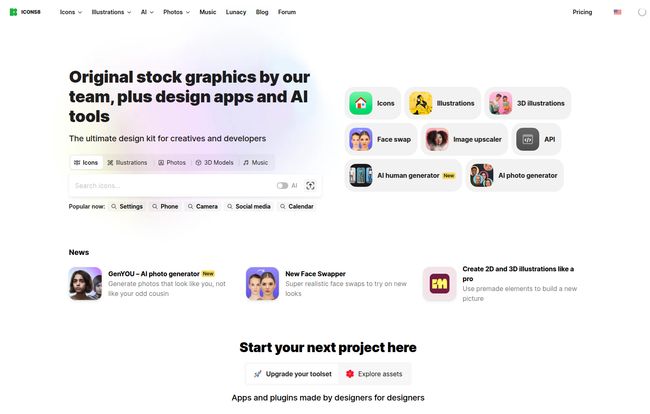
The first thing that hits you is the sheer variety. We’re talking about a massive collection of design assets. But it’s not just a quantity game; there’s a consistent thread of quality running through it all, which they achieve by having a lot of stuff made by their own team of designers. That means you can actually build a cohesive brand look without pulling your hair out.
You’ve got your core food groups:
- Icons: This is their bread and butter. They have dozens of styles, from clean and corporate to funky and hand-drawn. And they’re available in PNG and SVG, so they scale beautifully.
- Illustrations: These aren’t your grandma’s clipart. They partner with top Dribbble illustrators to create vector illustrations that are genuinely stylish and modern.
- Stock Photos: A huge library of photos that feel a bit more authentic and less “business-people-laughing-at-a-salad” than some other sites.
- Royalty-Free Music: An often-overlooked asset for video creators and podcasters. Finding good, affordable background music is a nightmare, and they have a solid collection.
Visit Icons8
The real magic, for me, is how these elements can work together. You can find an icon set, matching illustrations, and even photos that all share a similar aesthetic. It’s a massive time-saver.
The AI Tools That Genuinely Save You Time
Okay, I know. Every company on earth is slapping an “AI” label on their products right now. Most of it is marketing fluff. But some of the AI tools inside Icons8 are… actually useful. Shocking, I know.
The Practical Workhorses: Background Remover and Smart Upscaler
Let’s start with the basics. The Smart Upscaler is a lifesaver. Ever found the perfect image, but it’s a low-res postage stamp? This tool uses AI to enlarge it without turning it into a pixelated mess. It’s not perfect, but it’s saved my bacon on more than one occasion. The Background Remover does exactly what it says on the tin. It’s fast, surprisingly accurate, and a great alternative if you don’t want to fire up Photoshop just to cut out a product shot.
Getting Creative with AI Human and Face Generators
This is where things get a bit more futuristic. The Human Generator and Face Generator create realistic (or stylized) portraits of people who… don’t exist. Why is this useful? For one, you avoid all the legal and ethical headaches of model releases and using real people’s likenesses. You can create buyer personas, mockups, or app avatars on the fly. It’s a little uncanny valley at times, but also incredibly powerful.
Some might argue this is a step towards soulless, generic design, but I see it differently. It’s a tool. In the right hands, it’s about speed and iteration. In the wrong hands, well, any tool can be misused. For me, it’s a sandbox for ideas.
Let’s Talk Money – Breaking Down the Icons8 Pricing
Alright, the all-important question: what’s this going to cost me? The pricing structure is… flexible. Maybe a little confusing at first, but it offers options, which I appreciate.
First off, there’s a Free plan. You can get a lot of assets for free, but there’s a catch: you have to provide attribution. That means placing a link back to Icons8. For a personal blog or a small project, that’s totally fine. But on a professional client website or a sleek corporate page? That little “Icons by Icons8” link can kind of kill the vibe. It screams “we didn’t want to pay for assets”.
This is where the paid plans come in. You can subscribe to individual asset types or bundle them up. Here’s a quick look at their monthly pricing (it’s a bit cheaper if you pay yearly):
| Plan | Monthly Price (Approx.) | What You Get |
|---|---|---|
| Free | $0 | Limited formats, must give credit with a link. |
| Icons Plan | $13 | All icons, no attribution, SVG formats. |
| Illustrations Plan | $13 | All illustrations, no attribution, vector source files. |
| Graphics + Music (Best Value) | $19 | All icons, illustrations, photos, and music. No attribution. |
| AI Tools | Varies | Some are free to start, others have their own pricing. |
In my opinion, the $19/month Graphics + Music plan is the sweet spot. For less than the cost of a few fancy coffees, you get unlimited access to almost their entire creative library, without the hassle of attribution. If you’re a content creator, that’s a fantastic deal.
Workflow Integration – Does It Actually Fit In?
A library of assets is useless if it’s a pain to access them. Thankfully, Icons8 gets this. They have desktop apps for Mac and Windows (I remember their old app, Pichon) that let you search and drag-and-drop assets right into your work.
But the real winner for me is the Figma plugin. So many of us live in Figma these days, and being able to pull icons and illustrations directly into my design files without leaving the application is just… chef’s kiss. It removes a ton of friction from the creative process.
The Not-So-Perfect Parts
No tool is perfect, right? While I’m a fan, there are a few things to keep in mind. The free license attribution is a big one for professional use. Also, even with a subscription, you need to read the fine print. The licenses are generous, but they do have their limits, so always be sure what you’re downloading and how you can use it.
And the AI tools, while cool, are still AI. They can produce funky results. The hands on an AI-generated human might have six fingers, or the face swapper might look like a horror movie poster. You still need a human eye to curate and touch up the results. Don’t expect magic buttons that do all the work for you.
My Final Verdict – Who Is Icons8 Really For?
So, should you sign up? I think Icons8 is an absolute powerhouse for a specific type of creative.
It’s a fantastic choice for:
Solo entrepreneurs and small businesses who need professional-looking assets without a big budget.
Marketers and bloggers who constantly need fresh visuals for articles, social media, and ads.
UI/UX designers who want a vast, integrated library for wireframing and mockups, especially with the Figma plugin.
Developers who need clean, consistent icons for their applications and can tap into the API.
Who might want to look elsewhere? Maybe a high-end branding agency that needs 100% bespoke, custom illustration work for a Fortune 500 client. But for the rest of us, the 99% who are making stuff for the web every day, Icons8 feels like a secret weapon.
Frequently Asked Questions about Icons8
- Can I use Icons8 assets for free on my company’s website?
- Yes, you can, but you must place a visible link to Icons8.com on every page where the assets are used. For most businesses, upgrading to a paid plan to remove this requirement is the way to go.
- What is the best Icons8 plan?
- It depends on your needs, but I believe the “Graphics + Music” bundle for $19/month offers the most value. It covers almost every creative need you could have for one low price.
- Are the AI-generated photos and people unique?
- They are generated by an AI model, so while they aren’t of real people, it’s theoretically possible for the AI to generate similar-looking results for different users. They are best used for mockups and presentations where absolute uniqueness isn’t a hard requirement.
- How does Icons8 compare to Envato Elements or The Noun Project?
- It’s a strong competitor. Envato Elements might have a larger library overall (including video templates and fonts), but I find the style consistency of Icons8 to be superior. The Noun Project is fantastic for icons, but Icons8 offers a much broader range of assets and powerful AI tools, making it more of an all-in-one solution.
- Is it easy to cancel my Icons8 subscription?
- Based on their website’s FAQ section, yes. You can manage and cancel your subscription from your account settings at any time.
- Does Icons8 offer student or educator discounts?
- Yes, their site mentions they do. You typically have to chat with their support team to provide proof and get the discount applied.
It’s a Creative Playground Worth Exploring
At the end of the day, Icons8 has managed to build something more than just a stock library. It’s a creative toolkit. It’s a place that respects your workflow and gives you tools—both simple assets and clever AI—to get the job done faster and with more style. If you’re tired of the endless asset hunt, I’d say giving their free plan a spin is a no-brainer. You might just find your new favorite Swiss Army knife.


