
Categories: AI Background Remover, AI Illustration Generator, AI Image Generator, AI Image Upscaler, AI SVG Generator
illostrationAI Review: AI Illustrations in a Flash?

Let’s have a little chat. You and me. As a blogger and SEO guy, I spend an ungodly amount of time staring at content. And you know what one of the biggest time-sucks is? Finding the perfect image. Not just any image. Not another soulless stock photo of a person in a suit laughing at a salad. Something unique. Something that fits the brand. Something that doesn’t cost an arm and a leg.
It’s a constant battle. You either spend hours scrolling through Unsplash, hoping for a miracle, or you fork over a hefty sum for a graphic designer. For a while, AI image generators like Midjourney felt like the answer, but let’s be real—they can be a bit… much. Getting a consistent, clean illustration for a blog post can feel like trying to teach a cat advanced calculus.
So when I stumbled upon illostrationAI, my curiosity was definitely piqued. The promise? Create unique, AI-generated illustrations. In seconds. That’s a bold claim. So, naturally, I had to see what was under the hood.
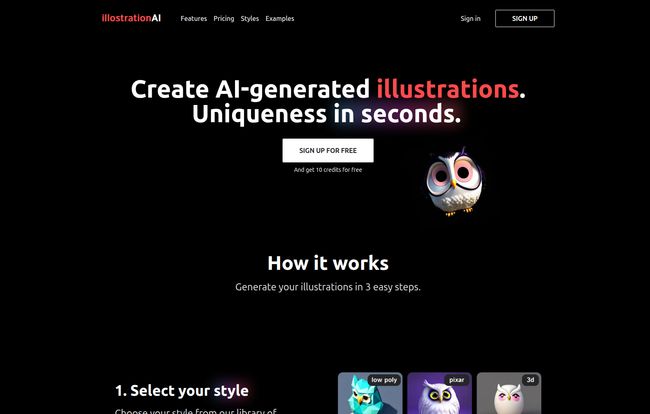
Visit illostrationAI
So, What’s the Deal with illostrationAI?
At its core, illostrationAI is a specialized AI tool designed to do one thing and do it well: generate illustrations. This isn’t a photorealism engine or a general-purpose art machine. It’s a focused platform for creating clean, usable graphics for your projects. Think of it less like a wild, unpredictable artist and more like a super-fast, on-demand graphic design intern who runs on code instead of coffee.
The entire process is boiled down to a simple, three-step dance:
- Pick a style.
- Tell it what to draw.
- Tweak the result.
That’s it. No complicated parameters to learn, no weird command-line prompts. It’s refreshingly straightforward, which I absolutely appreciate. In a world of overly complex tools, simple is a feature, not a limitation.
Let’s Break Down The Features
Okay, the simple process is great, but the devil is always in the details, right? What can you actually do with it?
A Style for Every Mood and Project
This is where I first got genuinely interested. illostrationAI isn’t just spitting out one type of generic art. You get a whole library of styles to choose from. We’re talking 3D renders that pop, clean vector graphics (a godsend for websites), trendy low poly designs, and even that charming, big-eyed Pixar style. They’ve also got options for icons and pixel art, covering a ton of ground for different use cases.
Personally, the vector option is the most exciting. Getting clean, scalable vectors usually means firing up Adobe Illustrator and bracing for a few hours of pen tool madness. The idea of getting a solid starting point in seconds is… well, it’s pretty amazing.
The Magic of AI Upscaling and Editing
Once the AI churns out your initial image, you’re not just stuck with it. The platform has an ‘Improve your result’ function that includes AI upscaling. For the uninitiated, upscaling uses AI to increase the resolution of your image without turning it into a pixelated mess. This means you can generate a small concept and then blow it up for a high-quality blog header or presentation slide.
It also lets you remove the background, which is a small feature that saves a ton of time. No more tedious background erasing in Photoshop or Canva. You can just pop in a new background color or a custom image and be on your way.
Power-User Tools on the Horizon
Now, this part is a mix of awesome and a little bit of a tease. illostrationAI has some serious power features listed, but they’re marked with a tiny, frustrating “Later” tag. The big one for me is bulk illustration creation via a CSV file. Imagine uploading a spreadsheet of 50 blog post titles and getting a unique illustration for each one. That’s an agency-level game changer right there.
There’s also a Figma plugin in the works, which will make designers everywhere nod in approval. Dragging and dropping AI illustrations directly into your design files? Yes, please. Editing specific parts of an illustration and converting files to SVG are also on the roadmap. I’m waiting for these, and I’m not very patient.
Okay, How Much Does This Cost?
Alright, let’s talk money. I was pleasantly surprised here. There are no confusing monthly subscriptions or tiered feature gates. It’s a simple, pay-as-you-go credit system. And at the time of writing, they’re running some pretty aggressive launch pricing.
| Credits | Generations | Price | Cost Per Image |
|---|---|---|---|
| 100 Credits | ~100 Images | $4.90 | ~$0.05 |
| 500 Credits | ~500 Images | $9.90 | ~$0.02 |
| 1000 Credits | ~1000 Images | $14.90 | ~$0.015 |
Looking at those numbers, it’s… kinda crazy. Getting a thousand unique illustrations for fifteen bucks is unheard of. A single custom illustration from a designer can cost anywhere from $50 to $500. Even a premium stock photo subscription costs more than the biggest package here. The value proposition is strong, to say the least.
The Real Talk: Pros, Cons, and a Dose of Reality
No tool is perfect. Let’s be real for a second. While I’m pretty jazzed about illostrationAI, there are trade-offs.
On the one hand, the speed is undeniable. The ability to generate a dozen concepts in minutes is a creative superpower for non-designers. The variety of styles and the incredibly low cost-per-image make it accessible to virtually anyone. It’s a fantastic way to democratize good design for bloggers, startups, and social media managers who are wearing too many hats already.
However, you are handing over a lot of the creative control to the algorithm. The quality of your output is directly tied to how well you can describe the object you want. You might not be able to get that exact angle or that perfect little detail you have in your head. It’s a tool for rapid creation and iteration, not for fine-art-level control. And of course, the fact that some of its most powerful features are still ‘coming soon’ is a bit of a bummer. You’re buying into the promise as much as the current product.
Who Should Be Using illostrationAI?
So, who is this for? In my opinion, it’s a perfect fit for content creators. Bloggers who need a unique featured image for every post. Social media managers who need an endless stream of visual content. Marketers building landing pages who want something more custom than stock photos. Even developers who need quick placeholder assets or icons for a new app.
Will it replace high-end graphic designers? No, of course not. The creative intuition and pixel-perfect precision of a skilled human are irreplaceable for major branding projects. But for the day-to-day grind of content creation? This thing is a workhorse.
Frequently Asked Questions
- Is illostrationAI free to try?
- The website has a “Sign up for Free” call to action, which usually means there’s a free trial or a certain number of free credits to let you test the waters before you commit to a package.
- Do I need to be a designer to use it?
- Absolutely not. That’s the whole point! If you can write a simple sentence describing what you want (e.g., “a happy robot holding a flower”), you can create an illustration.
- How does the credit system work?
- It’s pretty straightforward. You buy a bundle of credits, and each illustration you generate uses up one credit. So, the 500-credit package gets you about 500 images.
- What is AI upscaling, and why does it matter?
- AI upscaling is a technique where the software intelligently adds pixels to your image to increase its size and resolution without making it look blurry or distorted. It means you can use your small, quickly generated graphic for larger formats like posters or high-res web banners.
- Can I use these illustrations for my business?
- Generally, AI art generation tools grant you commercial rights to the images you create, but you should always, always double-check the platform’s specific Terms of Service to be sure. It’s just good practice.
- What styles are available?
- You can choose from a good range, including 3D renders, vector art, low poly, a Pixar-like style, icons, and classic pixel art.
Final Thoughts
illostrationAI has carved out a really smart niche for itself in the booming AI landscape. Instead of trying to do everything, it focuses on being a fast, affordable, and easy-to-use illustration generator. It’s not going to put top-tier illustrators out of a job, but it is going to put a powerful new tool in the hands of millions of creators.
For me, the potential to streamline my content workflow is massive. The pricing is a no-brainer. While I’ll be impatiently waiting for those bulk creation and Figma features to drop, what’s already here is impressive. If you’ve ever found yourself agonizing over visuals for your content, you should definately give illostrationAI a look. It might just be the creative assistant you’ve been looking for.


