
Categories: AI Art Generator, AI Image Enhancer, AI Image Generator, AI Photo Editor, Text to Image
Illusion Diffusion Review: Making AI Art That Tricks the Eye

The AI art scene exploded so fast it gave us all whiplash. One minute we were happy with our grainy phone pictures, the next we’re seeing hyper-realistic portraits of cats dressed as Napoleon and arguing about whether an algorithm can be an ‘artist’. I’ve been in the SEO and digital trends space for years, and even I’m constantly amazed at the new tools popping up every week.
But every so often, something cuts through the noise. A few weeks ago, I saw an image on Twitter. At first glance, it was a dense, leafy forest. But when I squinted… I saw a face. It wasn’t just a face photoshopped onto trees; the trees themselves formed the face. It was mesmerizing. A bit of digging led me to the source of this digital magic: a tool called Illusion Diffusion. And I, of course, had to try it.
This isn’t just another prompt-to-image generator. It’s a different beast entirely. It’s less about creating something from nothing and more about reimagining what’s already there. It’s a collaboration between your photograph, your imagination, and some seriously clever AI.
What Exactly is Illusion Diffusion?
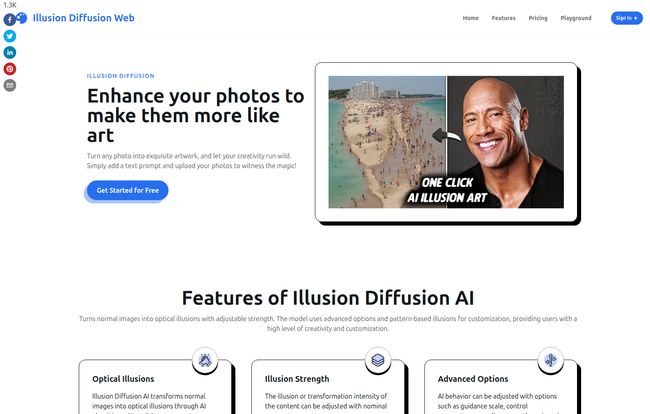
So what’s under the hood? Illusion Diffusion takes a standard photo you provide and uses a text prompt to weave an entirely new image into its structure. Think of it like a visual magic trick. You give it a picture of a rocky canyon and whisper the prompt, “a portrait of an old man,” and suddenly the cracks and shadows of the canyon walls rearrange themselves to form a wise, weathered face.
It’s powered by a combination of AI models you may have heard of—Stable Diffusion and ControlNet. In simple terms, Stable Diffusion is the wild, creative artist that can paint anything, while ControlNet is the meticulous guide that tells it, “Okay, be creative, but you have to use the shapes and lines from this original photo as your guide.” This pairing is what allows for the creation of those mind-bending optical illusions. It’s not just slapping one image on top of another; it’s a genuine fusion.
Visit Illusion Diffusion
Getting Your Hands Dirty: My First Run with Illusion Diffusion
The interface is refreshingly straightforward. You’re not immediately bombarded with a million sliders and settings. I decided to start with something simple. I grabbed a photo of a brick wall behind my house and uploaded it.
The process is basically a three-step dance:
- Upload Your Image: This is your canvas. A brick wall, a crowd of people, a cloudy sky—anything with some texture works best, in my experience.
- Write Your Prompt: This is where you tell the AI what hidden image you want to create. I went with “A sprawling medieval cityscape.”
- Adjust the ‘Illusion Strength’: This is the secret sauce. It’s a simple slider that controls how prominent the illusion is. Crank it up, and the cityscape almost completely takes over the bricks. Dial it down, and it’s just a subtle hint, something you might not see at first glance. It’s like a DJ’s crossfader, blending two different tracks together until you find the perfect mix.
I hit ‘Run’ and waited. A few seconds later, there it was. My boring old brick wall now held the ghost of a gothic city, with the mortar lines cleverly forming rooftops and windows. It was… well, it was cool. Really cool.
The Features That Actually Matter
While the basic function is fun, the real power comes when you start playing with the other options. It’s not just a one-trick pony.
More Than Just a Pretty Picture: Patterns and Prompts
You don’t always have to start with a photo. The platform lets you choose from different patterns, like spirals or intricate geometric shapes, to serve as the base for your illusion. This is great for creating abstract art. The website also provides some fantastic example prompts to get your creative juices flowing, like “Paint a tranquil landscape disrupted by mesmerizing moiré patterns in the sky
or “Design a mind-bending structure that defies the laws of geometry.
Sometimes seeing what’s possible is all the inspiration you need.
For the Control Freaks (Like Me): Advanced Settings
If you’re the type of person who likes to fine-tune everything, you’ll feel right at home in the advanced settings. Here you can tweak things like the ‘Guidance Scale’ (basically, how strictly the AI must listen to your prompt), upscaling strength, and even ‘Seed’ values. A seed value is like a specific starting point for the AI’s randomness; if you use the same seed value and the same prompt, you’ll get the same result again, which is super helpful for iterative design. Most folks won’t need to touch these, but for designers and artists, this level of control is a massive plus.
Let’s Talk Money: The Illusion Diffusion Pricing Model
Alright, the big question: what does all this creative power cost? Illusion Diffusion doesn’t use a monthly subscription, which honestly, is a breath of fresh air. I have enough of those. Instead, it operates on a credit system. You buy a pack of credits, and each image generation costs one credit. Simple.
Here’s the breakdown as of my last check:
| Pack Name | Price | Credits | Cost Per Image |
|---|---|---|---|
| Small Pack | $7.90 | 500 | ~$0.02 |
| Medium Pack (Most Popular) | $9.90 | 1000 | ~$0.01 |
| Large Pack | $29.90 | 5000 | ~$0.006 |
The value proposition is pretty clear. The more you buy, the cheaper each image becomes. For just two dollars more than the small pack, you double your credits with the medium one. In my opinion, the Medium Pack is the sweet spot for anyone who wants to seriously experiment without a huge commitment. At a penny per image, the cost of a mistake or a ‘dud’ generation is practically zero.
The Good, The Bad, and The… Artsy?
No tool is perfect. After spending a good bit of time with Illusion Diffusion, here’s my honest take. The high points are high: it’s incredibly fun and the results can be genuinely stunning. It’s one of the best tools I’ve seen for creating content that makes people stop scrolling and say, “Wait, what am I looking at?” That kind of engagement is gold for social media marketers.
On the flip side, it shares a weakness with all AI image generators: its output is only as good as your input. A blurry, low-contrast photo and a vague prompt will give you a muddy, confusing mess. There’s a bit of an art to writing good prompts and selecting the right base images. And yes, it costs money. While the per-image cost is tiny, it’s not a free-for-all, so you have to be a bit more intentional than with some other tools.
Who is This Tool Really For?
So, who should open their wallet for Illusion Diffusion? I see a few clear groups:
- Social Media Managers and Content Creators: If you need to generate eye-catching visuals that stop the scroll, this is a phenomenal tool. The potential for viral content is huge.
- Graphic Designers and Artists: It’s a fantastic source of inspiration. Use it to brainstorm ideas, create unique textures, or just break through a creative block.
- Hobbyists and the Curious: If you just love playing with new tech and making cool things, the entry price is low enough to justify the hours of fun you’ll have.
It’s probably not for someone who needs a tool for photo-realistic product mockups or corporate headshots. This is an instrument of creativity, not replication.
Final Thoughts: Is Illusion Diffusion a Gimmick or a Game-Changer?
So, what’s the final verdict? I’d say Illusion Diffusion sits in a fascinating middle ground. It’s more than a simple gimmick but not quite an all-in-one design suite like Canva or Photoshop. And that’s its strength. It does one specific, very difficult thing, and it does it remarkably well. It’s a specialized tool for a specialized job: creating awe and wonder.
It won’t replace your entire design workflow, but it adds a powerful new brush to your creative toolkit. For me, it’s a definite keeper. It’s a reminder that sometimes the most interesting art isn’t about what you see, but how you see it.
Frequently Asked Questions about Illusion Diffusion
- What is Illusion Diffusion in simple terms?
- It’s an AI-powered tool that merges a photo you upload with a text description you write. The result is an optical illusion where the new image is hidden within the structure of the original photo.
- How do you get the best results with it?
- Use high-contrast, textured photos as your base—things like forests, rock faces, or crowds work well. For your prompts, be descriptive but clear. Experimenting with the ‘Illusion Strength’ slider is also key to finding the perfect balance.
- Is Illusion Diffusion free to use?
- No, it’s not completely free. It uses a credit-based system where you purchase packs of credits. Each image you generate costs one credit. There’s no recurring monthly subscription.
- Can I use the images I create for commercial purposes?
- Generally, AI art tools have specific terms of service regarding commercial use. Since you are providing the original image, ownership can be complex. I’d strongly suggest checking the latest terms on the Illusion Diffusion website to be sure your intended use is permitted.
- What’s the difference between this and other AI generators like Midjourney?
- While Midjourney and DALL-E primarily create images from scratch based only on a text prompt, Illusion Diffusion’s main feature is its ability to integrate that text prompt into an existing image, using the photo’s composition as a guide for the final illusion.
- How important is the “Illusion Strength” setting?
- It’s probably the most important setting for a beginner! It directly controls the intensity of the effect. It’s the main tool you’ll use to make your illusion either very obvious or super subtle and hidden.
Reference and Sources
- Official Website: Illusion Diffusion Web
- Pricing Page: Illusion Diffusion Pricing


