
Categories: AI Art Generator, AI Image Generator, AI Realistic Image Generator, Text to Image
Image-Generator.com Review: Free AI Art Without Hassle?

Another day, another AI tool lands in my inbox, promising to revolutionize my workflow. Honestly, at this point, my digital toolbox is overflowing. We’ve got AI writers, AI video editors, AI for SEO… it’s a lot. And a huge chunk of them are fighting for a piece of my credit card.
So when I stumbled upon Image-Generator.com, my default setting was skepticism. The claim? Free AI image generation from a simple text prompt. The hook that really got me? No registration required.
Let’s be real, the ‘no signup’ promise is the siren song for any content creator or marketer. My inbox is already a graveyard of welcome emails from services I used exactly once. The idea of just… using a tool without handing over my data felt refreshingly old-school. But is it too good to be true? Does it produce garbage, or is it a hidden gem? I spent an afternoon playing with it, and here’s what I found.
First Impressions: Simplicity is the Ultimate Sophistication
Landing on the site is, well, simple. It’s a clean, dark-mode interface with one thing front and center: a box for your prompt. No pop-ups. No flashy banners. No desperate plea for my email address. It’s just you, your idea, and a ‘Generate Image’ button. I have to say, I appreciate that. It feels confident.
The whole process is exactly as advertised:
- You type in what you want to see.
- You hit the button.
- You wait a few seconds.
- An image appears.
It’s beautifully straightforward. No wrestling with complicated settings if you don’t want to, though there are a few toggles for things like image size and quality if you feel like tinkering. For anyone who needs a quick visual for a blog post or a social media update, this lack of friction is a massive win.
Putting It to the Test: From Text to Digital Canvas
Okay, let’s get to the main event. What can this thing actually create? The homepage shows off some impressive examples – an astronaut on horseback, a detailed cyberpunk portrait, a Ghibli-style rocket launch. Pretty ambitious stuff.
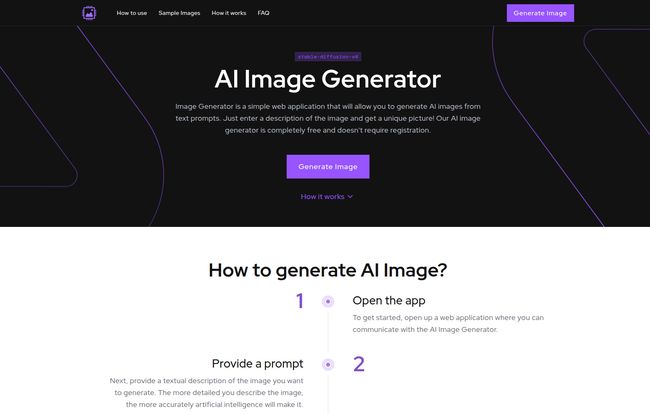
Visit Image-Generator.com
So, I threw a few of my own classic test prompts at it. Something like, “A photorealistic image of a vintage typewriter sitting on a wooden desk, a cup of coffee steaming beside it, soft morning light from a window.” The result? Surprisingly good. Not quite the emotional masterpiece I’d get from spending 20 minutes tweaking a prompt in Midjourney, but absolutly usable for a blog post about writing.
I then tried something a bit more whimsical: “A cute robot made of gears and bolts, reading a book in a cozy library, hyperdetailed, office-core.” Again, it delivered something charming and on-brief. The key, as with all these text-to-image models, is the prompt. The more detail you give it, the better your results will be. It’s not a mind reader; its a collaborator that needs good direction. Garbage in, slightly-less-garbage-but-still-not-great out.
So, How Does This Free Magic Work?
The site mentions it uses a “diffusion model.” If you’ve been in the AI space for a minute, that probably makes you think of platforms like Stable Diffusion. And that’s likely what’s humming away under the hood here.
Think of it like this: the AI starts with a canvas full of random static, like an old TV with no signal. Your text prompt acts as a guide. The AI then carefully “cleans up” that static, step by step, removing the noise that doesn’t match your description until a coherent image emerges. It’s like a sculptor who sees a statue inside a block of marble and just chips away the unnecessary bits. It’s a fascinating process, and it’s getting better all the time as more people use it and it continues to learn.
The Good, The Bad, and The Free
No tool is perfect, especially a free one. It’s important to know the trade-offs. Here’s my breakdown based on the platform’s own info and my experience.
| The Good Stuff (Pros) | The Catches (Cons) |
|---|---|
| It’s actually free. The price is right. Zero. Zilch. My favorite four-letter word when it comes to tools. | There’s a daily limit. You get 15 images per day. This is fine for casual use, but you can’t run a content farm on it. |
| No registration. My inbox breathes a sigh of relief. This is a huge plus for privacy and convenience. | Accuracy is on you. Vague prompts lead to weird, vague images. You need to be a decent prompt-writer to get great results. |
| Commercial use is allowed. This is the real kicker. Being able to use these images for your blog or business without worrying about licensing is a game-changer. (Still, I always advise a quick peek at the latest Terms of Service, just to be safe!) | It uses their servers. This isn’t a ‘con’ for you, but a reminder that this service isn’t free to run. Someone is paying for the processing power. |
The 15-image limit is probably the biggest constraint. It forces you to be thoughtful with your prompts. But for a free service? It’s more than fair. It prevents abuse and keeps the service available for everyone.
Who Is This Tool Really For?
After playing around with it, I have a pretty clear idea of who gets the most value from Image-Generator.com.
This is a fantastic tool for:
- Bloggers and Content Creators: Need a quick, unique featured image? This is your new best friend.
- Social Media Managers: Brainstorming visual concepts or need a fast graphic for a post? Perfect.
- Students and Educators: Creating visuals for presentations without paying for stock photos.
- The AI-Curious: Anyone who wants to try text-to-image generation without the commitment of a paid subscription or complex software.
This might not be the right fit for:
- Professional Graphic Designers: You’ll want the fine-tuned control and higher resolution of paid tools like Midjourney or Adobe Firefly.
- Marketing Agencies: The daily limit and potential for inconsistency make it tricky for high-volume, brand-specific campaigns.
- Pixel-Perfectionists: If you need to generate the exact same character in ten different poses, this probably isn’t the tool for that level of consistency.
Also Read: Zhipu Qingyan Review: China's AI Powerhouse?
Final Verdict: A Worthy Bookmark in Your AI Toolbox
So, is Image-Generator.com a game-changer? Maybe not in the way that DALL-E 2 first was. It’s not going to put professional illustrators out of business. But that’s not its goal.
It’s a wonderfully practical, no-nonsense tool that delivers on its promise. It’s like a reliable swiss-army knife. It won’t replace your entire set of professional power tools, but for a huge number of everyday tasks, it’s exactly what you need. It’s fast, its easy, and its free.
In a world of over-hyped tech and subscription fatigue, there’s something incredibly appealing about a tool that just… works. It has earned a permanent spot in my browser’s bookmarks bar, for sure.
Frequently Asked Questions about Image-Generator.com
- Is Image-Generator.com really free to use?
- Yes, the service is completely free. There are no hidden charges or subscription fees. The trade-off is a daily limit on the number of images you can create.
- Can I use the images I create for commercial purposes?
- According to their site, yes. Images generated can be used for commercial projects, which is a significant advantage over many other free tools. However, it’s always a good habit to review their terms of service for any updates or specific restrictions.
- What is the daily limit for generating images?
- The current limit is 15 images per user per day. This helps manage server load and keep the service free for everyone.
- Do I need to sign up or register to use the service?
- No, and that’s one of its best features. You can visit the website and start generating images immediately without creating an account or providing any personal information.
- Why are my generated images not very accurate?
- The accuracy of the AI largely depends on the detail and clarity of your text prompt. Try to be more descriptive. Instead of “a dog,” try “a happy golden retriever puppy with floppy ears, sitting in a field of green grass, sunny day.” Adding details about style, lighting, and composition helps a lot.
- What AI technology does the site use?
- It uses a diffusion model, a modern AI technique for generating images from text. This is the same underlying technology that powers popular platforms like Stable Diffusion and Midjourney.
A Final Thought
Give it a shot. Seriously. In the time it took you to read this article, you could have already created a handful of unique images. What have you got to lose? It’s a fun, powerful, and genuinely useful tool for the modern content creator’s arsenal.
Reference and Sources
- Image-Generator.com – The official website for the tool.
- Stability AI – The company behind Stable Diffusion, a leader in diffusion model technology.


