
Categories: AI Background Remover, AI Image Enhancer, AI Image Generator, AI Image Sharpening, AI Image Upscaler, AI Photo Editor, AI Photo Restoration
Imglarger Review: An AI Image Editor Worth Your Time?

As content creators, marketers, or just people who like pretty pictures, we spend an ungodly amount of time wrestling with images. You find the perfect photo for your blog post, but it’s the size of a postage stamp. You dig up a priceless old family photo, but it’s got more scratches than a DJ’s favorite record. Or you need to cut out a product from its background and suddenly you’re an hour deep in Photoshop, questioning all your life choices. I’ve been there. You’ve been there. We’ve all been there.
So, when another all-in-one AI tool slides across my desk, I’m usually a little skeptical. They all promise the world, right? But I’ve been playing around with Imglarger for a few weeks, and I have to say… I’m pleasantly surprised. It’s not trying to be the next Adobe Creative Suite. Instead, it feels like a trusty, intelligent Swiss Army knife for your most common image headaches.
So What Is Imglarger, Exactly?
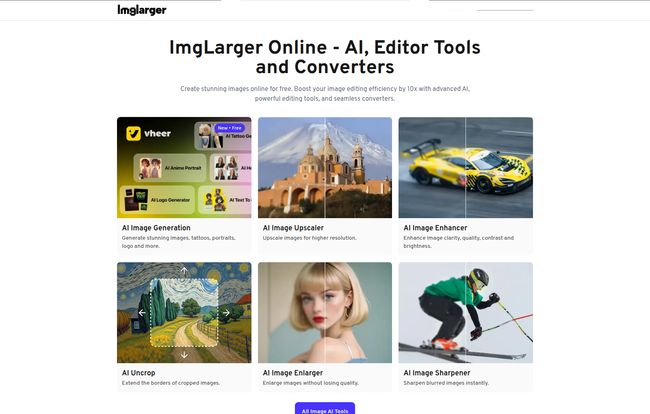
In a nutshell, Imglarger is a web-based platform that bundles a bunch of AI-powered image tools together. Think of it as a specialized workshop for your pictures. You’ve got different stations for different jobs: making images bigger without turning them into a pixelated mess, sharpening blurry details, removing unwanted backgrounds, and even breathing new life into old, faded photos. It also handles the basic stuff, like converting a JPG to a PNG or a quick crop. It’s designed for speed and convenience, aimed at people who need good results without a degree in graphic design.
Visit ImgLarger
The AI Tools That Do the Heavy Lifting
This is where the magic is supposed to happen, right? The AI. I’ve seen some AI tools that feel more artificial than intelligent, so I put Imglarger’s main features to the test.
AI Image Enlarger & Enhancer
Okay, this is the main event for a lot of us. Trying to upscale a low-resolution image is usually a recipe for disaster. It’s like stretching a small ball of pizza dough to make an extra-large pizza; you just end up with a thin, sad, hole-filled mess. Imglarger’s AI Enlarger attempts to intelligently fill in the gaps. It can upscale images to 2k, 4k, and even 8k resolutions. I fed it a few crummy, low-res logos and some web images I had lying around, and the results were genuinely impressive. It’s not flawless—it won’t turn a blurry photo of Bigfoot into a crystal-clear portrait—but it does a remarkable job of making unusable images usable. The Enhancer works in a similar way, focusing on improving color, contrast and overall quality. It’s great for giving a flat-looking photo that extra little pop.
Bringing Old Photos Back to the Future
This feature is a bit more personal for me. We’ve all got those shoeboxes filled with faded, cracked photos of grandparents we never met or childhood moments captured on film that hasn’t aged gracefully. The AI Photo Restoration tool is designed specifically for this. It tackles scratches, yellowing, and minor damage. I tried it on a scanned photo of my dad from the 70s, and while it didn’t completely erase every single flaw, it cleaned up the worst of the creases and brought a lot of the color back. It’s a pretty amazing feeling to see a piece of family history look a little less like a historical artifact and a little more like a living memory.
The Vanishing Act: AI Background Remover
Anyone who’s ever tried to manually cut out an object in an image editor knows the pain of the ‘Magic Wand’ tool. It felt less like magic and more like a frustrating guessing game, right? Imglarger’s AI Background Remover is a massive time-saver. For product shots, profile pictures, or just creating collages, this thing is a godsend. It’s a one-click process that is surprisingly accurate, even with tricky subjects like hair or fuzzy edges. It’s one of those features that, once you use it, you’ll wonder how you ever managed without it.
Let’s Talk Turkey: The Pricing Structure
Alright, nothing in life is truly free, and that includes fancy AI processing. Imglarger runs on a freemium model, which I think is fair. Here’s a quick breakdown of how it looks:
| Plan | Price | Who It’s For |
|---|---|---|
| Free | $0 / month | Casual users, people wanting to test the waters. You get a handful of credits and limited access. |
| Starter | $4.90 / month | Hobbyists or bloggers who need more than the free plan offers but don’t process tons of images. |
| Premium | $9.90 / month | This feels like the sweet spot for most professionals—freelancers, marketers, content creators. More credits and full feature access. |
| Business | $19 / month | Agencies or small businesses that need to process images in bulk. This gives you a ton of credits. |
The system works on “credits.” Every time you use an AI feature, it costs a credit. It’s a common model for these kinds of services because AI processing is computationally expensive. It can be a little annoying to keep an eye on your credit balance, but it’s a transparent way of handling usage. For more details, you can always check their official pricing page.
The Good, The Bad, and The Honest Truth
No tool is perfect. After kicking the tires, here’s my honest take.
What I love is the convenience. Having all these powerful tools under one roof saves me from jumping between three or four different apps. The results from the AI are genuinely solid for 90% of my day-to-day needs, and the batch processing feature is a true lifesaver for those big projects. I also have to give them a nod for their data policy—they state that all uploaded files are deleted after 24 hours. In an age of data paranoia, that’s a really nice touch.
“I used AI Image Enlarger to blow up a small image. I was surprised at the output quality. I got a clean, crisp, and bigger version of my picture without any quality loss.” – A testimonial from Eca Wahyuni on their site. It kinda mirrors my own experience.
On the flip side, the biggest drawback is, of course, the paywall and credit system. The free plan is quite limited, which is understandable but might frustrate some users just trying to get one job done. If you’re a heavy user, you will absolutely need a paid subscription. This isn’t a full-blown Photoshop replacement, either. For complex, multi-layered editing, you’ll still need a more robust program. But then again, it’s not trying to be.
So, Is Imglarger Worth a Spot in Your Toolbox?
My verdict? Yes, absolutely. For the right person.
If you’re a professional photographer or graphic designer who lives inside the Adobe ecosystem, this might not replace your primary tools. But for bloggers, social media managers, marketers, small business owners, and even genealogists, Imglarger is a fantastic asset. It automates tedious tasks, saves a ton of time, and delivers results that are more than good enough for most professional and personal projects. It lowers the barrier to entry for high-quality image enhancement.
It solves the most common, nagging problems quickly and efficiently. And sometimes, that’s exactly what you need to get on with your day.
Frequently Asked Questions
- 1. What’s the main difference between the AI Enlarger and the AI Enhancer?
- Think of it this way: the Enlarger’s main job is to increase the physical dimensions (pixels) of your image without it looking terrible. The Enhancer focuses on improving the quality of the existing image—fixing colors, improving sharpness, and reducing noise.
- 2. Is it really safe to upload my personal photos to Imglarger?
- According to their policy, yes. They guarantee that all uploaded and processed files are permanently deleted from their servers after 24 hours. This is a big plus for privacy-conscious users.
- 3. Can I cancel my subscription whenever I want?
- Yep. Their site says you can cancel anytime. If you do, you can still use your remaining credits until the end of your current billing cycle, which is a fair way to handle it.
- 4. How do the credits work?
- Credits are the currency you use for the AI-powered features. Each time you process an image with an AI tool (like enlarging or removing a background), it costs one or more credits from your account. The free plan gives you a few to start, and paid plans give you a much larger monthly allowance.
- 5. Does this work on my phone?
- Since it’s a web-based tool, you can access and use it from any device with a browser, including your smartphone or tablet. This is super handy for making quick edits on the go.
Final Thoughts
Give the free version a spin. Upload that one grainy photo you’ve always wished was clearer or that product shot that needs a clean background. See how it feels. For me, it’s earned its bookmark as a reliable, fast-acting problem solver in my digital toolkit.


