
Categories: AI Assistant, AI Email Assistant, AI Email Writer, AI Productivity Tools, Open Source AI Models
Inbox Zero Review: An AI Email Tool That Actually Works?

For most of us in the digital marketing world, our inbox is less a ‘mailbox’ and more a chaotic, raging dumpster fire of forgotten newsletters, passive-aggressive follow-ups, and pitches from people who clearly have no idea what we do. I’ve spent years—literally, years—of my life wrestling with my Gmail. I’ve tried every productivity hack in the book. The Pomodoro Technique. Color-coded labels. Filters so complex they looked like ancient hieroglyphs. Nothing stuck.
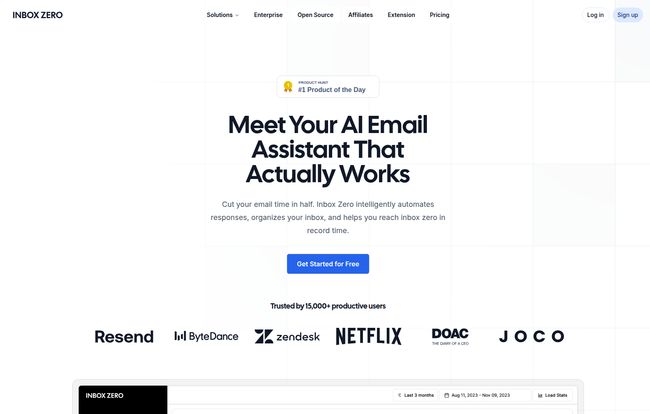
The dream of ‘inbox zero’ felt like a myth, a legend whispered by hyper-organized productivity gurus who probably don’t even get that many emails. I had resigned myself to a life of digital clutter. Then, a few weeks ago, I stumbled across a tool on Product Hunt called, fittingly, Inbox Zero. My first thought? “Oh great, another one.” But the tagline caught my eye: “Meet Your AI Email Assistant That Actually Works.”
That’s a bold claim. A very bold claim. So, with the healthy skepticism of someone who’s been burned by a thousand over-hyped SaaS tools, I decided to give it a whirl. And folks, I think they might actually be on to something.
Visit Inbox Zero
So, What Exactly is Inbox Zero?
At its core, Inbox Zero isn’t just another email client that slaps a pretty interface on your existing Gmail. Think of it more as a smart, invisible layer that sits on top of your inbox. It’s an AI-powered assistant that automates the grunt work. It learns your habits, drafts replies for you, nukes spam from orbit, and basically acts like the highly efficient executive assistant you’ve always wanted but could never afford.
It’s designed to work alongside your current setup (right now it’s for Gmail and Google Workspace users), so you don’t have to abandon your familiar workflow. It just… makes it better. A lot better.
The Standout Features That Made Me a Believer
Okay, let’s get into the nitty-gritty. A tool is only as good as its features, and Inbox Zero has a few that are genuine game-changers.
Your Own Personal AI Assistant
This is the heart of the platform. You can literally tell the AI how to manage your email in plain English. It’s like having a conversation with ChatGPT, but for your inbox. For example, I told it: “Any newsletters from marketing blogs, archive them automatically but label them ‘Reading List’. Any emails about ‘link building’ that aren’t from my team, mark as spam.” It just… did it. No more creating complicated filters. It’s almost spookily intuitive.
The Magical One-Click Unsubscriber
I am a serial subscriber. I see a shiny new lead magnet and I’m in. The result? Hundreds of newsletters, many of which I haven’t opened since 2019. The Inbox Zero Bulk Unsubscriber is a thing of beauty. It presents you with a simple list of all your subscriptions, showing how many emails you’ve received from each and, crucially, how many you’ve actually read. Seeing that I had 538 emails from HARO and had only read 2% of them was a real wake-up call. One click on ‘Unsubscribe,’ and poof. Gone. The pure satisfaction is indescribable.
A Digital Bouncer for Cold Emails
As an SEO blogger, my inbox is a prime target for the most cringe-worthy cold outreach you can imagine. “Dear Sir/Madam, I love your article on [INSERT WRONG TOPIC HERE]…” It’s noise. It’s a distraction. The Cold Email Blocker acts as my personal bouncer. It automatically archives or labels these pitches so I never even have to see them unless I want to. You can adjust the prompts to tell it what you consider a cold email, and it does the rest. My focus time has skyrocketed since I turned this on.
What Gets Measured, Gets Managed
I’m a data nerd, so the Email Analytics feature really spoke to me. It gives you a simple dashboard showing who emails you the most, who you email the most, and what types of emails are clogging up your inbox. This isn’t just a vanity metric; it’s actionable intelligence. Seeing that 70% of my inbox was newsletters prompted me to get aggressive with the unsubscriber. It’s the first step to actually understanding the problem instead of just complaining about it.
Trust in the Age of AI: The Open-Source Advantage
Here’s what really sealed the deal for me. In a world where every company seems to be gobbling up our data to train their AI models, Inbox Zero is refreshingly transparent. It’s open-source.
You can go to their GitHub repository right now and look at their code. For the tech-savvy out there, you can even self-host the entire thing on your own infrastructure. This is a massive trust signal. They’ve also gone through Google’s security review and are SOC2 compliant, meaning they take privacy and data security seriously. They explicitly state your data is not used to train general AI models. In 2024, that’s a feature, not a footnote.
Okay, It Can’t Be Perfect. What’s the Catch?
No tool is perfect, and it’s important to be real about the limitations. Right now, the biggest one is that Inbox Zero only supports Gmail and Google Workspace accounts. They mention on their site that Outlook support is coming soon, which will be a big deal, but for now, if you’re on a different platform, you’ll have to wait. Also, while there’s a free trial, the most powerful features are part of the paid plans. This isn’t really a con, per se—developers gotta eat!—but it’s something to be aware of.
A Look at Inbox Zero’s Pricing
So, what does this email magic cost? The pricing structure is pretty straightforward, which I appreciate. No hidden fees or confusing tiers.
| Plan | Price | Best For |
|---|---|---|
| Pro | $16 per month | Individuals, freelancers, and small businesses looking to get their email under control. You can add more email accounts for an extra $10/month each. |
| Business | $42 per month | Teams dealing with high email volumes, like support or sales. Includes priority support and dedicated onboarding. Extra accounts are $25/month each. |
Note: Prices are based on monthly billing; you can get a discount for paying annually. Both plans come with a 7-day free trial.
Is it worth it? In my opinion, yes. If you bill your time at, say, $100/hour, and this tool saves you even 2-3 hours a month (and I’d wager it saves way more), it’s already paid for itself. It’s an investment in your most valuable resource: your time and focus.
Frequently Asked Questions About Inbox Zero
Can I still use my regular Gmail interface?
Absolutely. Inbox Zero works in the background and alongside your existing email client. You don’t have to learn a new interface. It enhances the one you already use.
Is it safe to connect my email to Inbox Zero?
This is a valid concern for any third-party app. Their commitment to being open-source is a big plus here. They’ve also undergone Google’s own strict security vetting process and are SOC2 compliant, which are strong indicators of a secure platform.
What happens if I don’t like it?
There’s a 7-day free trial to test everything out. According to their FAQ, they also offer a refund within 14 days of upgrading if you feel it didn’t provide value. That’s a pretty confident stance.
Is the AI going to send emails without my permission?
No. The AI features like Reply Zero draft replies for you, but they always wait in your drafts folder for you to review, edit, and send yourself. You’re always in control.
What does “open-source” mean for a regular user like me?
It means transparency and community trust. It means that anyone can inspect the code to see exactly how the tool works and verify that there’s nothing malicious happening with your data. It’s a green flag for privacy-conscious users.
The Final Verdict: Is It Time to Declare Victory Over Your Inbox?
Look, I’ve seen countless tools that promise to boost productivity. Most are just digital snake oil. Inbox Zero feels different. It doesn’t try to reinvent the wheel; it just puts an incredibly smart robot in charge of spinning it for you. The combination of powerful, practical AI features with a strong, transparent stance on privacy is a rare and welcome find.
It has genuinely saved me hours and, more importantly, a significant amount of mental energy that I used to spend just managing email. My inbox is no longer a source of dread. It’s just a tool again. And that, my friends, is a victory worth celebrating.


