
Categories: AI Design Assistant, AI Design Generator, AI Interior Design, AI Realistic Image Generator, AI Room Planner, Text to Image
Indesignify Review: AI Interior Design Made Frighteningly Easy

You’re scrolling through Pinterest or an interior design magazine, your eyes glazing over with images of perfectly curated, impossibly beautiful rooms. You look at your own living room—the one with the slightly-stained couch and the bookshelf that’s seen better days—and a wave of ‘analysis paralysis’ washes over you. Where would you even start? What if you paint it the wrong color? What if that trendy boucle chair looks ridiculous next to your coffee table?
For years, bridging that gap between inspiration and reality meant either hiring a pricey interior designer or taking a wild, expensive guess. But the game is changing, folks. I’ve been watching the AI space with a mix of awe and professional curiosity, and I recently stumbled upon a tool that genuinely made me say, “wow.” It’s called Indesignify, and it’s basically an interior designer on speed dial, powered by some serious artificial intelligence.
So, What is Indesignify Anyway?
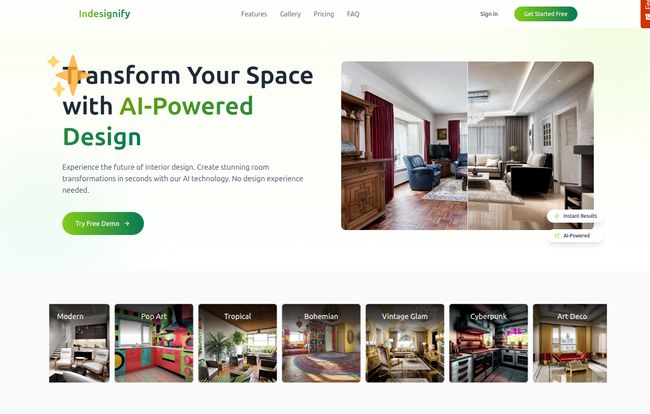
At its core, Indesignify is a web-based platform that lets you upload a picture of your room—any room—and redesign it in seconds. I’m not exaggerating. Seconds. It’s not just slapping a filter on it; this thing uses AI to generate photorealistic renderings of your space in a completely new style. You can take a drab, dated bedroom and instantly see what it would look like as a modern minimalist retreat, a cozy bohemian nook, or even a wild ‘Cyberpunk’ den. It’s built for regular people, no fancy design degree needed.
Visit Indesignify
How This AI Magic Actually Works
The process is refreshingly simple. You start with a picture. This could be your fully furnished (and slightly messy) home office, a completely empty room you’re about to move into, or even a basic sketch. From there, you become the director of your own design show.
A Playground of Styles and Materials
This is where I started to get giddy. The sheer volume of choices is incredible. You’re not just picking ‘Modern’ or ‘Traditional’. You can choose from styles like Pop Art, Vintage Glam, and Art Deco. Then you dive into specifics. You can tell the AI what kind of room it is (kitchen, bathroom, media room…), select a color palette like ‘Coastal Calm’ or ‘Forest Retreat’, and even specify the materials you want to see. Want to see how a marble countertop looks with brick walls and leather chairs? Go for it. The AI understands the structure of your room and intelligently re-imagines it with your chosen elements, maintaining the original layout. It’s less like editing a photo and more like having a conversation with a designer who can instantly show you what they’re thinking.
The Good, The Not-So-Bad, and The AI-Generated Sofa
Okay, no tool is perfect, right? After playing around with Indesignify for a while, I’ve got a pretty good handle on its strengths and weaknesses. On the plus side, the speed is mind-blowing. The ability to prototype dozens of ideas in the time it takes to make a cup of coffee is a genuine game-changer for anyone feeling stuck. The quality of the renders is also top-notch—we’re talking high-resolution, photorealistic images that look like they’re from a design portfolio.
Now, for the trade-offs. If you stick with the free plan, your beautiful new designs will have a small watermark. It’s not huge, but it’s there. For personal brainstorming, who cares? But if you’re a pro showing mockups to a client, you’ll want to upgrade. Speaking of which, the ‘Pay as you go’ model is great because there’s no subscription trap, but if you get carried away (and trust me, it’s easy to), those generations could add up. It’s also web-based, so you need an internet connection, which is pretty standard for tools like this these days anyway.
Let’s Talk Money: The Indesignify Pricing Structure
I appreciate a straightforward pricing model, and Indesignify delivers. There are basically two options, and they’re easy to understand.
| Plan | Cost | Key Features |
|---|---|---|
| Free | Free Forever | 30 free transformations, small watermark, personal use only, high-res results. |
| Pay as you go | €0.070 / generation | No watermark, commercial license included, high-res results. No subscription needed. |
In my opinion, this is brilliantly structured. The free plan is more than enough for a homeowner to completely plan out a renovation. You get 30 chances to find the perfect look without spending a dime. The pay-as-you-go option is perfect for professionals—interior designers, real estate agents doing virtual staging, or builders—who need clean, commercially-licensed images for client projects without being locked into a monthly fee. Honestly, for the quality you’re getting, that price per generation feels more than fair.
Is Indesignify the Future of Interior Design?
Look, a tool like Indesignify isn’t going to replace the nuanced expertise and project management skills of a great human interior designer. Not at all. What it does do is democratize the ideation phase of design. It empowers homeowners to take control, to experiment fearlessly, and to come to a professional with a crystal-clear vision of what they want. It’s a powerful visualization tool that removes the biggest barrier to starting a project: uncertainty.
For me, it turned a vague, lingering desire to ‘do something’ with my living room into a concrete plan. I tried a dozen styles, found one I loved, and now I have a visual shopping list. It’s a bridge between the dream and teh doing. And that’s something I can definitely get behind.
Frequently Asked Questions About Indesignify
What exactly is Indesignify?
Indesignify is an online tool that uses artificial intelligence to help you redesign any room. You upload a photo of your space, choose from various styles, colors, and materials, and it generates a new, photorealistic image of your room in seconds.
Do I need any design experience to use it?
Absolutely not! It’s designed for everyone, from complete beginners to professionals. The interface is intuitive—if you can upload a photo and click a few buttons, you can use Indesignify.
Is there really a free version?
Yes, there is. The ‘Free Forever’ plan gives you 30 free design transformations. These images come with a small watermark and are for personal use only. You don’t even need a credit card to get started.
Can I use the images for my business?
You can! If you use the ‘Pay as you go’ option, the generated images come with a commercial license and no watermark, making them perfect for client presentations, real estate listings, or your professional portfolio.
What kind of rooms can I design?
You can design almost any interior space. The platform has presets for living rooms, bedrooms, kitchens, bathrooms, home offices, dining rooms, kids’ rooms, and even media rooms.
How much does the paid version cost?
It’s not a subscription. You pay per design generation. The current rate is €0.070 (that’s about 7 cents in Euros) for each image you create. You just load up your account and pay as you go.
Final Thoughts
If you’re feeling stuck in a design rut or are on the verge of a home project, you owe it to yourself to give Indesignify a try. It’s fun, it’s fast, and it might just be the spark you need to turn your design dreams into a reality. The fact that you can get started for free makes it a complete no-brainer. Go play, and see what your space is capable of.


