
Categories: AI Ad Generator, AI API, AI Blog Generator, AI Chatbot, No-Code&Low-Code
InsertChatGPT Review: A Promising AI Bot Builder… If It Works

Alright, let’s talk shop. In the wild world of SEO and traffic generation, we’re all constantly chasing the next big thing. The new tool, the secret sauce, the little bit of tech that gives us an edge. For the last couple of years, that conversation has been dominated by AI. Specifically, how we can bake it right into our websites to better serve our visitors and, let’s be honest, capture more leads.
So, when a tool like InsertChatGPT swims into my view, I get genuinely excited. The promise is so, so good: build a custom AI chatbot, trained on your own data, with zero coding required. You just feed it your website URLs, your help docs, your product PDFs, and BAM—you’ve got a 24/7 digital employee who knows your business inside and out. It sounded like the holy grail for user engagement and support automation.
I was ready to sign up, kick the tires, and report back with a glowing review. But then… well, things got a little weird. Stick with me, because this story took a turn I didn’t expect.
What is InsertChatGPT Supposed to Be?
Before we get to the drama, let’s talk about the dream. On paper, InsertChatGPT is designed to be a bridge between the raw power of large language models (like the ones from OpenAI) and your business. Instead of a generic chatbot that can only say “Hello, how can I help you?” and point to a contact form, this would be different. This would be a bot that could answer complex questions like, “What’s the warranty policy on your Q3 2022 model, and how does it compare to the new one?”
The idea is to give your website visitors an experience. A real conversation. It’s like giving your website its own brain, trained exclusively on your company’s knowledge base. For a small business, that’s huge. It’s a way to offer enterprise-level support without an enterprise-level budget.
Visit InsertChatGPT
The Promised Land of Features
So what was supposed to be in the box? The feature list I saw was impressive and hit all the right notes for a marketer like me.
- No-Code Builder: This is the big one. The ability to create a sophisticated bot by just uploading files (PDFs, DOCX, TXT, and a bunch more) and pasting in URLs is a game-changer for non-technical folks.
- Full Customization: You could apparently theme the chat widget to match your brand’s colors and style perfectly. You could even remove the “Powered by” branding on higher tiers, which is crucial for a seamless user experience.
- Behavior Control: I loved the sound of this. You could give the bot a personality. Want it to be witty and fun? Or strictly professional? You could set system prompts to define its tone, writing style, and even creativity level.
- Data Control: You own the interactions and the data. In an age of privacy concerns, this is a massive plus.
It was all there. The ability to see chat history, integrate with other tools via API, and on the higher plans, even add lead capture forms and call-to-action buttons directly into the chat. A marketer’s dream, right?
The Good, The Bad, and The AI
Every tool has its ups and downs, and from the specs, InsertChatGPT was no different. Here’s my breakdown of what got me excited versus what gave me pause.
Why It Caught My Eye (The Pros)
Honestly, the biggest pro is the sheer accessibility. For years, this kind of custom AI was the domain of developers with deep pockets. A tool like this democratizes it. The idea of training a bot on my own sitemap, my blog archive, and my internal documentation in an afternoon is just… chef’s kiss. The use of the latest OpenAI models (including GPT-4 on some plans) meant it would have some serious conversational firepower. The control over branding and the user journey is just the cherry on top.
A Few Potential Hiccups (The Cons)
Of course, there were a few things to keep in mind. Being tied to plan limits is standard SaaS practice, but having your bot disabled if you exceed your query count could be a problem during a surprise traffic spike. You’d have to pick your plan carefully. And, naturally, many of the most powerful features—like API access, lead forms, and white-labeling—were reserved for the pricier tiers. The other thing is the reliance on OpenAI. If their API goes down, your bot goes down. It’s a dependency you can’t escape with this model.
How Much Does This AI Brain Cost?
Pricing is always where the rubber meets the road. InsertChatGPT offered a pretty comprehensive range of plans, with discounts for paying annually. I’ve put together a table to make sense of it all, focusing on the annual pricing which is more competitive.
| Plan | Annual Price (per month) | Key Features |
|---|---|---|
| Starter | $40.83 | 2 Chatbots, 5K Queries/mo, GPT-3.5 Access, 10M Training Words |
| Standard | $82.50 | 5 Chatbots, 10K Queries/mo, GPT-4 Access, API Access, CTA Buttons |
| Pro | $165.83 | 10 Chatbots, 15K Queries/mo, GPT-4 & BARD, Leads Form Builder, AI Sequences |
| Business+ | $832.50 | 50 Chatbots, 50K Queries/mo, White-Labeling, Custom Domain, 99.99% Uptime SLA |
Note: Monthly pricing is also available but at a higher rate. For instance, the Starter plan is $49/month if you don’t commit to a year.
My take? The pricing seems fair for the value proposed. The Starter plan is a decent entry point for a small blog or business. The Standard plan is the sweet spot for many, unlocking GPT-4 and the API. But that Business+ plan, while pricey, is clearly aimed at agencies or large companies who want a fully white-labeled solution to resell or deploy across many departments. An uptime SLA is a serious comittment.
So, What’s the Catch? A Digital Ghost Town
This is the part of the story where my excitement turned to confusion. After geeking out over the features and pricing, I navigated to insertchatgpt.com to sign up. And I was greeted with this:
Error 521: Web server is down.
A classic Cloudflare error. For the non-techy folks, this means Cloudflare (a service that helps websites run fast and securely) is working fine, but it can’t get a response from the actual server where InsertChatGPT is hosted. It’s like the postman showing up to a house to deliver mail, but the house is dark and no one’s answering the door. I tried again later. Same thing. I checked from a different network. Still down.
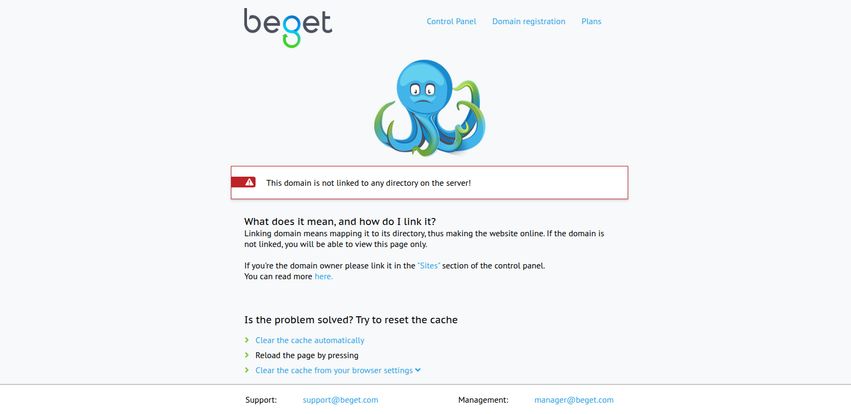
Digging a bit deeper, I even saw a hosting error page from a provider called Beget, featuring a very sad-looking octopus and a message that the domain wasn’t linked to a server. Not a good sign.
So, what does this mean? It’s hard to say for certain. Maybe the company is undergoing a massive server migration. Maybe they ran out of funding and quietly shut their doors. Perhaps they’re in the middle of a relaunch under a new name. There’s no status page, no Twitter update that I could find. Just… silence. And a 521 error.
Should You Still Consider InsertChatGPT?
It feels strange to say this, but… I can’t tell you to consider it, because as of this writing, it doesn’t seem to exist as a functioning service. And that’s a real shame.
The idea of InsertChatGPT is fantastic. The feature set is smart, the pricing is logical, and it solves a real problem for businesses. It’s a tool I would have genuinely tested and possibly recommended. But an idea is only as good as its execution, and right now, the execution is a dead end.
My advice? Bookmark the name if the concept appeals to you. Check back in a few weeks or months. Maybe the sad octopus will swim away and the server lights will come back on. But for now, if you need a no-code chatbot solution today, you’re better off looking at more established players in the space like Chatbase or Dante AI. This whole episode is a bit of a cautionary tale: in the fast-moving world of AI startups, always check for a pulse before you get your wallet out.
Frequently Asked Questions about InsertChatGPT
- 1. What was InsertChatGPT designed to do?
- InsertChatGPT was a platform designed to let users build custom AI chatbots without any coding. You could train the bot using your own data, like website content, PDFs, and other documents, to provide personalized answers to your visitors.
- 2. Did you need coding skills to use it?
- No, one of its main selling points was being a completely no-code solution. The entire process of building, training, and customizing the bot was meant to be done through a user-friendly interface.
- 3. What kind of data could you use for training?
- The platform supported a wide range of data sources, including website URLs, sitemaps, PDFs, CSVs, DOCX, TXT files, and more. This would allow the bot to have a deep knowledge of a specific business or topic.
- 4. Is InsertChatGPT’s website currently working?
- As of late 2023 / early 2024, the website `insertchatgpt.com` has been consistently down, showing a ‘Web server is down’ error. It is not currently accessible.
- 5. What are the main benefits of a custom AI chatbot?
- A custom chatbot can dramatically improve user engagement, provide 24/7 customer support, answer specific questions instantly, and act as a powerful tool for lead generation by guiding users and collecting information.
- 6. What AI models did it use?
- According to its pricing plans, it offered access to OpenAI’s GPT-3.5 and GPT-4 models, and even Google’s BARD on its higher-tier plans, promising powerful and accurate conversational abilities.
A Promising Idea, A Quiet Goodbye?
So there you have it. The story of InsertChatGPT, the tool that had everything going for it except, it seems, a working server. It’s a perfect snapshot of the current AI gold rush—tons of incredible ideas, but not all of them will make it to the finish line. It’s a reminder for all of us in the digital space to not just be wowed by a feature list, but to check the foundations too. I’ll keep an eye out, and if this digital ghost town ever comes back to life, you’ll be the first to know. Until then, the search continues.
Reference and Sources
- Archived information regarding features and pricing was sourced prior to the website outage. The pricing page was located at: https://insertchatgpt.com/pricing (Note: Link is currently inactive).
- For more information on the server error encountered, see Cloudflare’s explanation of an Error 521.
- Alternative AI Chatbot Builders mentioned: Chatbase and Dante AI.


