
Categories: Other
iPadian Review: An iOS Simulator for Your PC? My Take

Okay, let’s have a real chat. If you’ve been in the digital marketing or tech space for more than five minutes, you’ve probably had this thought: “Man, I wish I could just test this one thing on an iPhone without having to buy one.” Or maybe you’re just an Android lifer, curious about what all the fuss is about in Apple’s pristine, walled garden. The idea of running iOS on a Windows machine is a bit of a holy grail, isn’t it?
Enter iPadian. The name itself is clever, and the promise is tantalizing: experience iOS right on your PC or Mac. I’ve seen tools like this pop up for years, each promising to bridge the gap between the two dominant operating systems. My inner skeptic, honed by years of analyzing CPC trends and traffic that goes nowhere, was immediately on high alert. But my curiosity? That was piqued. So I took a look, and honestly, the reality is a little more complicated—and interesting—than a simple yes or no.
So, What Exactly Is iPadian? Let’s Clear the Air
First thing’s first, we need to get a critical piece of terminology right. The iPadian website calls it an iOS simulator, and that’s exactly what it is. It is not an emulator.
What’s the difference? It’s a big one.
Think of it like this: an emulator is like building a perfect, functional, miniature replica of a Ford engine. It uses the same principles, has moving parts, and tries to behave exactly like the real thing. It’s complex and resource-heavy. A simulator, on the other hand, is like having a hyper-realistic dashboard of that same Ford, connected to a screen. You can press the buttons, turn the wheel, and see the gauges react. It simulates the experience of driving, but it doesn’t actually replicate the underlying mechanics.
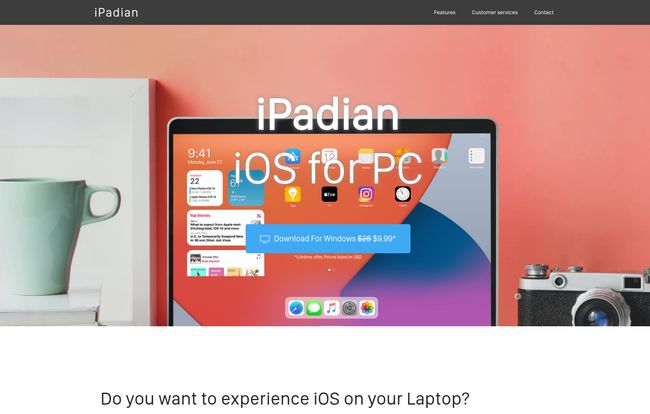
iPadian is the dashboard. It creates a desktop environment on your Windows or Mac that looks and feels just like an iPad’s home screen. It doesn’t install Apple’s iOS on your machine; it just wears an incredibly convincing iOS costume.
Visit iPadian
My First Impressions and The User Experience
Getting it running is straightforward. Once you’re in, the illusion is pretty good! You’re greeted by that familiar grid of clean, rounded icons. The dock at the bottom, the settings icon, the general aesthetic—it’s all there. It feels clean. For someone who just wants to poke around and see what the iOS interface is all about, it’s a neat trick. It successfully mimics the vibe of using an Apple device.
You can navigate around, open the pre-installed apps, and get a sense of the workflow. But pretty quickly, you start to see the edges of the simulation. It’s like being on a movie set; it looks incredible from the front, but if you walk behind the building, you see it’s just a facade.
The Big Question: What Can You Actually Do With It?
This is where we need to manage expectations. You boot up iPadian, you see an “AppStore” icon, and your heart skips a beat. Could it be? Can you finally access the treasure trove of the Apple App Store?
Nope. Sorry to be the bearer of bad news.
The iPadian AppStore isn’t a gateway to Apple’s official store. Instead, it’s iPadian’s own curated collection of apps that have been specifically designed to run within the simulator. Now, this isn’t all bad. They’ve included some heavy hitters: Facebook, WhatsApp, TikTok, Spotify, Instagram, and a few games like Crossy Road. It’s a decent, if limited, selection. But if you’re looking to run a specific, niche iOS-only app for your business or a new game that’s topping the charts, you’re out of luck. You only get to play with the toys already in the sandbox.
Let’s Talk Performance and Limitations
As a simulator, iPadian is pretty lightweight. It runs without turning my laptop’s fan into a jet engine, which is more than I can say for some full-blown Android emulators I’ve tested. It’s snappy enough for what it is.
But the limitations are part of the deal. Beyond the restricted app library, you won’t get access to deep iOS features. No iMessage integration with your other Apple devices, no iCloud, no seamless handoff. It’s a standalone experience. It gives you the look and feel, but not the interconnected ecosystem that is arguably Apple’s biggest selling point. You can’t expect the performance to match a native M1 or M2 chip on a real iPad either. It’s running on your PC’s hardware, through a layer of simulation. It’s… fine. Just fine.
The Price of Admission: Is iPadian Worth the Ten Bucks?
iPadian has a very simple pricing model: $9.99 for a lifetime offer for the Windows version. A one-time payment. In a world of endless monthly subscriptions, I have to say, that’s refreshing. For less than the price of a fancy lunch, you get this tool forever.
So, is it worth it? That depends entirely on who you are.
If you’re an iOS developer needing a robust environment to test your app’s code, absolutely not. You need Apple’s native tools, like Xcode. Don’t even consider this.
But if you’re a die-hard Windows user who’s just intensely curious about the iOS interface? Or you want a simple, dedicated desktop client for Instagram and TikTok that feels a bit more app-like? For ten dollars? Yeah, that seems pretty reasonable. It’s a novelty, a fun little toy to satisfy your curiosity without dropping hundreds of dollars on a new device.
Who Should Get iPadian
You should consider it if you are a casual user curious about the iOS layout, someone who wants a separate space for a few social media apps, or a person who just enjoys tinkering with different software without a huge financial commitment.
Who Should Definitely Skip It
You should give it a pass if you are an app developer, a power user needing specific iOS-only applications, or anyone expecting a full 1:1 replacement for an actual iPhone or iPad. This ain’t it, chief.
Final Thoughts: A Fun Toy or a Serious Tool?
After spending some time with it, my verdict is in. iPadian is a fun toy. It’s a well-made simulator that delivers on its core promise: to give you an impression of iOS on your PC. It’s not a serious productivity tool or a developer’s workstation, and it doesn’t pretend to be. The marketing is actually quite honest about it being a simulation.
For a one-time fee of $9.99, it provides a safe, simple, and affordable way to scratch that iOS curiosity itch. It’s a walled garden inside your already-familiar Windows machine. And sometimes, that’s all you really need.
Frequently Asked Questions about iPadian
- Is iPadian safe to download and use?
- Based on its model as a self-contained simulator that doesn’t mess with your core system files, it appears to be safe. It runs as a standalone program. As always, make sure you download it from the official website to avoid any third-party malware.
- Is iPadian an emulator?
- No. It’s a simulator. It mimics the look and feel of the iOS interface but does not emulate the underlying hardware or operating system. This means it’s less powerful but also less demanding on your computer.
- Can I access the official Apple App Store?
- No, you cannot. iPadian has its own curated “AppStore” with a limited number of applications that have been adapted to work within the simulator.
- Does iPadian work on a Mac?
- Yes, the official website states that it works on both Windows and Mac operating systems, though the prominent pricing is for the Windows version.
- Can I get a refund for iPadian?
- The iPadian website has a link to a “Refund Policy” in its footer. You should review their specific terms and conditions there before making a purchase.
Reference and Sources
For the most current information, pricing, and to download the software, please refer to the official source:
- Official iPadian Website: https://ipadian.net/


