
Categories: AI Anime Generator, AI Art Generator, AI Avatar Generator, AI Background Remover, AI Face Swap Generator, AI Headshot Generator, AI Image Generator, AI Meme Generator, AI Outpainting, AI Tattoo Generator
iPic.Ai Review: An AI Image Generator for Everyone?

If you’re a blogger, a small business owner, or any kind of content creator, you know the struggle. The relentless, never-ending content hamster wheel demands to be fed. And what does it crave most? Visuals. Good ones. Unique ones. Images that don’t look like the same five stock photos everyone else is using.
For years, this meant one of three things: spending a fortune on stock photo subscriptions, hiring a designer (also a fortune), or trying to become a Photoshop wizard overnight. I’ve tried them all. My wallet has cried. I have cried.
Then, AI image generators exploded onto the scene, promising a new way. A faster, cheaper way. I’ve been in the SEO and traffic game for a long time, and I’ve seen tools come and go. Some are game-changers, others are just hype. So when iPic.Ai kept popping up on my radar, I knew I had to take it for a spin. Is it just another face in the crowd, or is it the creative assistant we’ve all been secretly wishing for?
What Exactly is iPic.Ai? More Than Just a Pretty Picture Generator
At first glance, iPic.Ai looks like your standard text-to-image generator. You type in some words, you get a picture back. Simple. But when you start poking around, you realize it’s less of a single tool and more of a creative’s toolkit. Think of it as a Swiss Army knife for visuals. The homepage itself throws a bunch of options at you right away: AI Art Generator, a BG Remover, a Face Swapper, even an AI Tattoo Generator. That’s… a lot.
The core idea, according to them, is to help you “create unique and custom images effortlessly.” And they’re not just talking about generating fantasy art (though you can definitely do that). They have practical tools that a professional like me actually needs. Removing a background from a product shot without wanting to tear my hair out? Yes, please. Creating a quick, professional-looking headshot from a selfie? Sign me up.
Visit iPic.Ai
It’s this collection of utilities, all housed under one roof, that makes it interesting. You’re not just subscribing to a prompt-and-pray art machine; you’re getting a suite of tools that can genuinely speed up your daily workflow.
Getting Your Hands Dirty: My First Impressions of iPic.Ai
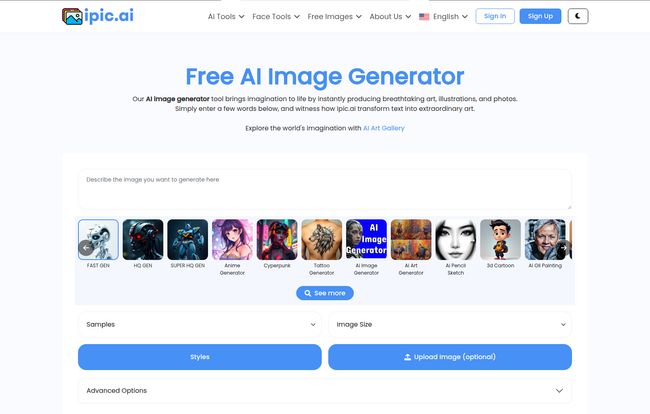
Okay, so I jumped in. The main interface is clean, almost deceptively simple. There’s a big box that says, “Describe the image you want to generate here.” No confusion, no hunting for the main event. I love that. Too many SaaS platforms feel like you need a pilot’s license to navigate them.
I decided to start with a classic blogger request: “A friendly robot sitting at a desk, writing a blog post on a futuristic laptop, warm and optimistic lighting.”
Beneath the prompt box, you can choose from different models like “Fast Gen” or “Hyper HD Gen,” and a bunch of styles. This is where you can really start to dial in the look. I picked a slightly painterly style, set my image size, and hit the big blue “Generate” button. It felt a bit like putting a coin in a digital art vending machine and waiting to see what prize you get. A few seconds later, four options popped up. And you know what? They were pretty darn good. Not perfect, mind you—one robot had a suspicious third arm—but definitely usable. More than usable, actually. One was a perfect fit for a featured image.
The Good, The Bad, and The AI-Generated Ugly
No tool is perfect, especially in the wild west of AI. After spending a good few hours generating images, swapping faces onto memes (for research, of course), and removing backgrounds, I have some thoughts.
What I Really Liked About iPic.Ai
First off, the sheer variety of tools is a massive win. The fact that I can generate an image, then immediately pop it into a background remover without leaving the site is a huge time-saver. As someone who bills by the hour, that’s money in the bank.
It’s also incredibly accessible. You don’t need to learn complex commands or understand the difference between diffusion models. My mom could use this. It truly lowers the bar for creating custom visuals, and I’m all for that. It’s a huge step up from the early days of AI art where you practically had to be a developer to get a decent image.
Where It Falls a Little Short
Now, for the reality check. Some folks will say AI image generators are not a replacement for human artists, and they are absolutely right. This is a tool, not a creative director. You will get weird stuff sometimes. Uncanny valleys, funky-looking hands, text that looks like an alien language. It’s part of the charm, and part of the frustration. You need to guide it.
And, of course, the free plan is… a free plan. It’s great for testing the waters, but the limitations are there. If you’re going to use this professionally, you’ll hit that ceiling pretty quickly. Many of the more advanced models and faster generation speeds are, unsurprisingly, reserved for paying customers. No such thing as a free lunch, right?
Let’s Talk Money: A Breakdown of iPic.Ai Pricing
This is where the rubber meets the road for most of us. A great tool is only great if you can afford it. I appreciate that iPic.Ai has a pretty transparent pricing structure, catering to different users. Let’s break it down.
| Plan | Price | Who It’s For |
|---|---|---|
| Free Plan | $0 | The curious, the hobbyist, or just someone who wants to try before they buy. Perfect for getting a feel for the platform. |
| Silver Plan | $9.99/month | Startups or small creators. 1,000 images a month is a decent amount for social media and a few blog posts. |
| Gold Plan | $29.99/month | This feels like the sweet spot for serious bloggers and professionals. 5,000 images and faster, no-recaptcha generation is a solid value proposition. |
| Platinum Plan | $59.99/month | Now we’re talking bulk users. Marketing agencies or businesses that need a high volume of visuals. The API access is the main draw here. |
| Dedicated Plan | $999.99/month | The enterprise-level plan for heavy-duty API users generating over 100,000 images. If you need this, you’re not just running a blog, you’re running a visual-heavy operation. |
I like that they show the per-request cost. It’s a small detail, but it shows they’re thinking about users who care about ROI. You can check out the full details on their pricing page.
Who is iPic.Ai Actually For?
So, who should be adding iPic.Ai to their bookmarks? In my opinion, it’s not for the fine artist trying to create a masterpiece for a gallery. Tools like Midjourney might have a slight edge in pure artistic output, for now. But for the rest of us?
- Bloggers and Content Creators: Absolutely. This is your new best friend for creating endless featured images, social media graphics, and in-article visuals without breaking the bank or copyright laws.
- Startups & Small Businesses: A resounding yes. Need a quick concept for a marketing campaign? A graphic for a Facebook ad? iPic.Ai is faster and cheaper than a freelance designer for those quick-turnaround jobs.
- API Users: Clearly, with their Platinum and Dedicated plans, they are courting developers who want to build applications on top of their tech.
- The Casual User: It’s just plain fun. Want to see what your dog would look like as an astronaut? Go for it. Making a funny meme for your friends? The Face Swapper tool is waiting for you.
The Elephant in the Room: How Does iPic.Ai Compare?
The AI space is crowded. You’ve got heavy hitters like Midjourney, DALL-E 3 (baked into ChatGPT Plus), and open-source options like Stable Diffusion. So where does iPic.Ai fit?
I’d say it positions itself as the practical workhorse. Midjourney can feel like a high-end, finicky sports car—incredibly powerful but with a steep learning curve inside Discord. iPic.Ai is more like a reliable, well-equipped SUV. It’s easy to drive, has plenty of room for all your stuff (the extra tools), and it gets you where you need to go without any fuss. It prioritizes a user-friendly experience and an all-in-one feature set over being the absolute bleeding-edge of raw AI power. And for 90% of users, that’s a much better deal.
My Final Verdict
So, is iPic.Ai the AI image generator you’ve been waiting for? If you’re a content creator looking for a powerful, versatile, and—most importantly—easy-to-use tool to solve your visual content problems, then my answer is a firm yes. It’s a fantastic addition to the digital toolkit.
It’s not going to put high-end graphic designers out of a job. But it is going to save countless hours and headaches for the millions of us who are just trying to create good-looking content without it taking over our lives. Give the free plan a spin. I have a feeling you’ll be upgrading to Gold before you know it.
Frequently Asked Questions about iPic.Ai
- Is iPic.Ai really free to use?
- Yes, iPic.Ai has a Free Plan that’s perfect for getting started and trying out the tools. However, it has limitations on the number of images you can generate and which AI models you can access. For regular use, you’ll likely want to look at one of their paid plans.
- Can I use images from iPic.Ai for commercial purposes?
- This is a big question in the AI space. Generally, with paid plans on services like this, you are granted commercial rights to the images you create. However, I always recommend reading the platform’s specific Terms of Service to be 100% sure, as copyright law around AI art is still a bit of a developing story.
- What kind of images can I make with iPic.Ai?
- Pretty much anything you can imagine! From realistic photos and professional headshots to anime characters, fantasy art, logos, and even memes. The platform has a wide range of styles and specific tools like the Avatar Generator and BG Remover to help you create all sorts of visuals.
- How is iPic.Ai different from Midjourney?
- The biggest difference is the user experience and feature set. Midjourney operates primarily through Discord and is known for its incredibly high-quality, artistic output, but it has a steeper learning curve. iPic.Ai offers a much simpler web-based interface and includes a whole suite of practical editing tools (like background removal) in one place, making it more of an all-in-one solution for creators.
- Do I need to be a good artist to use iPic.Ai?
- Not at all! That’s the beauty of it. Your main skill is writing a descriptive prompt. If you can describe what you want to see, the AI does all hte heavy lifting. It’s designed for everyone, regardless of their artistic skill.
Reference and Sources
- iPic.Ai Official Website
- iPic.Ai Official Pricing Page
- U.S. Copyright Office – Artificial Intelligence – For those interested in the evolving legal landscape of AI-generated works.


