
Categories: Ad Copy, AI Blog Generator, AI Email Generator, AI Product Description Generator, AI Rewriter, AI Social Media Post Generator, AI Text Generator, AI Text-to-Speech, AI Transcriber
iSavantAI Review: The All-in-One AI Content Tool?

Let’s have a real chat. My browser’s bookmark bar is a chaotic graveyard of AI tools. Seriously. I’ve got one for writing blog intros, another for generating social media captions, a separate one for AI images, and don’t even get me started on the transcription service I pay for every month. It’s a classic case of “AI tool sprawl,” and my wallet… well, it feels the pain of a dozen little subscriptions nibbling away at it.
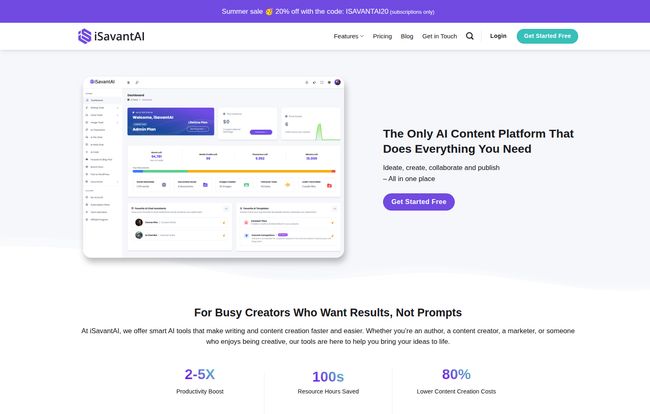
So, when I stumbled upon a platform called iSavantAI, my curiosity was definitely piqued. The tagline on their site is bold: “The Only AI Content Platform That Does Everything You Need.”
Everything? That’s a mighty big claim. My inner skeptic, honed by years of navigating SEO and marketing tech, immediately raised an eyebrow. But another part of me, the part that’s tired of juggling logins and invoices, leaned in closer. Could this actually be the content creation command center I’ve been looking for?
I decided to roll up my sleeves and see if iSavantAI is just another shiny object or if it’s the real deal. Here’s what I found.
What is iSavantAI, Really?
At its core, iSavantAI positions itself as an all-in-one AI suite. It’s not just another GPT wrapper that helps you write a paragraph. It’s designed to be a comprehensive toolkit for business owners, marketers like me, and writers who need to do more than just write. We’re talking writing, rewriting, brainstorming, creating images, generating voiceovers from text, and even transcribing audio files. All in one spot.
Their whole angle seems to be about simplifying the workflow. Instead of duct-taping three or four different services together, they want to be your single destination. A noble goal, but a tough one to execute well.
My First Impressions: A Look Inside the Platform
Logging in, the interface is clean. It’s not cluttered with a million confusing options, which is a breath of fresh air. They make a point of saying their platform is for “Busy Creators Who Want Results, Not Prompts.” I find this interesting because the whole AI world has become obsessed with ‘prompt engineering.’ iSavantAI seems to suggest a more guided, template-driven approach, which could be a huge win for people who don’t want to spend an hour crafting the perfect prompt just to get a decent blog outline.
Visit iSavantAI
The layout is intuitive, guiding you toward the different tools – AI Writer, Text to Speech, Transcription, etc. It feels less like a blank canvas and more like a well-equipped workshop. You know where the tools are, you just have to pick one up and get to work.
The Core Features That Actually Matter
An AI tool can have a hundred features, but usually, only a handful make or break the experience. Here’s my breakdown of what stands out in iSavantAI.
The AI Writing Assistant: Your New Co-pilot?
This is the heart of the platform. iSavantAI boasts over 45 AI writing templates, which covers pretty much all the standard marketing and content needs—blog posts, ad copy, emails, video scripts, you name it. The Article Wizard is particularly handy for generating long-form content step-by-step, which helps maintain a logical flow.
One of the biggest pluses for me is the multi-language support. With capabilities in over 35 languages, it’s immediately valuable for anyone working with international audiences. It’s not just about translation; it’s about generating content natively in those languages. A subtle but important difference.
Now, a quick note on credits. The platform uses a credit system, and not all AI models are created equal. Using the standard (but still very capable) ChatGPT 4o mini model uses fewer credits than firing up the big guns like the full ChatGPT 4o. It’s fair, but something you need to watch so you don’t burn through your monthly allowance unexpectedly.
Beyond Text: Transcription and AI Voiceovers
Here’s where iSavantAI starts to pull away from the pack of simple AI writers. The inclusion of text-to-speech (TTS) and transcription tools on their Creator Pro plan is a big deal. For a podcaster, this means you can upload your episode audio and get a full transcript for show notes or a blog post. For a YouTuber or course creator, you can generate surprisingly natural-sounding voiceovers for your videos in multiple languages without hiring a voice actor.
I’ve paid for standalone services like Descript and Otter.ai for years. Having this integrated could be a genuine money and time saver, even if the included limits (like 240 minutes of transcription on the Pro plan) might require a top-up for power users.
A Few Game-Changing Tools for Marketers
Okay, a couple of features really caught my eye from a pure marketing efficiency standpoint. First, the YouTube video to blog post converter. This is content repurposing gold. You feed it a YouTube URL, and it pulls the transcript and helps you structure it into a full-fledged article. For anyone doing video marketing, this is an absolute godsend for SEO and reaching a wider audience.
Second is the AI File Chat. You can upload a PDF, a DOCX, or other documents and just… talk to them. Imagine uploading a dense research paper and asking it to summarize the key findings, or feeding it your company’s style guide and asking it questions while you write. That’s powerful stuff.
And of course, the direct Post to WordPress integration. Cutting out the copy-paste-reformat dance is a small thing that adds up to a lot of saved time and frustration.
Customization and Branding: Making the AI Yours
One of my biggest gripes with AI content is that it can sound… well, robotic and generic. iSavantAI addresses this with its Brand Voice feature (available on the Writer Pro plan and up). You can feed it samples of your writing, and it will learn your tone, style, and vocabulary to generate content that sounds more like you and less like a generic AI. You can also create custom templates and AI characters, which is fantastic for maintaining consistency across a team.
This isn’t just a vanity feature; it’s crucial for building a recognizable brand and avoiding the sea of sameness that’s flooding the internet.
Let’s Talk Money: iSavantAI Pricing Breakdown
Alright, the all-important question: what does it cost? The pricing structure is flexible, which I appreciate. There are monthly subscriptions and one-time prepaid credit options. (Note: I’ve seen a couple of different pricing pages, so I’m using the one from their detailed comparison chart which seems most current).
| Plan | Price | Who It’s For | Key Features |
|---|---|---|---|
| Free | $0 | The Curious & Testers | 10,000 credits (basic model), limited templates, 30-day storage, no internet access. |
| Writer Basic | $12/month | Solo Bloggers & Freelancers | 100k credits, all templates, YouTube to Blog, File Chat, WP Integration, Web Access. |
| Writer Pro | $15/month | Marketers & Small Businesses | 200k credits, all Basic features + AI Vision & Images, Brand Voice, Custom Templates. |
| Creator Pro | $25/month | Content Teams & Power Users | 500k credits, all Pro features + Text to Speech, Transcription, and Team Members. |
There’s also an Enterprise plan for larger teams and prepaid plans if you just need a one-time boost of credits for text, voiceovers, or transcription. It’s a pretty solid lineup.
The Not-So-Great Stuff (Let’s Be Honest)
No tool is perfect, and it’s important to go in with eyes wide open. The Free plan is very much a trial. The 30-day storage for your documents and limited features mean you’ll hit a wall pretty quickly. It’s enough to get a feel for the platform, but not for any serious work.
Also, the lack of yearly subscription plans at the moment is a bit of a bummer for businesses that prefer annual billing cycles. And while the prepaid credit top-ups are great, it’s important to know they just add credits to your current plan; they don’t unlock features from a higher tier. So you can’t be on the Basic plan, buy a transcription credit pack, and expect the transcription tool to magically appear.
So, Who Is iSavantAI Actually For?
After playing around with it, I have a pretty clear picture of the ideal user.
- Solo Creators and Bloggers: The Writer Basic or Writer Pro plans are fantastic value. You get the core writing tools, the game-changing YouTube to blog feature, and even branding tools for a very reasonable price.
- Marketing Teams and Agencies: The Creator Pro plan is the way to go. The ability to add team members, combined with the full suite of writing, voice, and transcription tools, makes it a powerful collaborative hub.
- Anyone Drowning in Subscriptions: If you’re currently paying for a separate AI writer, a transcription service, and maybe a stock image site or AI art generator, you can likely consolidate all of those into a single iSavantAI plan and save money.
Who is it not for? If you only need one of these functions—say, just transcription—you might find a cheaper, dedicated tool. The magic of iSavantAI isn’t in being the absolute best at every single task, but in being very, very good at all of them in one convenient package.
The Verdict: Is iSavantAI the All-in-One Solution It Claims to Be?
So, back to that big claim: “The Only AI Content Platform That Does Everything You Need.” Is it true? For a huge number of creators and marketers, I’d say it gets impressively close. It successfully tackles the ‘AI tool sprawl’ problem by bringing the most important content creation tools under one roof.
For me, the value proposition is clear. It’s the synergy. It’s turning a video into a blog post, then using the AI writer to create social media blurbs from that post, and then using text-to-speech to create an audio version, all without ever leaving the platform. That’s a workflow that just makes sense.
It’s not perfect, but it’s a powerful, well-designed, and thoughtfully-priced platform that could genuinely streamline your content creation process. If you’re feeling the pain of juggling too many tools, I’d say taking the free plan for a spin is a no-brainer.
Frequently Asked Questions about iSavantAI
- How do the AI credits work?
- You get a certain number of credits with your monthly plan. Different actions consume credits. Writing with a basic AI model might use 1 credit per word, while a more advanced model or generating an image might use more. The platform is transparent about the cost of each action.
- Can I collaborate with my team?
- Yes, team collaboration is a key feature of the Creator Pro plan, allowing you to add team members to your account to share credits and work on projects together.
- What’s the cancellation policy like?
- It’s straightforward. You can cancel your monthly subscription at any time. You’ll retain access to your plan’s features and credits until the end of the current billing cycle.
- Does it support languages other than English?
- Absolutely. iSavantAI supports content generation, rewriting, and text-to-speech in over 35 languages, making it a strong choice for global content strategies.
- Can I really turn a YouTube video into a blog post?
- Yes! This feature is available on the Writer Basic plan and up. You provide a YouTube URL, and the tool uses the video’s transcript to help you generate a complete blog post, which is a massive time-saver for content repurposing.


