
Categories: AI Answer, AI Assistant, AI Chatbot, AI PDF, AI PDF Summarizer, AI Summarizer, Large Language Models (LLMs)
iTextMaster Review: Chat with Any PDF or Web Page?

If you’re anything like me, your digital life is drowning in PDFs. Research papers, client reports, ebooks you swore you’d read, dense legal agreements… it’s a text-based tidal wave. For years, my process was a clunky dance of frantic scrolling and hitting Ctrl+F, hoping to land on the one keyword that would save me. It was tedious. Inefficient. And frankly, a colossal waste of time.
Then AI tools started popping up, promising to be our savior. I’ve been in the SEO and digital marketing game long enough to be skeptical of anything that promises to “revolutionize” my workflow. But every now and then, something comes along that actually delivers. And I think iTextMaster might just be one of those things.
It’s an AI-powered tool that lets you chat with your documents. Yeah, you read that right. You can upload a PDF or point it to a webpage and just… ask it questions. It’s like hiring a super-fast research assistant who’s already read the entire thing and is just waiting for your query.
What Exactly is iTextMaster? (And Why Should You Care?)
At its core, iTextMaster is a personal document assistant. It uses the brainpower of OpenAI’s ChatGPT to analyze, summarize, and interact with text from PDFs and web pages. Instead of you having to read every single word of a 100-page document to find one specific piece of information, you can simply ask the tool, “What were the key findings of the Q3 performance report?” and it will spit out a coherent answer, based only on the content of that document.
This is a game-changer. It’s not just about finding keywords; it’s about understanding context. The tool creates what it calls a “semantic index” of your document, which is a fancy way of saying it learns what the document is actually about. This allows it to provide genuinely intelligent answers that feel like you’re talking to an expert on that specific text.
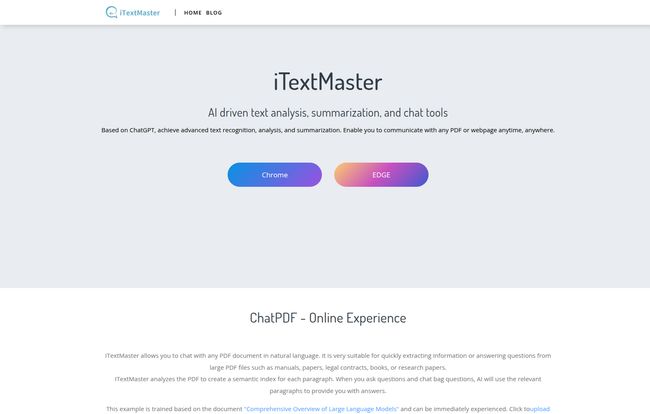
Visit iTextMaster
A Closer Look at the Key Features
So, how does this all work in practice? The platform is surprisingly straightforward, broken down into a few core functions that are incredibly useful.
Document Chat: Finally, a Way to Interrogate Your PDFs
This is the main event. You can either upload a PDF directly from your computer or, and I love this, just paste a link to a PDF hosted online. No need to download it first. I threw a 50-page SEO audit at it, a notoriously dense document filled with jargon and tables. Instead of spending an hour picking through it, I just asked questions:
- “What are the top 3 recommendations for improving on-page SEO?”
- “Summarize the section on backlink analysis in three bullet points.”
- “Are there any mentions of core web vitals?”
In seconds, I had my answers. Clear, concise, and pulled directly from the source material. It even felt a little like cheating, but I got over that pretty quickly.
Web Chat: Taming the Wild West of Web Content
This feature works just like the PDF chat, but for any live webpage. We’ve all been there—staring at a massive Wikipedia entry or a long-form article from The Atlantic, trying to find the one data point we need. With Web Chat, you just paste the URL. It’ll digest the content and stand by for your questions. This is fantastic for competitor analysis, digesting news, or quickly getting the gist of a complex topic without getting lost in the weeds. Its definately better than just skimming.
Smart Chat: The AI’s Little Helper
Sometimes you don’t even know what to ask. The Smart Chat feature is a nice touch that tries to solve this. It automatically generates a few potential questions based on its initial analysis of the document. It’s a great way to kickstart your investigation, especially with a document you’re completely unfamiliar with. It’s not always perfect, but it often points you in a helpful direction.
My Experience: Putting iTextMaster to the Test
Okay, so the features sound great on paper. But how does it feel to use? The website claims a “friendly interface,” and for once, the marketing copy isn’t lying. The design is clean, minimalist, and you can get started in about 30 seconds. There’s no steep learning curve here.
I was also impressed with the multi-language support. I tested it with a Spanish news article and it handled the translation and summarization without breaking a sweat. For international teams or researchers working with foreign-language sources, this is a massive advantage.
The Good, The Bad, and The AI-Powered
No tool is perfect, right? After spending a good amount of time with iTextMaster, here’s my honest breakdown.
The biggest positive is the sheer amount of time it saves. The ability to extract accurate information and summaries this quickly is incredible. The contextual answers are the real magic—it genuinely feels like you’re interacting with the knowledge inside the document, not just the words on the page.
Now, let’s be real about the downsides. The tool’s power comes from being “Based on ChatGPT.” This is also its potential Achilles’ heel. It means its performance is tied to the ChatGPT API. If the API is slow or down, iTextMaster could be too. It also means its “knowledge” is only as good as the underlying AI model’s ability to interpret your specific document. For some super-niche, highly technical, or poorly formatted documents, I suspect it might struggle to create a perfect semantic index. It’s a powerful assistant, not a magical oracle.
What About the Price Tag?
This is the million-dollar question, isn’t it? As of writing this, iTextMaster hasn’t listed public pricing plans on their main site. This is a pretty common strategy for tools in their early stages. They are likely still fine-tuning their tiers and offerings. My advice? Head over to their website and check for yourself. They might have a free trial or an introductory offer running that you can take advantage of. I’m hoping they land on a reasonable model, perhaps with a generous free tier for light users.
Who is iTextMaster Actually For?
While I think almost anyone could find a use for it, a few groups will see massive benefits immediately:
- Students and Researchers: Imagine turning a mountain of academic papers into a manageable, searchable database. This is your new best friend for literature reviews.
- Legal and Business Professionals: Need to quickly find a specific clause in a 200-page contract? Or get the key takeaways from a quarterly report before a meeting? This is your tool.
- Marketers and Content Creators: I’ve been using it to analyze competitor blog posts and summarize industry trend reports. It’s a huge boost to my research process.
Basically, if your job or studies involve reading and processing large amounts of text, this is something you should look at. Seriously.
Frequently Asked Questions about iTextMaster
- How does iTextMaster actually work?
- It uploads your document, uses AI to analyze the text and create a special ‘semantic index’ (a map of the document’s meaning), and then uses that index and ChatGPT to answer your questions based only on the source material.
- Is my data safe when I upload a PDF?
- While iTextMaster’s site focuses on functionality, most reputable services of this kind use secure connections and have privacy policies that state they don’t retain your documents longer than necessary. However, I’d always recommend checking their latest Privacy Policy and avoiding uploading anything with extremely sensitive personal or financial data, just to be safe.
- Can it handle languages other than English?
- Yes! The website highlights multi-language support, and in my own testing, it worked very well with Spanish. This is a big plus over some other tools on the market.
- Is it better than just using Ctrl+F?
- Absolutely. Ctrl+F finds specific keywords. iTextMaster understands context and meaning. You can ask “What was the author’s main argument?” and it will give you a summary. Ctrl+F could never do that.
- Do I need my own ChatGPT account to use it?
- No, it appears to be a self-contained service. It uses the ChatGPT API on the backend, so you don’t need your own account or API key to use iTextMaster.
- Is iTextMaster free?
- The pricing isn’t clearly stated on the website at this time. They may offer a free trial or a free tier with certain limitations. Your best bet is to visit their website for the most current information.
My Final Verdict
So, is iTextMaster the AI PDF tool we’ve been waiting for? For a lot of us, I think the answer is yes. It’s not perfect, and its reliance on the ChatGPT API is something to be aware of. But it’s a powerful, intuitive, and genuinely useful tool that solves a very real, very annoying problem.
It successfully bridges the gap between our static documents and our desire for dynamic, conversational access to information. It’s one of the first AI productivity tools I’ve tested that I’ll actually continue to use in my day-to-day work. And in this crowded market, that’s probably the highest praise I can give.


