
Categories: AI Design Generator, AI Pattern Generator, Text to Image
Jack-O-Lantern AI Review: Ditch the Stencil Books?

Alright, let’s talk about a sacred autumn ritual. The Great Pumpkin Carve-a-thon. For me, it usually involves spreading newspaper all over the kitchen floor, scooping out an obscene amount of pumpkin guts, and then spending the next two hours scrolling through my phone, trying to find a stencil that isn’t the same boring triangle-eyed face I’ve carved for the last ten years. It’s a tradition. A messy, frustrating, glorious tradition.
But this year, something’s different. AI has come for our gourds. And honestly? I’m here for it. I stumbled upon a tool called Jack-O-Lantern AI, and the premise was so simple, so niche, I just had to give it a spin. It claims to generate custom pumpkin carving templates from a simple text prompt. No more endless searching. No more settling for a generic ghost. Just type what you want, and poof, a stencil appears.
Sounds too good to be true, right? That’s what I thought. So I rolled up my sleeves, brewed some apple cider, and decided to see if this AI could really handle my weirdest Halloween ideas.
So, What Is Jack-O-Lantern AI Anyway?
Think of it like having a tiny, dedicated artist living in your computer, an artist whose sole purpose is to design jack-o’-lantern faces. That’s Jack-O-Lantern AI. You don’t need any artistic skill. You dont need to know how to draw. You just need an idea. You type your concept—say, “a vampire cat sipping a martini” or “a detailed haunted house on a hill”—into a box, and its AI model generates a black-and-white, carve-able template for you.
The whole point is to save you that most precious of all commodities: time. And to inject a massive dose of creativity into your Halloween decor. In a world saturated with AI writing assistants and image generators, this feels refreshingly specific and, dare I say, fun.
Getting Started: The First Few Clicks
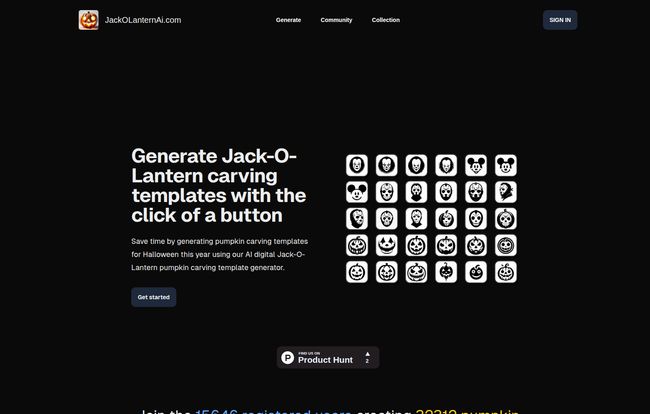
The homepage is clean and to the point. It boasts that over 15,646 users have already generated more than 32,312 templates. That’s a lot of pumpkins. Getting started was a breeze. A quick sign-up and I was looking at the generator’s interface.
This is where the magic happens. A simple text box awaits your command. My first prompt was a classic: “A spooky, grinning skull.” Within about 15 seconds, four different options popped up. They were all genuinely cool, high-contrast designs perfect for carving.
Visit Jack-O-Lantern Ai
Then I decided to get a little more ambitious. “A cyberpunk wolf howling at a circuit board moon.” The results were… surprisingly good! It wasn’t just a random jumble; it was a coherent design that looked like something you could actually carve. The templates are high-resolution, which is a big plus. It means you can print them large for a prize-winning pumpkin or scale them down for those cute little ones without everything turning into a blurry mess.
The Good, The Great, and The Gourd-geous
After playing around for a solid hour (and generating way too many templates), a few things really stood out. This tool has some serious advantages over the old-school methods.
Speed Is the Name of the Game
Let’s be real. The time it took me to dream up and generate a dozen unique templates was less than the time I’d typically spend finding one decent stencil online. The site’s claim of “Ultra Fast Feedback” is no joke. For busy parents or anyone throwing a last-minute Halloween party, this is a game-changer. No more frantic trips to the store for a crumpled template book.
Your Imagination Is The Only Limit (Mostly)
This is the core appeal. You aren’t limited to the five stencils in a cheap carving kit. You want a T-Rex juggling chainsaws? Go for it. A portrait of your dog as a zombie? Type it in. This level of customization means your pumpkin can finally reflect your personality. My porch is about to get a whole lot weirder, and I couldn’t be happier. This feature alone makes it feel like a massive upgrade.
Managing Your Ghoulish Gallery
I didn’t think much of this at first, but the tool automatically saves all your generated templates into a personal collection in the cloud. This is surprisingly handy. You can compare designs, pick your favorites, and even save ideas for next year without cluttering up your computer’s download folder. It’s a small touch that shows they’ve thought about the actual user experience.
Where The AI Gets a Little… Seedy
Of course, no tool is perfect. There are a couple of things to keep in mind. The main challenge is what I’m calling “pumpkin prompt engineering.” The quality of your template is directly tied to the quality of your prompt. If you’re too vague (“a scary face”), you’ll get something generic. You have to be a bit descriptive to get the best results.
And, like all AI, it can sometimes get things wrong. I asked for “a ghost reading a book” and one of the results looked more like a melted marshmallow holding a brick. You might have to generate a few times to get the perfect one. But honestly, that’s part of the fun. It feels less like a vending machine and more like a creative collaboration with a slightly eccentric robot.
Let’s Talk Pricing
So, what does this magic cost? This is where it gets a little murky. The website doesn’t have a clear, dedicated pricing page at the moment (the link seems to be broken, which happens). However, the homepage gives us some pretty strong clues. It mentions a free trial and proudly states it offers “Affordable Prices.”
It specifically calls out other services that “charge you $10 for 10 credits,” heavily implying that Jack-O-Lantern AI uses a similar credit-based system, just at a better rate. Based on this, I’d guess you get a few free generations to start, and then you can buy a pack of credits for a reasonable price. For the level of customization and time saved, I’d say paying a few bucks for a batch of unique, high-quality stencils feels like a fantastic deal, especially when a single, flimsy template book can cost more.
What Real Users Are Saying
Don’t just take my word for it. The site has a wall of happy users. One user, Maya, calls it the “sweetest little web app,” which I think is pretty accurate. Another, Doug Straab, loves that it “keeps a log of all my pumpkin templates in one easy place.”
But my favorite review has to be from a user named Rick Roll, who simply says, “I could save money and just rick roll all my neighbors with pumpkin carving templates…” You can’t buy that kind of endorsement. It speaks to the chaotic, creative energy this tool unleashes.
Final Carve-Out: My Verdict
So, is Jack-O-Lantern AI a trick or a treat? For me, it’s a definite treat. It takes one of the most tedious parts of a beloved tradition and makes it exciting again. It’s not just a utility; it’s a creativity tool that empowers you to make something truly your own.
It’s perfect for families who want to create a whole pumpkin squad with a consistent theme, for Halloween enthusiasts who want their decorations to stand out, and for anyone who’s ever thought, “I wish I could find a stencil of…” It’s simple, fast, and genuinely fun to use. While you might need to finesse your prompts a bit, the end result is more than worth it.
Frequently Asked Questions
How does Jack-O-Lantern AI work?
It uses an AI model trained to interpret text descriptions (prompts) and generate corresponding black-and-white images suitable for pumpkin carving stencils. You just type what you want to see, and the AI draws it for you.
Is Jack-O-Lantern AI free to use?
It appears to have a free trial that gives you some initial generations. After that, it likely operates on a credit system, which the website suggests is more affordable than competing services.
Can I use the templates on any size pumpkin?
Yes! The templates are generated in high resolution, so you can easily resize them when you print them out. You can scale them up for a giant pumpkin or down for a small one without losing detail.
What kind of designs can I create?
Pretty much anything you can describe! From simple spooky faces to complex scenes, pop culture characters, or funny concepts. The more descriptive your prompt, the better the result.
Are the templates hard to carve?
It depends on the design you generate. The AI creates a stencil, but the carving difficulty depends on the design’s complexity. You can always generate a few options and pick one that matches your skill level.
Do I need to be an artist to use this?
Absolutely not. That’s the whole point! If you can type a sentence, you can create a custom pumpkin template.
Ultimately, Jack-O-Lantern AI is a fantastic example of technology enhancing a tradition instead of replacing it. It puts the power of a designer in your hands and removes the frustration, leaving just the fun part. My carving game has been forever changed. This Halloween, my porch won’t just be spooky; it’ll be a custom-designed masterpiece, all thanks to a clever little AI. Good luck to my neighbors; the competition is on.


