
Categories: AI Developer Tools, AI Notes Generator, AI Productivity Tools
Jots Review: The Dev Journal to Level Up Your Code

How many browser tabs do you have open right now? How many untitled notes.txt files are scattered across your desktop? And how many times have you solved a gnarly bug, only to face its slightly different cousin six months later with zero memory of how you fixed it the first time? Yeah, me too.
The life of a developer is one of organized chaos. We juggle project requirements, side-hustle ideas, obscure terminal commands, and the lingering dread of that one line of legacy code nobody dares to touch. For years, we’ve cobbled together solutions: Notion pages, complex Obsidian vaults, GitHub Gists, or just good ol’ fashioned paper notebooks. They work. Kinda. But they aren’t built for the unique rhythm of a developer’s brain.
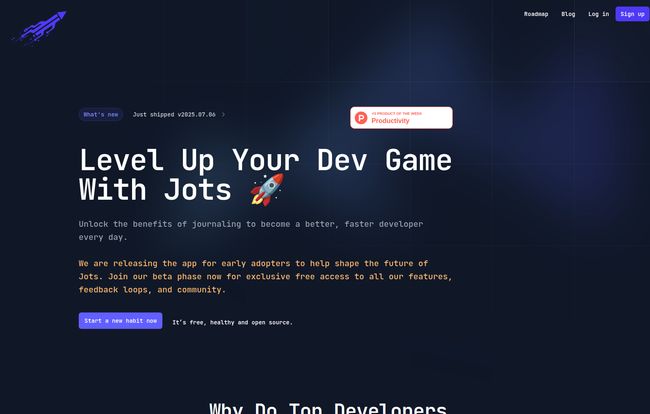
Then I stumbled upon Jots. The tagline—”Level Up Your Dev Game”—is bold, but honestly, it caught my attention. It’s not just another note-taking app. It promises to be a developer-focused journaling app, a dedicated space to help us get better, faster. And I have to say, I’m intrigued.
So, What Exactly is Jots?
At its core, Jots is a journaling application designed specifically for software engineers. Think of it less like a diary for your feelings (though you could use it for that, no judgment) and more like a professional logbook for your brain. It’s a single, centralized place to document your thought processes, track your progress, save those “aha!” moments, and reflect on your work.
The whole idea revolves around creating a “second brain” – a concept I’m sure many of you have heard buzzing around productivity circles. But instead of a generic system you have to bend to your will, Jots is tailored from the ground up for our world. It understands that our notes aren’t just text; they’re code snippets, error messages, debugging steps, and the context behind a Pull Request. It’s built to be a developer’s companion, helping turn daily chaos into a structured, searchable knowledge base of your own expertise.
Why Top Developers Swear By Journaling (Even if They Don’t Call It That)
The landing page for Jots makes a great point: top developers already do this. They might not have a fancy app, but the habit is there. It’s in the detailed PR descriptions, the well-commented code, the internal blog posts. Jots just aims to make that practice intentional and a hell of a lot easier. Here’s why this is such a game-changer.
You Finally Get a Rubber Duck That Talks Back
We’ve all done it. Explained a complex problem out loud to a rubber duck, a pet, or an unsuspecting houseplant on our desk. The act of verbalizing a problem often magically reveals the solution. It’s a tried-and-true debugging technique. Jots takes this classic method and injects it with a bit of modern magic: AI.
The platform has a built-in, AI-powered “Rubber Duck” feature. You can type out your problem, your thought process, your frustrations, and the AI helps you process it. It’s not about writing code for you; it’s about being a sounding board that can help you connect the dots. It’s a brilliant way to unstick your brain without having to bother a coworker who’s deep in the zone.
Give Your Pull Requests a Backstory
Ever submitted a PR and had a reviewer ask, “Why did you do it this way?” And your brilliant, multi-step reasoning from Tuesday afternoon has completely evaporated from your brain by Thursday morning? Jots is designed to capture that backstory. You can log your thought process as you code. Why you chose one algorithm over another, what you tried that didn’t work, what the future implications of a refactor might be. When it’s time to write that PR description, you just pull up your notes. Your team gets better context, reviews are faster, and the future you (or your replacement) will thank you profusely.
Visit Jots
Stop Googling the Same Error Message Over and Over
I have a confession. For the longest time, I could not remember the exact git command to delete a remote branch. I probably Googled it once a week. It’s embarrassing, but true. Jots is the perfect place to build your personal cheat sheet. That weird webpack error you finally solved? Log the solution in Jots. The clever SQL query you wrote? Save it. Over time, you build a personal, searchable database of your own solutions to your own common problems. It’s like having your own private Stack Overflow, but without the sarcastic comments.
Actually See Your Growth and Prep for What’s Next
This might be the most powerful feature for your career. When promotion time comes around or you’re prepping for a job interview, the question is always the same: “What have you achieved?” It’s so easy to forget the small wins, the complex systems you designed, the fires you put out. By journaling your work in Jots, you’re creating a running log of your accomplishments. You can track your progress, measure your growth, and have a detailed list of achievements ready to go. It transforms that dreaded self-review from a work of fiction into a well-documented report.
The Best Part? The Price Tag and Philosophy
Okay, so this all sounds great, but what’s the catch? Usually, it’s a hefty subscription fee. But right now, Jots is in a beta phase, and the developers are offering free access for all early adopters. That’s a pretty sweet deal. You get to help shape the future of the tool while getting all the benefits at no cost.
But here’s the kicker, the thing that really earned my respect: Jots is open source. This is huge. For a tool that holds our precious thoughts and work history, knowing that the code is transparent and can be audited is a major trust signal. It also means the community can contribute, ensuring the tool evolves with the needs of its users. I’ve always believed the best tools for developers are the ones built by developers, and this is proof of that philosophy in action.
“We promise, it can only do you good. Discover all our features and level up with success.” – The Jots Team
Okay, But Do I Really Need Another App?
I get it. The app fatigue is real. You might be thinking, “I can do all of this in Notion or Obsidian.” And you’re not wrong. You could. But the question is, will you? The power of Jots isn’t just in its features, but in its focus. It removes the friction. You don’t have to spend a weekend building the perfect template or installing a dozen plugins. It’s a dedicated, purpose-built space that encourages the habit of professional reflection. It’s the difference between a cluttered garage with a bunch of tools and a perfectly organized workbench where everything you need is right at your fingertips. Sometimes, a dedicated tool is what it takes to build a lasting habit.
Frequently Asked Questions About Jots
1. How much does Jots cost right now?
During its beta phase, Jots is completely free for early adopters. It’s a great chance to get in on the ground floor and see if it fits your workflow.
2. Is Jots an open-source tool?
Yes, it is! You can check out their GitHub repository. This is a massive plus for transparency, security, and community-driven development.
3. How is Jots different from a general note-taking app like Notion or Evernote?
While those tools are powerful, they are general-purpose. Jots is specifically designed for developers with tailored features like the AI Rubber Duck, PR backstory logging, and a focus on tracking technical growth and solutions.
4. Who is the ideal user for Jots?
Any software developer or engineer who wants to be more intentional about their skill development, keep better records of their work, and build a personal knowledge base. It’s for juniors looking to accelerate their learning and for seniors who want to mentor better and document complex systems.
5. Is the AI just another version of GitHub Copilot?
Not at all. It’s not designed to write or suggest code. The AI in Jots acts as a sounding board—a partner for ‘rubber duck debugging’ to help you articulate and solve problems by thinking through them.
My Final Take on Jots
I’m genuinely optimistic about Jots. In an industry obsessed with the next big framework or language, a tool that focuses on the developer’s process and personal growth is a breath of fresh air. It’s an investment in yourself. The real power here isn’t just the software; it’s the habit of reflection it encourages. Taking a few minutes each day to log what you learned, what you built, and what you struggled with can compound into massive skill gains over time.
Given that it’s free for early users and open source, there’s literally no reason not to give it a shot. Go start a new habit. Your future self will thank you for it.
References and Sources
- Jots Official Website
- The Concept of Rubber Duck Debugging – A fun site explaining the methodology.


