
Categories: AI Advertising, AI Copywriting, AI Digital Marketing, AI Lead Generation, AI Marketing, Image to Video
Keak Review: AI A/B Testing on Autopilot? My Honest Take

How many hours have you, me, and every other marketer on the planet sunk into A/B testing? The brainstorming sessions that go nowhere. The endless debates over button color. The agonizing wait for ‘statistical significance’ only to find out that changing ‘Sign Up’ to ‘Get Started’ had a whopping 0.2% impact. It can feel like a high-effort, low-reward guessing game sometimes.
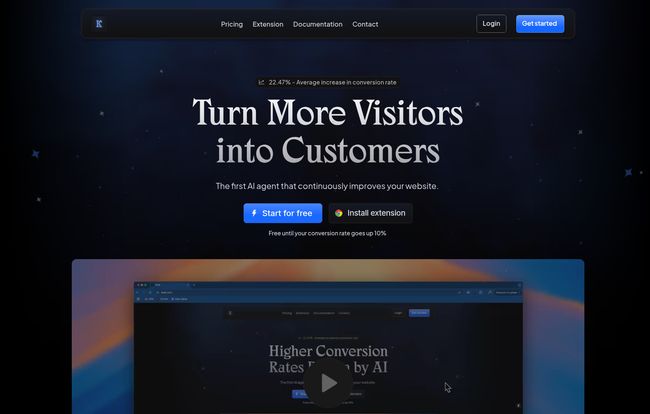
For years, we’ve treated Conversion Rate Optimization (CRO) as a manual grind. It’s an art form, sure, but one that requires a ton of elbow grease. So when a tool like Keak comes along, claiming to be the “first AI agent that continuously improves your website,” my cynical-veteran-marketer senses start tingling. Is this just more marketing fluff, or is it the real deal?
I decided to pull back the curtain and see what this thing is really all about. And honestly? I’m intrigued. Very intrigued.
So, What’s the Big Idea Behind Keak?
At its core, Keak isn’t just another platform for you to run tests on. That’s the key difference. Instead of giving you a wrench and a box of parts, Keak is the AI mechanic that does the work for you. It connects to your website, uses its AI brain—trained on thousands of successful tests—to generate its own variations of your copy, headlines, calls-to-action, and even images. Then, it automatically launches A/B tests to see what works.
Think of it like having a tireless, data-obsessed CRO specialist on your team who works 24/7, never needs a coffee break, and is obsessed with one thing: turning more of your visitors into customers. When a test finds a winner, it fine-tunes its own understanding and starts the process all over again. It’s a perpetual optimization engine. A wild concept, right?
My First Impressions: A/B Testing on Cruise Control
My first thought was, “This is what we’ve been waiting for.” The idea of offloading the creative ideation part of A/B testing to an AI is… well, it’s a massive weight off the shoulders. We all have our biases. We fall in love with our own copy. An AI doesn’t have an ego. It just follows the data.
Keak’s proposition is simple: stop guessing, let the machine learn. This isn’t about replacing the marketer; it’s about giving us a powerful new lever to pull. It frees us up to focus on the bigger picture strategy while the AI handles the granular, iterative tweaks that can lead to significant gains over time.
Breaking Down The Keak Feature Set
Okay, let’s get into the nitty-gritty. What’s actually under the hood?
The Magic of AI-Generated Variations
This is the main event. Keak doesn’t just give you a text editor. It actively suggests and creates new versions of your site’s elements. You can point it at a headline, a button, or a block of text, and its AI will whip up alternatives. It’s been trained on what converts, so the suggestions aren’t just random strings of words. They’re calculated attempts to improve performance. And the new “Image to Video with AI” feature is a fascinating addition. Turning static product shots into simple, engaging videos could be a low-effort way to boost engagement on product pages. This is something that would typically require a designer or video editor, now it’s just part of the toolkit.
On-Page vs. URL Split Testing: Choosing Your Weapon
I was happy to see Keak supports both major types of testing. You have On-Page Testing, which is perfect for tweaking individual elements like a CTA or an image on an existing page. Then you have URL Split Testing, where you can test two completely different page designs against each other (e.g., your-site.com/pricing-A vs. your-site.com/pricing-B). Having both gives you the flexibility to go for small, quick wins or test major strategic overhauls. It’s not one-size-fits-all, and Keak gets that.
Getting Personal with Your Visitors
Generic marketing is dead. We all know this. Keak allows for personalized testing based on some really useful parameters:
- Location: Show visitors in London a different headline than those in Los Angeles.
- Browser: Maybe Chrome users convert better with a different layout?
- UTM Parameters: This is huge for paid campaigns. You can show custom content to visitors who clicked a specific ad on Facebook or Google. Tailor the landing page experience to the ad creative—a classic CRO best practice, now easier to implement.
- Language: A no-brainer for international sites.
This level of personalization is where you can start seeing some serious lifts in conversion rates, moving beyond simple A/B tests into truly adaptive user experiences.
Visit Keak
The ‘Free Until 10% Lift’ Promise: Seriously?
Alright, let’s talk about the elephant in the room. Keak’s pricing page has a headline that made me do a double-take: “Free Until Your Conversion Rate Goes Up 10%.”
Let that sink in. They are so confident in their product’s ability to deliver results that they won’t charge you a dime until it has proven its worth with a tangible, 10% improvement. In an industry full of SaaS tools that promise the world and ask for your credit card upfront, this is… incredibly refreshing. It’s the ultimate “put your money where your mouth is” move. It completely de-risks the trial for any business. You literally have nothing to lose and a potential 10% conversion lift to gain. That’s a powerful statement.
A Look at Keak’s Pricing
Once you cross that 10% threshold (a good problem to have!), the pricing is refreshingly simple. No confusing tiers based on traffic or features. It’s all-inclusive.
| Plan | Cost | Key Features |
|---|---|---|
| Monthly | $39 / month | Unlimited AI Variations, Autopilot, URL Split Tester, Analytics, API, Image to video with AI |
| Annual | $30 / month (billed annually) |
For what it does, this pricing feels more than fair. Thirty or forty bucks a month for an automated CRO engine is a steal, especially if it’s already proven its value by boosting your conversions. The annual plan offers a nice 20% discount if you’re ready to commit long-term.
The Not-So-Perfect Bits (Because Nothing Is)
No tool is a magic wand, and it’s only fair to talk about the potential downsides. First, like any A/B testing tool, Keak needs traffic to work. If you’re only getting 100 visitors a month, you’re never going to reach statistical significance on your tests. This is a tool for websites with at least a modest, steady stream of visitors.
Second, while they tout easy integration (and the guides for Shopify, WordPress etc. are a good sign), there might be a slight technical hurdle for complete beginners. You’ll likely need to be comfortable pasting a snippet of code or installing a plugin. It’s not rocket science, but it’s not a one-click-and-go for every single person.
Finally, the effectiveness hinges on your starting point. The AI is smart, but it’s not a miracle worker. If your initial website content and value proposition are fundamentally flawed, Keak can only polish a… well, you know. It optimizes what’s there; it doesn’t invent a new business model for you. Garbage in, slightly-less-garbage out.
The Final Verdict: Is Keak Worth Your Time?
So, do I think Keak is the future of CRO? In many ways, yes. It represents a shift from manual labor to intelligent automation, which is the direction our entire industry is heading. It’s not about making marketers obsolete, but about making them more effective by handling the repetitive, data-crunching tasks that eat up so much time.
Keak is perfect for:
- Busy marketers and small teams who wear multiple hats and don’t have a dedicated CRO department.
- E-commerce stores on platforms like Shopify that want to continuously optimize product pages and checkout flows.
- Agencies looking to provide more value to clients without exponentially increasing their workload.
With its no-brainer “free until it works” guarantee, there’s very little reason not to give it a try if you have the traffic to support it. It might just be the most productive new team member you hire this year. And it won’t even steal your lunch from the office fridge.
Frequently Asked Questions
- How does Keak’s AI actually work?
- Keak uses a sophisticated AI model that has been trained on a massive dataset of A/B tests. It analyzes the context and purpose of your website’s elements (like headlines and buttons) and generates variations based on patterns that have historically led to higher conversion rates. It then uses the results from your specific website to fine-tune its approach over time.
- What platforms does Keak integrate with?
- Keak offers straightforward installation guides for most major website platforms, including Shopify, Framer, Webflow, WordPress, and Squarespace. Essentially, if you can add a small javascript snippet to your site, you can use Keak.
- Is Keak difficult to set up?
- For most users on common platforms, the setup is quite simple and involves installing an extension or adding a code snippet to your site’s header. It’s designed to be user-friendly, but if you’ve never touched your website’s backend before, you might want to have a tech-savvy friend on standby.
- How much traffic do I need for Keak to be effective?
- There’s no official magic number, but for A/B testing to be meaningful, you need enough data to reach statistical significance. As a rule of thumb, if you have at least a few thousand visitors per month to the page you want to test, you should be able to get valuable results in a reasonable timeframe.
- What happens after I hit the 10% conversion lift?
- Once Keak has successfully increased your conversion rate by 10%, you’ll be prompted to subscribe to one of their paid plans (monthly or annual) to continue using the service and its ongoing optimization features.
- Is the pricing really all-inclusive?
- Yes, based on their pricing page, both the monthly and annual plans include all the core features: Unlimited AI Variations, Autopilot, Split Testing, Analytics, API access, and the Image-to-Video tool. There are no hidden tiers or traffic limits mentioned.


